> ## Documentation Index
> Fetch the complete documentation index at: https://waffo.com/docs/llms.txt
> Use this file to discover all available pages before exploring further.
# Point Topup API common specifications
> Interface conventions, message structure, SHA256WithRSA signing and verification, error codes, and RSA key generation for Waffo Point Topup supplier integrations.
This page applies to **Mode B** and **Mode C** integrations. Mode A involves no API, so none of it applies there.
## Common interface info
| Item | Description |
| ------------------ | ------------------------------------------------------------------------------------------------------------------------------------------------------------------------------------ |
| API protocol | RESTful |
| API format | JSON body (`Content-Type: application/json`), UTF-8 encoded |
| Submission method | HTTP `POST` |
| HTTPS transmission | TLS 1.2 and above |
| Time | A specific point in time following ISO 8601 with millisecond precision. Type String, example `2023-04-01T03:00:00.000Z` |
| Currency | Follows the [ISO 4217](https://en.wikipedia.org/wiki/ISO_4217) currency code standard. Type String, examples `IDR` Indonesian Rupiah, `PHP` Philippine Peso, `MYR` Malaysian Ringgit |
| Amount | Fiat currency precision is 2 decimal places, the unit is dollar. Type String, example `2.27` |
| Country code | Follows the [ISO 3166-1 alpha-3](https://en.wikipedia.org/wiki/ISO_3166-1_alpha-3) standard. Type String, examples `IDN` Indonesia, `PHL` Philippines, `HKG` Hong Kong |
The API response indicates whether the request was processed successfully through the HTTP status code:
| Class | Status codes |
| --------------------- | ------------------------------------------------------------------------------------------------ |
| **2XX success** | `200` OK |
| **4XX client errors** | `400` Bad request, `401` Unauthorized, `403` Forbidden, `404` Not found, `405` Method not found |
| **5XX server errors** | `500` Internal server error, `502` Bad gateway, `503` Service unavailable, `504` Gateway timeout |
**HTTP `200` does not mean business success.** It only means the transport worked — the request arrived, was accepted, and a response came back. The actual business outcome needs two more checks:
1. The `code` in the response body — only `0` means the request was accepted; handle everything else per the [error codes](#error-codes).
2. The business status field inside `data`, such as `status` or `fulfillmentStatus`.
For example, a failed fulfillment is also returned as HTTP `200` with `code` `0`; the failure shows up as `fulfillmentStatus` `PAY_SUCCESS_SUPPLY_FAILED` plus `failureCode` and `failureReason`. Reading only the HTTP status code would misread it as a success.
## API message structure
Request and response messages are JSON, UTF-8 encoded, and consist of a header and a body.
Distributor (Waffo Point Topup) request to the supplier:
```json theme={null}
{
"header": {
"Content-Type": "application/json",
"X-SIGNATURE": "..."
},
"body": {
...
}
}
```
Here `X-SIGNATURE` is Waffo Point Topup's signature over the whole body message, made with its own private key.
Supplier response:
```json theme={null}
{
"header": {
"Content-Type": "application/json",
"X-SIGNATURE": "..."
},
"body": {
"code": "xxx",
"msg": "xxx",
"data": {
...
}
}
}
```
Here `X-SIGNATURE` is the supplier's signature over the whole body message, made with its own private key. If the request fails, `data` is empty.
## API security
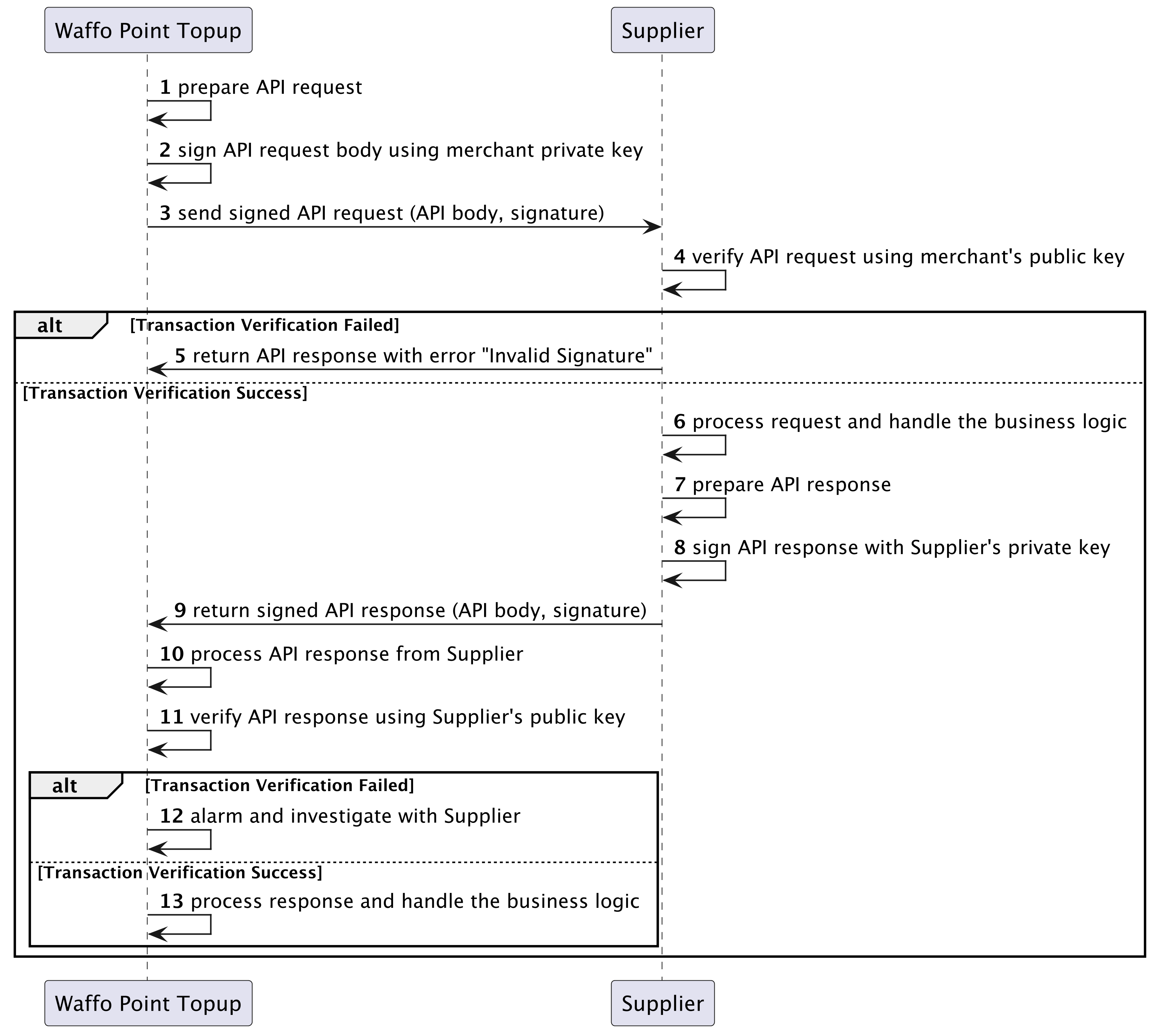
Transaction signing and verification ensure non-repudiation of the messages between Waffo Point Topup and the supplier. The signature algorithm is **SHA256WithRSA**.
Waffo and the supplier exchange RSA public keys. Each party keeps its own RSA private key and shares only the public key.
Waffo signs the message with its RSA private key and sends it to the supplier. The supplier verifies it with Waffo's public key: if verification passes, the supplier processes the request; if it fails, the supplier responds with an `Invalid Signature` error.
The supplier signs the response with its RSA private key and returns it to Waffo. Waffo verifies it with the supplier's public key: if verification passes, Waffo processes the response.
**If verification fails, Waffo investigates and contacts the supplier, and stops sending new transactions to that supplier until the issue is resolved.** The supplier may have already processed the request while Waffo failed to process the response because of the verification failure.
 ## Error codes
Error code prefixes:
| Prefix | Class |
| ------- | -------------------------------------------------------------------------------------------------------------------------------------------------------------------------- |
| `A`xxxx | Supplier-related error |
| `B`xxxx | User-related error |
| `C`xxxx | System-related error |
| `D`xxxx | Risk-related rejection |
| `E`xxxx | Unknown error, resulting from an unknown status within the supplier or a third-party system. Keep retrying the transaction until a final success or failure status arrives |
| Error code | Description | HTTP status |
| ---------- | ------------------------------------------------- | ----------- |
| `0` | Success | 200 |
| `A0001` | Invalid Api secret key | 401 |
| `A0002` | Invalid signature | 401 |
| `A0003` | Parameter validation failed | 400 |
| `A0004` | Permission denied | 401 |
| `A0005` | Purchase face value exceeds maximum value allowed | 400 |
| `A0006` | Order does not exist | 400 |
| `A0007` | Idempotent param mismatch error | 400 |
| `A0008` | Too many requests, please try again later | 400 |
| `B0001` | Buyer info does not exist | 400 |
| `B0002` | Buyer info does not match | 400 |
| `C0001` | System error | 500 |
| `C0002` | Order info mismatch error | 500 |
| `D0001` | Risk rejection | 406 |
| `E0001` | Unknown status | 500 |
When you receive `E0001` unknown status, do not treat the transaction as failed. Keep querying until you get a definitive success or failure state.
## Generate an RSA key
Use openssl to generate an RSA key pair.
Download and install openssl from [openssl.org/source](https://www.openssl.org/source).
```bash theme={null}
# generate private key
openssl genrsa 2048 | openssl pkcs8 -topk8 -nocrypt -out supplier_private_key.pem
# generate public key
openssl rsa -in supplier_private_key.pem -pubout > supplier_public_key.pem
```
Hand `supplier_public_key.pem` to Waffo, and obtain Waffo's public key in return.
**The private key must be kept secure and never disclosed to any third party.**
## Next steps
Request and response fields plus the idempotency requirement for real-time retrieval.
Signed URL redirect, direct fulfillment, and fulfillment inquiry.
## Error codes
Error code prefixes:
| Prefix | Class |
| ------- | -------------------------------------------------------------------------------------------------------------------------------------------------------------------------- |
| `A`xxxx | Supplier-related error |
| `B`xxxx | User-related error |
| `C`xxxx | System-related error |
| `D`xxxx | Risk-related rejection |
| `E`xxxx | Unknown error, resulting from an unknown status within the supplier or a third-party system. Keep retrying the transaction until a final success or failure status arrives |
| Error code | Description | HTTP status |
| ---------- | ------------------------------------------------- | ----------- |
| `0` | Success | 200 |
| `A0001` | Invalid Api secret key | 401 |
| `A0002` | Invalid signature | 401 |
| `A0003` | Parameter validation failed | 400 |
| `A0004` | Permission denied | 401 |
| `A0005` | Purchase face value exceeds maximum value allowed | 400 |
| `A0006` | Order does not exist | 400 |
| `A0007` | Idempotent param mismatch error | 400 |
| `A0008` | Too many requests, please try again later | 400 |
| `B0001` | Buyer info does not exist | 400 |
| `B0002` | Buyer info does not match | 400 |
| `C0001` | System error | 500 |
| `C0002` | Order info mismatch error | 500 |
| `D0001` | Risk rejection | 406 |
| `E0001` | Unknown status | 500 |
When you receive `E0001` unknown status, do not treat the transaction as failed. Keep querying until you get a definitive success or failure state.
## Generate an RSA key
Use openssl to generate an RSA key pair.
Download and install openssl from [openssl.org/source](https://www.openssl.org/source).
```bash theme={null}
# generate private key
openssl genrsa 2048 | openssl pkcs8 -topk8 -nocrypt -out supplier_private_key.pem
# generate public key
openssl rsa -in supplier_private_key.pem -pubout > supplier_public_key.pem
```
Hand `supplier_public_key.pem` to Waffo, and obtain Waffo's public key in return.
**The private key must be kept secure and never disclosed to any third party.**
## Next steps
Request and response fields plus the idempotency requirement for real-time retrieval.
Signed URL redirect, direct fulfillment, and fulfillment inquiry.