> ## Documentation Index
> Fetch the complete documentation index at: https://waffo.com/docs/llms.txt
> Use this file to discover all available pages before exploring further.
# Mode A: offline point code import
> The supplier delivers point codes offline as Excel/CSV, Waffo Point Topup imports them into inventory and handles the sale and delivery. No API development.
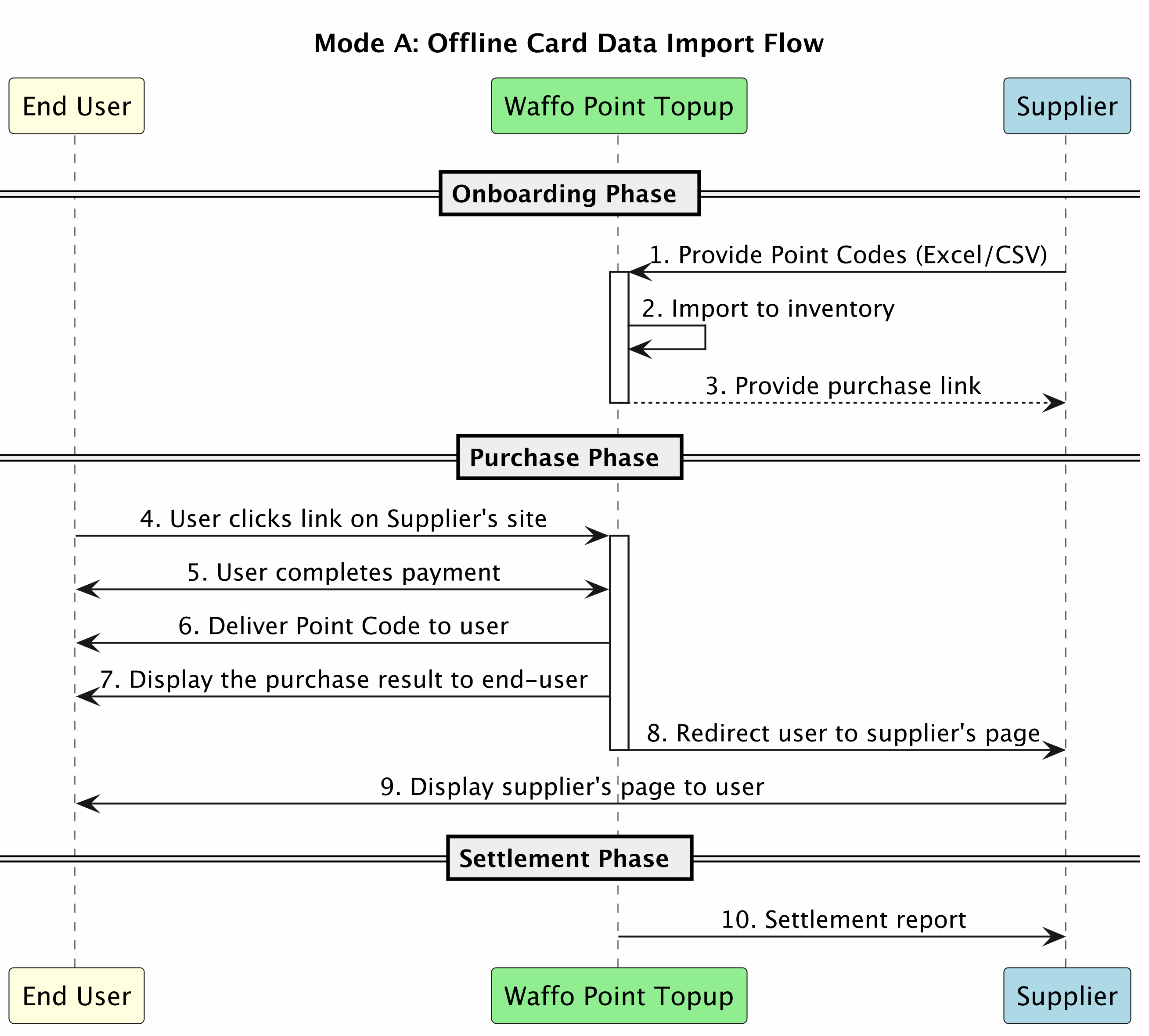
Mode A is for suppliers with no API capability. You hand point codes to Waffo Point Topup as Excel/CSV files, Waffo Point Topup imports them into the inventory system, and the storefront, payment, and delivery all run on the Waffo side.
* No API development required
* Simple and straightforward
* Quick to get started
* Requires manual point code CSV file delivery
* Inventory needs periodic replenishment
## Integration flow
## Point code CSV format
Provide point codes in the following Excel/CSV format:
| No. | Field name | Description | Required | Example |
| --- | ------------ | --------------------------------------------- | -------- | --------------------- |
| 1 | `skuId` | SKU identifier, provided by Waffo Point Topup | required | `SUPPLIER_POINT_001` |
| 2 | `pointCode` | Point serial number or code | required | `ABCD-1234-EFGH-5678` |
| 3 | `faceValue` | Face value | required | `1000` |
| 4 | `amount` | The point code price | required | `1000` |
| 5 | `currency` | Currency code | required | `JPY` |
| 6 | `expiryDate` | Expiration date, if applicable | optional | `2026-12-31` |
| 7 | `batchNo` | Batch number for tracking | optional | `BATCH_20250105_001` |
Sample CSV:
```csv theme={null}
skuId,pointCode,faceValue,amount,currency,expiryDate,batchNo
SUPPLIER_POINT_001,ABCD-1234-EFGH-5678,1000,1000,JPY,2026-12-31,BATCH_20250105_001
SUPPLIER_POINT_001,EFGH-5678-IJKL-9012,1000,1000,JPY,2026-12-31,BATCH_20250105_001
SUPPLIER_POINT_002,MNOP-3456-QRST-7890,3000,2900,JPY,2026-12-31,BATCH_20250105_001
```
## Purchase link integration
After Waffo Point Topup imports the point code CSV file, you receive a purchase link to embed on your website.
Link format:
```text theme={null}
https://{supplier}.waffoplay.com/{site_code}/
```
Example:
```html theme={null}
Buy Points
```
Mode A needs no signature and no API integration. Users are redirected straight to the Waffo Point Topup payment page.
## Settlement and reporting
Waffo Point Topup provides regular settlement reports containing:
* Total points sold and total amount
* Revenue breakdown by SKU
* Remaining inventory status
* Settlement amount
## Next steps
To retrieve point codes in real time and stop delivering files manually, see Mode B.
Full mode comparison and the preparation checklist.
 ## Point code CSV format
Provide point codes in the following Excel/CSV format:
| No. | Field name | Description | Required | Example |
| --- | ------------ | --------------------------------------------- | -------- | --------------------- |
| 1 | `skuId` | SKU identifier, provided by Waffo Point Topup | required | `SUPPLIER_POINT_001` |
| 2 | `pointCode` | Point serial number or code | required | `ABCD-1234-EFGH-5678` |
| 3 | `faceValue` | Face value | required | `1000` |
| 4 | `amount` | The point code price | required | `1000` |
| 5 | `currency` | Currency code | required | `JPY` |
| 6 | `expiryDate` | Expiration date, if applicable | optional | `2026-12-31` |
| 7 | `batchNo` | Batch number for tracking | optional | `BATCH_20250105_001` |
Sample CSV:
```csv theme={null}
skuId,pointCode,faceValue,amount,currency,expiryDate,batchNo
SUPPLIER_POINT_001,ABCD-1234-EFGH-5678,1000,1000,JPY,2026-12-31,BATCH_20250105_001
SUPPLIER_POINT_001,EFGH-5678-IJKL-9012,1000,1000,JPY,2026-12-31,BATCH_20250105_001
SUPPLIER_POINT_002,MNOP-3456-QRST-7890,3000,2900,JPY,2026-12-31,BATCH_20250105_001
```
## Purchase link integration
After Waffo Point Topup imports the point code CSV file, you receive a purchase link to embed on your website.
Link format:
```text theme={null}
https://{supplier}.waffoplay.com/{site_code}/
```
Example:
```html theme={null}
Buy Points
```
## Point code CSV format
Provide point codes in the following Excel/CSV format:
| No. | Field name | Description | Required | Example |
| --- | ------------ | --------------------------------------------- | -------- | --------------------- |
| 1 | `skuId` | SKU identifier, provided by Waffo Point Topup | required | `SUPPLIER_POINT_001` |
| 2 | `pointCode` | Point serial number or code | required | `ABCD-1234-EFGH-5678` |
| 3 | `faceValue` | Face value | required | `1000` |
| 4 | `amount` | The point code price | required | `1000` |
| 5 | `currency` | Currency code | required | `JPY` |
| 6 | `expiryDate` | Expiration date, if applicable | optional | `2026-12-31` |
| 7 | `batchNo` | Batch number for tracking | optional | `BATCH_20250105_001` |
Sample CSV:
```csv theme={null}
skuId,pointCode,faceValue,amount,currency,expiryDate,batchNo
SUPPLIER_POINT_001,ABCD-1234-EFGH-5678,1000,1000,JPY,2026-12-31,BATCH_20250105_001
SUPPLIER_POINT_001,EFGH-5678-IJKL-9012,1000,1000,JPY,2026-12-31,BATCH_20250105_001
SUPPLIER_POINT_002,MNOP-3456-QRST-7890,3000,2900,JPY,2026-12-31,BATCH_20250105_001
```
## Purchase link integration
After Waffo Point Topup imports the point code CSV file, you receive a purchase link to embed on your website.
Link format:
```text theme={null}
https://{supplier}.waffoplay.com/{site_code}/
```
Example:
```html theme={null}
Buy Points
```