> ## Documentation Index
> Fetch the complete documentation index at: https://waffo.com/docs/llms.txt
> Use this file to discover all available pages before exploring further.
# Sandbox simulator
> Instructions for using the simulator in the sandbox environment to simulate various payment scenarios.
The sandbox environment does not connect to real payment channels. Instead, it provides a simulator that lets you directly control payment outcomes and quickly verify your integration logic.
## One-time payment simulation
Call `POST /api/v1/order/create` to create an order.
Retrieve the checkout URL from `orderAction` in the response.
Open the checkout page in your browser. Simulation buttons will be displayed on the page.
Click the corresponding button to simulate a payment result:
* **Payment succeeded** — Simulates the user completing payment. The order status changes to `PAY_SUCCESS`.
* **Payment failed** — Simulates a declined payment. The order status changes to `ORDER_CLOSE`.
After clicking, Waffo automatically sends a `PAYMENT_NOTIFICATION` webhook to your `notifyUrl`.
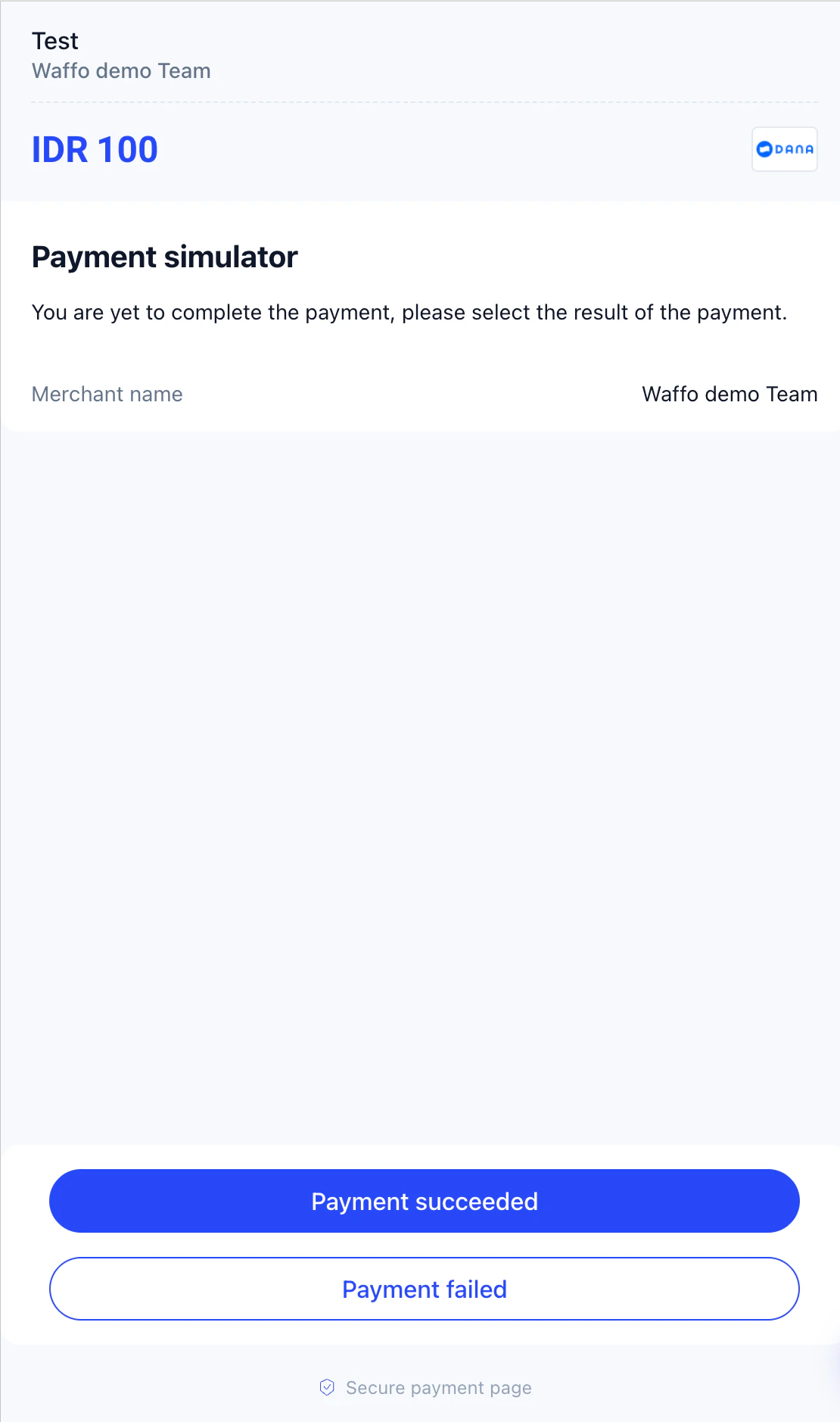 The sandbox checkout is a simulator interface — there is no real payment method selection or card number entry. The simulation flow is the same for all payment methods.
If you need to simulate a real card number entry flow (for example, to test 3DS), you can use the test card numbers in the [Test card numbers](#test-card-numbers) section below. For most scenarios, the simulation buttons are sufficient.
## Subscription simulation
### First payment
The first payment follows the same flow as a one-time payment:
Call `POST /api/v1/subscription/create` to create a subscription.
Retrieve the checkout URL from the response and open it in your browser.
Click **Payment succeeded** or **Payment failed**. After a successful first payment, the subscription status changes to `ACTIVE` and a `SUBSCRIPTION_STATUS_NOTIFICATION` is triggered.
### Simulate a renewal payment
After a subscription is activated, you can quickly test renewal without waiting for the real billing cycle to expire:
Call `POST /api/v1/subscription/manage` to retrieve the management page URL.
```json Request theme={null}
{
"subscriptionId": "SUB20260325000001"
}
```
```json Response theme={null}
{
"code": "0",
"msg": "Success",
"data": {
"managementUrl": "https://cashier.waffo.com/subscription/manage?token=xxx",
"expiredAt": "2026-03-25T11:00:00.000Z"
}
}
```
Open the `managementUrl` in your browser.
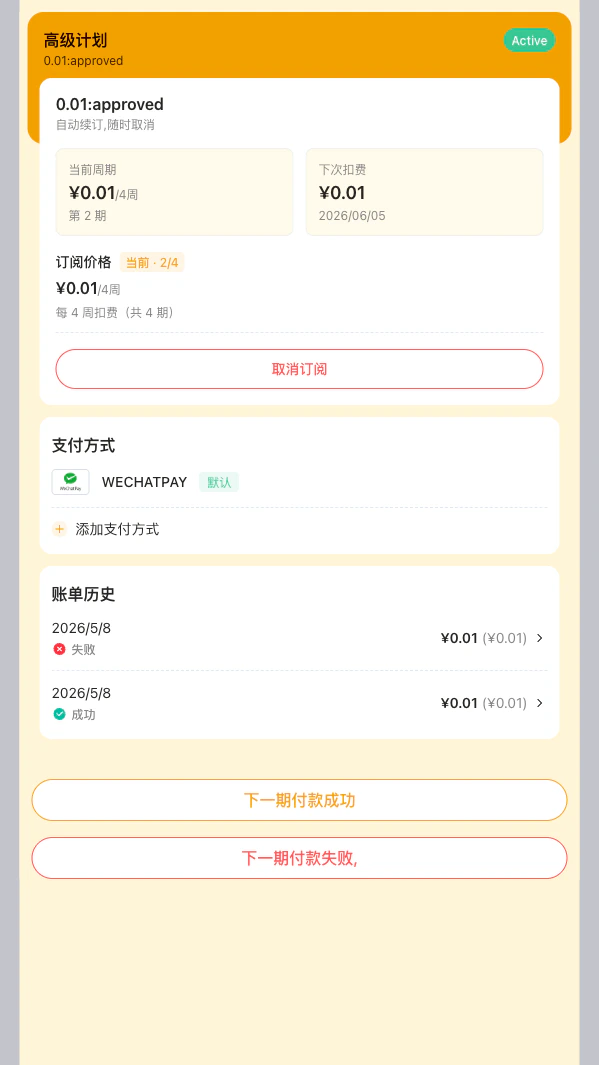
The management page displays two simulation buttons:
* **Simulate next payment succeeded** — Triggers a successful renewal. Sends a `PAYMENT_NOTIFICATION` and a `SUBSCRIPTION_PERIOD_CHANGED_NOTIFICATION`.
* **Simulate next payment failed** — Triggers a failed renewal. Sends a `PAYMENT_NOTIFICATION` (failed).
Each button click simulates one renewal period. You can click multiple times to test multi-period scenarios (for example, period 2 succeeds, period 3 fails).
Example subscription renewal management page:
The sandbox checkout is a simulator interface — there is no real payment method selection or card number entry. The simulation flow is the same for all payment methods.
If you need to simulate a real card number entry flow (for example, to test 3DS), you can use the test card numbers in the [Test card numbers](#test-card-numbers) section below. For most scenarios, the simulation buttons are sufficient.
## Subscription simulation
### First payment
The first payment follows the same flow as a one-time payment:
Call `POST /api/v1/subscription/create` to create a subscription.
Retrieve the checkout URL from the response and open it in your browser.
Click **Payment succeeded** or **Payment failed**. After a successful first payment, the subscription status changes to `ACTIVE` and a `SUBSCRIPTION_STATUS_NOTIFICATION` is triggered.
### Simulate a renewal payment
After a subscription is activated, you can quickly test renewal without waiting for the real billing cycle to expire:
Call `POST /api/v1/subscription/manage` to retrieve the management page URL.
```json Request theme={null}
{
"subscriptionId": "SUB20260325000001"
}
```
```json Response theme={null}
{
"code": "0",
"msg": "Success",
"data": {
"managementUrl": "https://cashier.waffo.com/subscription/manage?token=xxx",
"expiredAt": "2026-03-25T11:00:00.000Z"
}
}
```
Open the `managementUrl` in your browser.
The management page displays two simulation buttons:
* **Simulate next payment succeeded** — Triggers a successful renewal. Sends a `PAYMENT_NOTIFICATION` and a `SUBSCRIPTION_PERIOD_CHANGED_NOTIFICATION`.
* **Simulate next payment failed** — Triggers a failed renewal. Sends a `PAYMENT_NOTIFICATION` (failed).
Each button click simulates one renewal period. You can click multiple times to test multi-period scenarios (for example, period 2 succeeds, period 3 fails).
Example subscription renewal management page:
 ### Simulate subscription cancellation
The management page also supports user-initiated cancellation, which triggers a `SUBSCRIPTION_STATUS_NOTIFICATION` with the status changed to `USER_CANCELLED`.
## Sandbox special amounts for exception simulation
These amounts are only for sandbox acceptance and exception testing. If you pass them in the sandbox environment, Waffo intentionally returns the matching error code. This is not a production rule.
The following values come from the current acceptance templates and can be used to quickly reproduce specific exceptions:
| Scenario | Example amounts | Expected result |
| -------------------------------------------------------------- | ------------------------------------ | --------------------------------- |
| One-time order creation channel rejection | `90`, `990`, `1990`, `19990` | `C0005 Payment Channel Rejection` |
| Subscription creation channel rejection | `90`, `990`, `1990`, `19990` | `C0005 Payment Channel Rejection` |
| Order/subscription creation system error | `9.1`, `91`, `991`, `1991`, `19991` | `C0001 System Error` |
| Order/subscription creation Unknown Status | `9.2`, `92`, `992`, `1992`, `19992` | `E0001 Unknown Status` |
| Cancel API system error (order cancel / subscription cancel) | `9.3`, `93`, `993`, `1993`, `19993` | `C0001 System Error` |
| Cancel API Unknown Status (order cancel / subscription cancel) | `9.4`, `94`, `994`, `1994`, `19994` | `E0001 Unknown Status` |
| Refund API system error | `9.5`, `95`, `995`, `1995`, `19995` | `C0001 System Error` |
| Refund API Unknown Status | `9.6`, `96`, `996`, `1996`, `199996` | `E0001 Unknown Status` |
* If you only want the normal success/failure flow, avoid these amounts.
* `A0011` is not triggered by a special amount. It is triggered by reusing the same request ID with a different amount or currency.
* Refund `A0003` is not triggered by a special amount either. It happens when the refund amount exceeds the original paid amount.
## Test card numbers
### Credit cards
| payMethodName | Success card number | Failure card number |
| -------------- | ------------------- | ------------------- |
| CC\_VISA | `4576750000000110` | `4576750000000220` |
| CC\_MASTERCARD | `2226900000000110` | `2226900000000220` |
| CC\_JCB | `3528000000000214` | `3528000000120006` |
| CC\_AMEX | `3400000000000216` | `340000000200027` |
### Debit cards
| payMethodName | Success card number | Failure card number |
| -------------- | ------------------- | ------------------- |
| DC\_VISA | `4001700000000110` | `4001700000000220` |
| DC\_MASTERCARD | `2226930000000110` | `2226930000000220` |
| DC\_JCB | `3088850000000116` | `3088850000200004` |
| DC\_AMEX | `340034000100009` | `340034000400003` |
### General information
* Expiry date: any future date
* CVV: any 3-digit number (4 digits for AMEX)
## Sandbox environment information
| Item | Value |
| ----------------- | ------------------------------- |
| Base URL | `https://api-sandbox.waffo.com` |
| SDK configuration | `Environment.SANDBOX` |
The sandbox environment uses different API keys and RSA key pairs from the production environment. Do not mix them.
### Simulate subscription cancellation
The management page also supports user-initiated cancellation, which triggers a `SUBSCRIPTION_STATUS_NOTIFICATION` with the status changed to `USER_CANCELLED`.
## Sandbox special amounts for exception simulation
These amounts are only for sandbox acceptance and exception testing. If you pass them in the sandbox environment, Waffo intentionally returns the matching error code. This is not a production rule.
The following values come from the current acceptance templates and can be used to quickly reproduce specific exceptions:
| Scenario | Example amounts | Expected result |
| -------------------------------------------------------------- | ------------------------------------ | --------------------------------- |
| One-time order creation channel rejection | `90`, `990`, `1990`, `19990` | `C0005 Payment Channel Rejection` |
| Subscription creation channel rejection | `90`, `990`, `1990`, `19990` | `C0005 Payment Channel Rejection` |
| Order/subscription creation system error | `9.1`, `91`, `991`, `1991`, `19991` | `C0001 System Error` |
| Order/subscription creation Unknown Status | `9.2`, `92`, `992`, `1992`, `19992` | `E0001 Unknown Status` |
| Cancel API system error (order cancel / subscription cancel) | `9.3`, `93`, `993`, `1993`, `19993` | `C0001 System Error` |
| Cancel API Unknown Status (order cancel / subscription cancel) | `9.4`, `94`, `994`, `1994`, `19994` | `E0001 Unknown Status` |
| Refund API system error | `9.5`, `95`, `995`, `1995`, `19995` | `C0001 System Error` |
| Refund API Unknown Status | `9.6`, `96`, `996`, `1996`, `199996` | `E0001 Unknown Status` |
* If you only want the normal success/failure flow, avoid these amounts.
* `A0011` is not triggered by a special amount. It is triggered by reusing the same request ID with a different amount or currency.
* Refund `A0003` is not triggered by a special amount either. It happens when the refund amount exceeds the original paid amount.
## Test card numbers
### Credit cards
| payMethodName | Success card number | Failure card number |
| -------------- | ------------------- | ------------------- |
| CC\_VISA | `4576750000000110` | `4576750000000220` |
| CC\_MASTERCARD | `2226900000000110` | `2226900000000220` |
| CC\_JCB | `3528000000000214` | `3528000000120006` |
| CC\_AMEX | `3400000000000216` | `340000000200027` |
### Debit cards
| payMethodName | Success card number | Failure card number |
| -------------- | ------------------- | ------------------- |
| DC\_VISA | `4001700000000110` | `4001700000000220` |
| DC\_MASTERCARD | `2226930000000110` | `2226930000000220` |
| DC\_JCB | `3088850000000116` | `3088850000200004` |
| DC\_AMEX | `340034000100009` | `340034000400003` |
### General information
* Expiry date: any future date
* CVV: any 3-digit number (4 digits for AMEX)
## Sandbox environment information
| Item | Value |
| ----------------- | ------------------------------- |
| Base URL | `https://api-sandbox.waffo.com` |
| SDK configuration | `Environment.SANDBOX` |
The sandbox environment uses different API keys and RSA key pairs from the production environment. Do not mix them.