> ## Documentation Index
> Fetch the complete documentation index at: https://waffo.com/docs/llms.txt
> Use this file to discover all available pages before exploring further.
# Set up and use Coupons
> Enable Coupons, configure Promotion Codes in Merchant Portal, and apply discounts through the API or Waffo Checkout.
A Coupon defines a discount rule. A Promotion Code is a customer- or Merchant-facing redemption code linked to a Coupon. Configure both in Merchant Portal, then apply the discount through the API or Waffo Checkout.
Coupon must be enabled by Waffo for each environment. Before integrating, contact your Waffo business or technical support representative and provide the Merchant ID and target environment.
## How it works
```mermaid theme={null}
flowchart LR
coupon["Coupon
Discount rule"] --> code["Promotion Code
Customer redemption credential"]
code --> result["Waffo Checkout or API
Apply the discount"]
coupon -->|Pass couponId through the API| result
```
## Supported scope
| Scope | Supported method | Notes |
| ------------------ | -------------------------------------------------------------------------------------------- | --------------------------------------------------------------------------------------------------------------------- |
| `ONE_TIME_PAYMENT` | `promotionInfo` in `POST /api/v1/order/create` | The Merchant can pass `promotionCode` or `couponId` |
| Waffo Checkout | Customer enters a `promotionCode` | Available for an enabled one-time payment order only when the Merchant did not apply a discount during order creation |
| `SUBSCRIPTION` | `promotionInfo` in `POST /api/v1/subscription/create` and `POST /api/v1/subscription/change` | The Merchant can pass `promotionCode` or `couponId`; the Coupon duration controls how long the discount applies |
| Merchant Portal | **Marketing → Coupons** and **Marketing → Promotion Codes** | Create, view, and manage Coupons and Promotion Codes |
## Configure Coupons in Merchant Portal
Ask Waffo to enable Coupon for your Sandbox or Production Merchant. Confirm each environment separately.
Log in to Merchant Portal, go to **Marketing → Coupons**, and configure the discount rule and scope as described below.
To let customers enter a redemption code, create a Promotion Code and link it to the Coupon. Create it from the Coupon details page, or create one or more codes from **Marketing → Promotion Codes**.
Configure redemption limits, first-transaction eligibility, minimum order amount, and expiration as needed, then save.
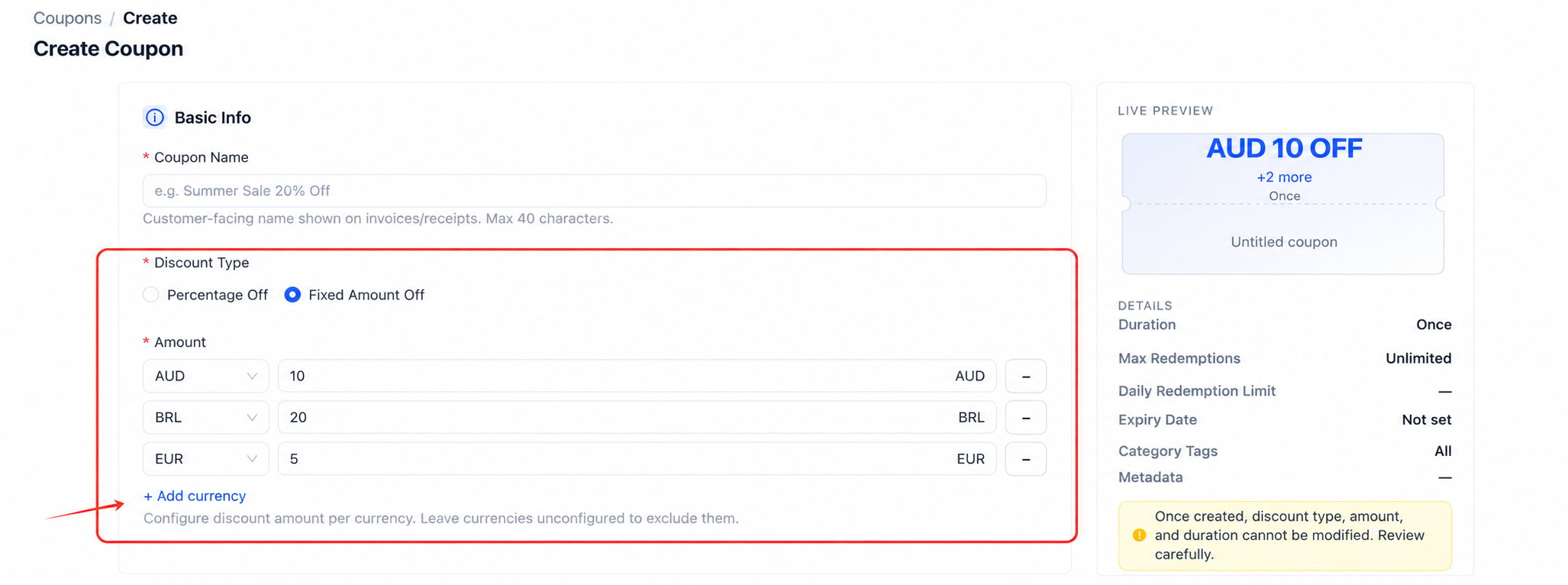
| Coupon setting | Rule |
| ---------------------- | ---------------------------------------------------------------------------------------------------------------------------------------------------------------- |
| Coupon Name | Customer-visible; up to 40 characters |
| Percentage Off | Enter 1–100; 100% makes the order free |
| Fixed Amount Off | Configure a fixed discount for each supported currency; the Coupon cannot be used with an unconfigured currency |
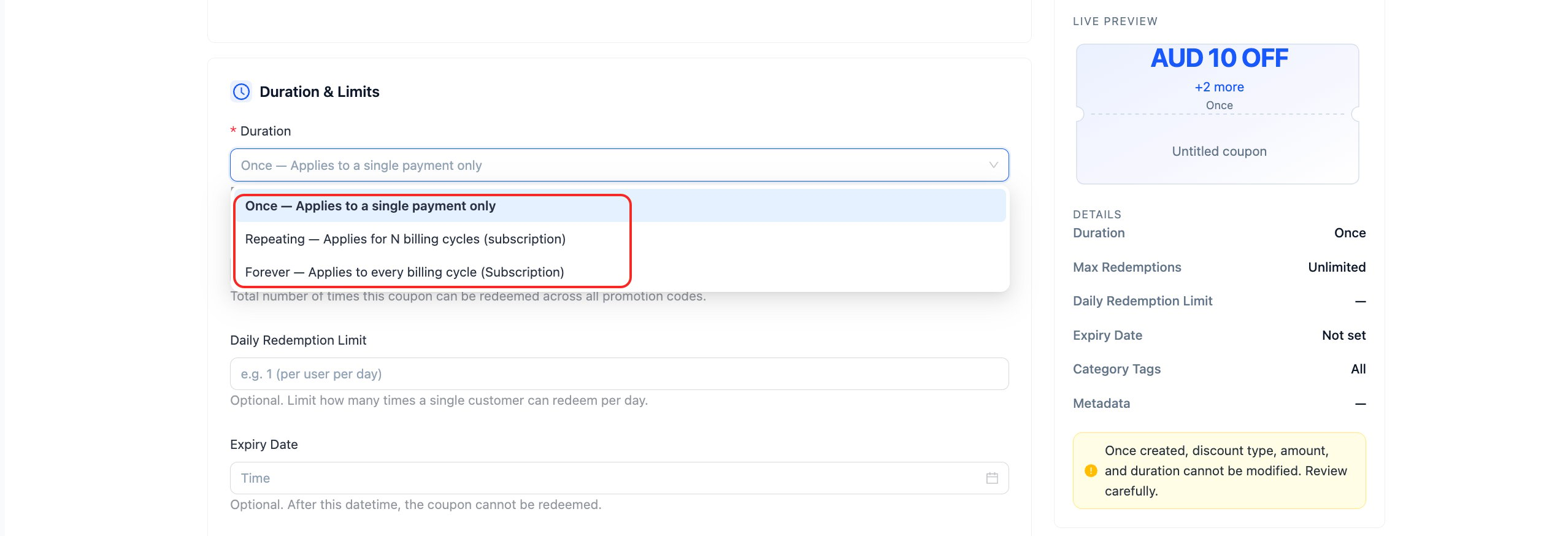
| Duration | `Once` applies to one payment; `Repeating` applies to a specified number of Subscription billing periods; `Forever` applies to every Subscription billing period |
| Max Redemptions | Limits total redemptions across all Promotion Codes linked to the Coupon |
| Daily Redemption Limit | Limits how many times one customer can redeem the Coupon per day |
| Expiry Date | Prevents redemption after the specified date and time |
| Category Tags | Restricts eligible products; leave blank to allow all products |
| Metadata | Stores custom information from the Merchant |
You cannot change the discount type, amount, or duration after creating the Coupon. Review these settings before creation. You can continue to edit Coupon Name and Metadata. Deactivate or archive a Coupon to stop using it.
 If you cannot see the **Marketing** menu or a create button, ask your Merchant administrator to check your account permissions and contact Waffo to confirm that Coupon is enabled for that environment. Read-only accounts can view Marketing data but cannot create or edit it.
After creation, use **Marketing → Discount Analytics** to view redemptions, discount amount, average discount per order, redemption rate, and trends. You can filter or export the results by Coupon.
## Apply a Coupon through the API
`promotionInfo` accepts two mutually exclusive fields:
| Field | When to use it | Limit |
| ----------------------------- | ---------------------------------------------------------------------------------------- | --------------------------- |
| `promotionInfo.promotionCode` | Your integration has a Promotion Code and should apply its linked Coupon | String, up to 64 characters |
| `promotionInfo.couponId` | Your integration has a specific Coupon instance ID and should apply that Coupon directly | String, up to 64 characters |
Pass only one field in each request. Do not send `promotionCode` and `couponId` together.
### One-time payment
Add `promotionInfo` to the [`POST /api/v1/order/create`](/docs/api-reference/order-create/create-new-order) request, and pass either `promotionCode` or `couponId`:
```json theme={null}
{
"orderCurrency": "USD",
"orderAmount": "100.00",
"promotionInfo": {
"promotionCode": "SAVE20"
},
"paymentInfo": {
"productName": "ONE_TIME_PAYMENT"
}
}
```
```json theme={null}
{
"orderCurrency": "USD",
"orderAmount": "100.00",
"promotionInfo": {
"couponId": "coupon_123"
},
"paymentInfo": {
"productName": "ONE_TIME_PAYMENT"
}
}
```
`orderAmount` is the order amount before the discount. After Waffo validates the Coupon, it recalculates the payable amount. In a [`POST /api/v1/order/inquiry`](/docs/api-reference/order-inquiry/order-inquiry) response, `originalAmount` is the pre-discount amount and `orderAmount` is the discounted Merchant order amount.
### Subscription
Add `promotionInfo` to a [`POST /api/v1/subscription/create`](/docs/api-reference/subscription-create/create-subscription) or [`POST /api/v1/subscription/change`](/docs/api-reference/subscription-change/subscription-change) request, and pass either `promotionCode` or `couponId`:
```json theme={null}
{
"currency": "USD",
"amount": "100.00",
"promotionInfo": {
"promotionCode": "SAVE20"
}
}
```
```json theme={null}
{
"currency": "USD",
"amount": "100.00",
"promotionInfo": {
"couponId": "coupon_123"
}
}
```
The Coupon duration determines whether the discount applies once, for a specified number of billing periods, or indefinitely. The Stripe adapter does not map Stripe Coupons or Promotion Codes to Waffo. To apply a discount, call the native Waffo Subscription API and pass `promotionInfo`.
## Let customers enter a Promotion Code in Waffo Checkout
To let a customer redeem a code, omit `promotionInfo` when creating the one-time payment order. The customer can enter a Promotion Code after opening `orderAction.webUrl`.
* Waffo shows the input only when Coupon is enabled for the Merchant and no discount was applied during order creation.
* Checkout accepts a Promotion Code, not a `couponId`.
* Waffo validates the Promotion Code, then recalculates and displays the payable amount.
* An invalid, expired, ineligible, or fully redeemed Promotion Code is rejected. The order does not silently continue at full price.
* If the Merchant applied a Coupon through the API, Checkout displays the discounted amount and hides the Promotion Code input.
## Refunds and payment results
* The maximum refundable amount is the discounted Merchant order amount, not the pre-discount amount.
* Treat the final state returned by a Webhook or inquiry endpoint as the payment result. Do not treat a browser redirect as proof of payment success.
* Store the `promotionCode` or `couponId` with your business order or Subscription so you can reconcile and troubleshoot the discount.
## Acceptance checklist
* Coupon is enabled for both Sandbox and the target Production Merchant.
* Authorized accounts can open **Coupons** and **Promotion Codes** in Merchant Portal and create and view records.
* One successful one-time payment uses `promotionCode`, and another uses `couponId`; each request contains only one field.
* A one-time payment without a pre-applied discount lets the customer enter a valid Promotion Code in Checkout and shows the recalculated amount.
* An invalid, expired, or ineligible Promotion Code shows an error and does not continue at full price.
* A Subscription create or change request applies a Coupon, and subsequent billing periods follow the configured Coupon duration.
* A Webhook or inquiry response confirms the final payment state. For a one-time payment, `originalAmount` and `orderAmount` match the pre-discount and post-discount amounts.
* The refund amount does not exceed the discounted Merchant order amount.
If you cannot see the **Marketing** menu or a create button, ask your Merchant administrator to check your account permissions and contact Waffo to confirm that Coupon is enabled for that environment. Read-only accounts can view Marketing data but cannot create or edit it.
After creation, use **Marketing → Discount Analytics** to view redemptions, discount amount, average discount per order, redemption rate, and trends. You can filter or export the results by Coupon.
## Apply a Coupon through the API
`promotionInfo` accepts two mutually exclusive fields:
| Field | When to use it | Limit |
| ----------------------------- | ---------------------------------------------------------------------------------------- | --------------------------- |
| `promotionInfo.promotionCode` | Your integration has a Promotion Code and should apply its linked Coupon | String, up to 64 characters |
| `promotionInfo.couponId` | Your integration has a specific Coupon instance ID and should apply that Coupon directly | String, up to 64 characters |
Pass only one field in each request. Do not send `promotionCode` and `couponId` together.
### One-time payment
Add `promotionInfo` to the [`POST /api/v1/order/create`](/docs/api-reference/order-create/create-new-order) request, and pass either `promotionCode` or `couponId`:
```json theme={null}
{
"orderCurrency": "USD",
"orderAmount": "100.00",
"promotionInfo": {
"promotionCode": "SAVE20"
},
"paymentInfo": {
"productName": "ONE_TIME_PAYMENT"
}
}
```
```json theme={null}
{
"orderCurrency": "USD",
"orderAmount": "100.00",
"promotionInfo": {
"couponId": "coupon_123"
},
"paymentInfo": {
"productName": "ONE_TIME_PAYMENT"
}
}
```
`orderAmount` is the order amount before the discount. After Waffo validates the Coupon, it recalculates the payable amount. In a [`POST /api/v1/order/inquiry`](/docs/api-reference/order-inquiry/order-inquiry) response, `originalAmount` is the pre-discount amount and `orderAmount` is the discounted Merchant order amount.
### Subscription
Add `promotionInfo` to a [`POST /api/v1/subscription/create`](/docs/api-reference/subscription-create/create-subscription) or [`POST /api/v1/subscription/change`](/docs/api-reference/subscription-change/subscription-change) request, and pass either `promotionCode` or `couponId`:
```json theme={null}
{
"currency": "USD",
"amount": "100.00",
"promotionInfo": {
"promotionCode": "SAVE20"
}
}
```
```json theme={null}
{
"currency": "USD",
"amount": "100.00",
"promotionInfo": {
"couponId": "coupon_123"
}
}
```
The Coupon duration determines whether the discount applies once, for a specified number of billing periods, or indefinitely. The Stripe adapter does not map Stripe Coupons or Promotion Codes to Waffo. To apply a discount, call the native Waffo Subscription API and pass `promotionInfo`.
## Let customers enter a Promotion Code in Waffo Checkout
To let a customer redeem a code, omit `promotionInfo` when creating the one-time payment order. The customer can enter a Promotion Code after opening `orderAction.webUrl`.
* Waffo shows the input only when Coupon is enabled for the Merchant and no discount was applied during order creation.
* Checkout accepts a Promotion Code, not a `couponId`.
* Waffo validates the Promotion Code, then recalculates and displays the payable amount.
* An invalid, expired, ineligible, or fully redeemed Promotion Code is rejected. The order does not silently continue at full price.
* If the Merchant applied a Coupon through the API, Checkout displays the discounted amount and hides the Promotion Code input.
## Refunds and payment results
* The maximum refundable amount is the discounted Merchant order amount, not the pre-discount amount.
* Treat the final state returned by a Webhook or inquiry endpoint as the payment result. Do not treat a browser redirect as proof of payment success.
* Store the `promotionCode` or `couponId` with your business order or Subscription so you can reconcile and troubleshoot the discount.
## Acceptance checklist
* Coupon is enabled for both Sandbox and the target Production Merchant.
* Authorized accounts can open **Coupons** and **Promotion Codes** in Merchant Portal and create and view records.
* One successful one-time payment uses `promotionCode`, and another uses `couponId`; each request contains only one field.
* A one-time payment without a pre-applied discount lets the customer enter a valid Promotion Code in Checkout and shows the recalculated amount.
* An invalid, expired, or ineligible Promotion Code shows an error and does not continue at full price.
* A Subscription create or change request applies a Coupon, and subsequent billing periods follow the configured Coupon duration.
* A Webhook or inquiry response confirms the final payment state. For a one-time payment, `originalAmount` and `orderAmount` match the pre-discount and post-discount amounts.
* The refund amount does not exceed the discounted Merchant order amount.