> ## Documentation Index
> Fetch the complete documentation index at: https://waffo.com/docs/llms.txt
> Use this file to discover all available pages before exploring further.

# Checkout

> Waffo's standardized checkout product for managing global payment interaction flows across one-time and subscription payment modes.

export const CardGroup = ({children, cols = 2}) => {
  const items = Array.isArray(children) ? children.filter(Boolean) : [children];
  const layoutColumns = items.length === 3 ? 3 : cols === 1 ? 1 : 2;
  return <div className="waffo-guide-cards not-prose my-4 grid gap-4" data-columns={layoutColumns}>
      <style>{`
        .waffo-guide-cards {
          grid-template-columns: minmax(0, 1fr) !important;
        }
        .waffo-guide-cards .waffo-clickable-card {
          transition:
            transform 180ms ease,
            border-color 180ms ease,
            box-shadow 180ms ease,
            background 180ms ease !important;
        }
        html:not(.dark) .waffo-guide-cards .waffo-clickable-card:hover {
          border-color: rgba(109, 145, 245, 0.45) !important;
        }
        html.dark .waffo-guide-cards .waffo-clickable-card:hover,
        .dark .waffo-guide-cards .waffo-clickable-card:hover {
          border-color: rgba(109, 145, 245, 0.45) !important;
        }
        @media (min-width: 768px) {
          .waffo-guide-cards[data-columns="2"],
          .waffo-guide-cards[data-columns="3"] {
            grid-template-columns: repeat(2, minmax(0, 1fr)) !important;
          }
          .waffo-guide-cards[data-columns="3"] .waffo-guide-card:nth-of-type(3) {
            grid-column: 1 / -1 !important;
          }
        }
      `}</style>
      {items}
    </div>;
};

export const Card = ({title, icon, href, children}) => {
  const resolvedHref = (() => {
    if (!href || typeof href !== "string") return href;
    if (!href.startsWith("/") || href.startsWith("//")) return href;
    if (typeof window === "undefined") return href;
    const docsPrefixMatch = window.location.pathname.match(/^\/docs(?=\/|$)/);
    const docsPrefix = docsPrefixMatch ? docsPrefixMatch[0] : "";
    if (!docsPrefix) {
      return href.startsWith("/docs/") ? href.slice(5) : href;
    }
    return href.startsWith(`${docsPrefix}/`) ? href : `${docsPrefix}${href}`;
  })();
  const Wrapper = resolvedHref ? "a" : "div";
  const interactiveClass = resolvedHref ? "waffo-clickable-card" : "";
  return <Wrapper href={resolvedHref} className={`waffo-guide-card waffo-hover-card block rounded-xl border border-slate-200 dark:border-neutral-700 bg-gradient-to-b from-slate-50 to-white dark:from-neutral-900 dark:to-neutral-950 p-6 no-underline ${interactiveClass}`}>
      <div className="flex flex-col items-start gap-3">
        <span className="inline-flex h-10 w-10 items-center justify-center rounded-lg border border-slate-200 dark:border-neutral-700 bg-white dark:bg-neutral-900 text-blue-700 dark:text-[#4D7CFF]">
          <svg width="20" height="20" viewBox="0 0 24 24" fill="none" stroke="currentColor" strokeWidth="2" strokeLinecap="round" strokeLinejoin="round" aria-hidden="true">
            {icon === "arrow-right" && <path d="M5 12h14M13 5l7 7-7 7" />}
            {icon === "bell" && <path d="M10 21h4M18 8a6 6 0 0 0-12 0c0 7-3 7-3 9h18c0-2-3-2-3-9" />}
            {icon === "code" && <>
                <path d="m16 18 6-6-6-6" />
                <path d="m8 6-6 6 6 6" />
              </>}
            {icon === "globe" && <>
                <circle cx="12" cy="12" r="10" />
                <path d="M2 12h20" />
                <path d="M12 2a15.3 15.3 0 0 1 0 20" />
                <path d="M12 2a15.3 15.3 0 0 0 0 20" />
              </>}
            {icon === "gear" && <>
                <circle cx="12" cy="12" r="3" />
                <path d="M19.4 15a1.7 1.7 0 0 0 .3 1.9l.1.1a2 2 0 1 1-2.8 2.8l-.1-.1a1.7 1.7 0 0 0-1.9-.3 1.7 1.7 0 0 0-1 1.6V21a2 2 0 1 1-4 0v-.1a1.7 1.7 0 0 0-1-1.6 1.7 1.7 0 0 0-1.9.3l-.1.1a2 2 0 1 1-2.8-2.8l.1-.1a1.7 1.7 0 0 0 .3-1.9 1.7 1.7 0 0 0-1.6-1H3a2 2 0 1 1 0-4h.1a1.7 1.7 0 0 0 1.6-1 1.7 1.7 0 0 0-.3-1.9l-.1-.1a2 2 0 1 1 2.8-2.8l.1.1a1.7 1.7 0 0 0 1.9.3H9a1.7 1.7 0 0 0 1-1.6V3a2 2 0 1 1 4 0v.1a1.7 1.7 0 0 0 1 1.6 1.7 1.7 0 0 0 1.9-.3l.1-.1a2 2 0 1 1 2.8 2.8l-.1.1a1.7 1.7 0 0 0-.3 1.9v.1a1.7 1.7 0 0 0 1.6 1h.1a2 2 0 1 1 0 4H21a1.7 1.7 0 0 0-1.6 1Z" />
              </>}
            {icon === "shield-check" && <>
                <path d="M12 22s8-4 8-10V5l-8-3-8 3v7c0 6 8 10 8 10Z" />
                <path d="m9 12 2 2 4-4" />
              </>}
            {icon === "circle-check" && <>
                <circle cx="12" cy="12" r="10" />
                <path d="m9 12 2 2 4-4" />
              </>}
            {icon === "arrow-trend-up" && <path d="m3 17 6-6 4 4 8-8M14 7h7v7" />}
            {icon === "arrows-rotate" && <>
                <path d="M21 12a9 9 0 0 1-15.5 6.2" />
                <path d="M3 12A9 9 0 0 1 18.5 5.8" />
                <path d="M21 3v6h-6" />
                <path d="M3 21v-6h6" />
              </>}
            {icon === "calendar" && <>
                <rect x="3" y="4" width="18" height="17" rx="2" />
                <path d="M16 2v4M8 2v4M3 10h18" />
              </>}
            {icon === "clock" && <>
                <circle cx="12" cy="12" r="10" />
                <path d="M12 6v6l4 2" />
              </>}
            {icon === "desktop" && <>
                <rect x="3" y="4" width="18" height="12" rx="2" />
                <path d="M8 20h8M12 16v4" />
              </>}
            {icon === "calculator" && <>
                <rect x="5" y="2" width="14" height="20" rx="2" />
                <path d="M8 6h8M8 10h.01M12 10h.01M16 10h.01M8 14h.01M12 14h.01M16 14h.01M8 18h.01M12 18h.01M16 18h.01" />
              </>}
            {icon === "plug" && <>
                <path d="M12 22v-5" />
                <path d="M9 8V2" />
                <path d="M15 8V2" />
                <path d="M18 8v5a6 6 0 0 1-12 0V8Z" />
              </>}
            {icon === "gauge" && <>
                <path d="M12 14l4-4" />
                <path d="M3.3 19a10 10 0 1 1 17.4 0" />
              </>}
            {icon === "layer-group" && <>
                <path d="m12 3 9 5-9 5-9-5 9-5Z" />
                <path d="m3 12 9 5 9-5" />
                <path d="m3 16 9 5 9-5" />
              </>}
            {icon === "laptop-mobile" && <>
                <rect x="3" y="4" width="13" height="10" rx="2" />
                <path d="M2 18h12" />
                <rect x="17" y="8" width="5" height="12" rx="1" />
              </>}
            {icon === "paintbrush" && <>
                <path d="m14 5 5 5" />
                <path d="M4 20c2 0 4-1 4-3 0-1.1-.9-2-2-2-2 0-3 2-3 4 0 .6.4 1 1 1Z" />
                <path d="m6 15 9-9a2.1 2.1 0 0 1 3 3l-9 9" />
              </>}
            {icon === "key" && <>
                <circle cx="7.5" cy="14.5" r="4.5" />
                <path d="m11 11 8-8" />
                <path d="m15 7 2 2" />
              </>}
            {icon === "circle-minus" && <>
                <circle cx="12" cy="12" r="10" />
                <path d="M8 12h8" />
              </>}
            {icon === "wallet" && <>
                <path d="M3 7h15a3 3 0 0 1 3 3v8a3 3 0 0 1-3 3H3Z" />
                <path d="M3 7V5a2 2 0 0 1 2-2h11" />
                <path d="M16 14h.01" />
              </>}
            {icon === "users" && <>
                <path d="M16 21v-2a4 4 0 0 0-4-4H6a4 4 0 0 0-4 4v2" />
                <circle cx="9" cy="7" r="4" />
                <path d="M22 21v-2a4 4 0 0 0-3-3.9" />
                <path d="M16 3.1a4 4 0 0 1 0 7.8" />
              </>}
            {icon === "link" && <>
                <path d="M10 13a5 5 0 0 0 7.1 0l2-2a5 5 0 0 0-7.1-7.1l-1.1 1.1" />
                <path d="M14 11a5 5 0 0 0-7.1 0l-2 2a5 5 0 0 0 7.1 7.1l1.1-1.1" />
              </>}
            {icon === "eye" && <>
                <path d="M2 12s3.5-7 10-7 10 7 10 7-3.5 7-10 7S2 12 2 12Z" />
                <circle cx="12" cy="12" r="3" />
              </>}
            {icon === "file-lines" && <>
                <path d="M14 2H6a2 2 0 0 0-2 2v16a2 2 0 0 0 2 2h12a2 2 0 0 0 2-2V8Z" />
                <path d="M14 2v6h6" />
                <path d="M8 13h8M8 17h6" />
              </>}
            {icon === "sliders" && <>
                <path d="M4 21v-7M4 10V3M12 21v-9M12 8V3M20 21v-5M20 12V3" />
                <path d="M2 14h4M10 8h4M18 16h4" />
              </>}
            {icon === "folder" && <path d="M3 6a2 2 0 0 1 2-2h5l2 2h7a2 2 0 0 1 2 2v10a2 2 0 0 1-2 2H5a2 2 0 0 1-2-2Z" />}
            {icon === "dollar-sign" && <>
                <path d="M12 2v20" />
                <path d="M17 5H9.5a3.5 3.5 0 0 0 0 7H14a3.5 3.5 0 0 1 0 7H6" />
              </>}
            {icon === "toggle-on" && <>
                <rect x="2" y="7" width="20" height="10" rx="5" />
                <circle cx="16" cy="12" r="3" />
              </>}
            {icon === "infinity" && <path d="M18.2 8.2c2.1 0 3.8 1.7 3.8 3.8s-1.7 3.8-3.8 3.8c-4.2 0-8.2-7.6-12.4-7.6C3.7 8.2 2 9.9 2 12s1.7 3.8 3.8 3.8c4.2 0 8.2-7.6 12.4-7.6Z" />}
            {icon === "book-open" && <>
                <path d="M2 4h7a3 3 0 0 1 3 3v14a3 3 0 0 0-3-3H2Z" />
                <path d="M22 4h-7a3 3 0 0 0-3 3v14a3 3 0 0 1 3-3h7Z" />
              </>}
            {icon === "circle-play" && <>
                <circle cx="12" cy="12" r="10" />
                <path d="m10 8 6 4-6 4Z" />
              </>}
            {icon === "gamepad" && <>
                <rect x="3" y="8" width="18" height="10" rx="5" />
                <path d="M8 13h3M9.5 11.5v3M16 13h.01M18 11h.01" />
              </>}
            {icon === "rocket" && <>
                <path d="M4.5 16.5c-1.5 1.3-2 3.5-2 5 1.5 0 3.7-.5 5-2" />
                <path d="M9 15 4 10l6-6c4-4 9-2 10-1 1 1 3 6-1 10l-6 6-5-5Z" />
                <path d="M15 9h.01" />
              </>}
            {(icon === "flask" || icon === "flask-vial") && <>
                <path d="M9 2v6L4 20a2 2 0 0 0 2 2h12a2 2 0 0 0 2-2L15 8V2" />
                <path d="M8 2h8" />
                <path d="M7 16h10" />
              </>}
            {icon === "credit-card" && <>
                <rect x="3" y="5" width="18" height="14" rx="2" />
                <path d="M3 10h18" />
                <path d="M7 15h4" />
              </>}
            {icon === "puzzle-piece" && <path d="M14 7V4a2 2 0 0 0-2-2H8a2 2 0 0 0-2 2v3H3a1 1 0 0 0-1 1v4a2 2 0 0 0 2 2h2v3a2 2 0 0 0 2 2h4a2 2 0 0 0 2-2v-3h3a2 2 0 0 0 2-2V8a1 1 0 0 0-1-1Z" />}
            {(icon === "arrows-spin" || icon === "repeat") && <>
                <path d="M17 2l4 4-4 4" />
                <path d="M3 11V9a4 4 0 0 1 4-4h14" />
                <path d="M7 22l-4-4 4-4" />
                <path d="M21 13v2a4 4 0 0 1-4 4H3" />
              </>}
            {icon === "coins" && <>
                <ellipse cx="8" cy="7" rx="5" ry="3" />
                <path d="M3 7v6c0 1.7 2.2 3 5 3s5-1.3 5-3V7" />
                <path d="M13 10c2.8 0 5 1.3 5 3v4c0 1.7-2.2 3-5 3-1.2 0-2.3-.2-3.1-.7" />
              </>}
            {icon === "triangle-exclamation" && <>
                <path d="m21.7 18-8-14a2 2 0 0 0-3.4 0l-8 14A2 2 0 0 0 4 21h16a2 2 0 0 0 1.7-3Z" />
                <path d="M12 9v4M12 17h.01" />
              </>}
            {icon === "list" && <>
                <path d="M8 6h13M8 12h13M8 18h13" />
                <path d="M3 6h.01M3 12h.01M3 18h.01" />
              </>}
            {icon === "star" && <path d="m12 2 3.1 6.3 6.9 1-5 4.9 1.2 6.8-6.2-3.3L5.8 21 7 14.2 2 9.3l6.9-1Z" />}
            {(icon === "rotate" || icon === "arrow-rotate-left") && <>
                <path d="M3 12a9 9 0 1 0 3-6.7" />
                <path d="M3 4v6h6" />
              </>}
            {icon === "clock-rotate-left" && <>
                <path d="M3 12a9 9 0 1 0 3-6.7" />
                <path d="M3 4v6h6" />
                <path d="M12 7v5l3 2" />
              </>}
            {icon === "circle-xmark" && <>
                <circle cx="12" cy="12" r="10" />
                <path d="m15 9-6 6M9 9l6 6" />
              </>}
            {icon === "paper-plane" && <path d="m22 2-7 20-4-9-9-4Z" />}
            {icon === "signal" && <>
                <path d="M2 20h.01M7 20v-4M12 20v-8M17 20V8M22 20V4" />
              </>}
            {icon === "circle-question" && <>
                <circle cx="12" cy="12" r="10" />
                <path d="M9.1 9a3 3 0 1 1 5.8 1c0 2-3 2-3 4" />
                <path d="M12 17h.01" />
              </>}
            {icon === "palette" && <>
                <path d="M12 22a10 10 0 1 1 7.5-3.4c-.9 1-2.4.4-2.4-.9 0-1.1-.9-2-2-2h-1.4c-1.2 0-2.2 1-2.2 2.2 0 1.1.9 2.1 2.1 2.1" />
                <circle cx="7.5" cy="10.5" r=".8" />
                <circle cx="12" cy="7.5" r=".8" />
                <circle cx="16.5" cy="10.5" r=".8" />
              </>}
            {(!icon || !["arrow-right", "bell", "code", "globe", "gear", "shield-check", "circle-check", "arrow-trend-up", "arrows-rotate", "calendar", "clock", "desktop", "calculator", "plug", "gauge", "layer-group", "laptop-mobile", "paintbrush", "key", "circle-minus", "wallet", "users", "link", "eye", "file-lines", "sliders", "folder", "dollar-sign", "toggle-on", "infinity", "book-open", "circle-play", "gamepad", "rocket", "flask", "flask-vial", "credit-card", "puzzle-piece", "arrows-spin", "repeat", "coins", "triangle-exclamation", "list", "star", "rotate", "arrow-rotate-left", "clock-rotate-left", "circle-xmark", "paper-plane", "signal", "circle-question", "palette"].includes(icon)) && <path d="M13 2 4 14h7l-1 8 9-12h-7l1-8Z" />}
          </svg>
        </span>
        <div className="flex flex-col gap-2">
          <h4 className="m-0 text-base font-semibold text-slate-900 dark:text-slate-100">
            {title}
          </h4>
          <div className="m-0 text-sm leading-6 text-slate-600 dark:text-slate-300">
            {children}
          </div>
        </div>
      </div>
    </Wrapper>;
};

export const CheckoutIntegrationModeCards = ({items = []}) => {
  return <div className="checkout-integration-mode-cards not-prose my-4 grid grid-cols-1 gap-4 md:grid-cols-2">
      <style>{`
        .checkout-integration-mode-cards .checkout-integration-card {
          padding: 24px !important;
          box-sizing: border-box;
        }
        .checkout-integration-mode-cards .checkout-integration-check-icon {
          background-color: #071f66;
          -webkit-mask: url("/images/essentials/checkout/check-icon.svg") center / contain no-repeat;
          mask: url("/images/essentials/checkout/check-icon.svg") center / contain no-repeat;
        }
        .dark .checkout-integration-mode-cards .checkout-integration-check-icon {
          background-color: #4D7CFF;
        }
      `}</style>
      {items.map(item => <div key={item.title} className="checkout-integration-card waffo-hover-card rounded-xl border border-slate-200 dark:border-neutral-700 bg-gradient-to-b from-slate-50 to-white dark:from-neutral-900 dark:to-neutral-950">
          <div className="mb-3 inline-flex h-5 w-5">
            <span className="checkout-integration-check-icon inline-flex h-5 w-5" aria-hidden="true" />
          </div>
          <h3 className="m-0 text-base font-semibold text-slate-900 dark:text-slate-100">
            {item.title}
          </h3>
          <p className="mt-2 mb-0 text-sm leading-6 text-slate-600 dark:text-slate-300">
            {item.description}
          </p>
        </div>)}
    </div>;
};

export const PaymentMethodsShowcase = ({prefix = "Supported ", highlight = "430+", suffix = " mainstream methods"}) => {
  const [isDark, setIsDark] = useState(false);
  useEffect(() => {
    const check = () => setIsDark(document.documentElement.classList.contains("dark"));
    check();
    const observer = new MutationObserver(check);
    observer.observe(document.documentElement, {
      attributes: true,
      attributeFilter: ["class"]
    });
    return () => observer.disconnect();
  }, []);
  return <div className="not-prose my-6 flex flex-col items-start gap-4 border-l-4 px-6 py-4" style={{
    borderColor: isDark ? "#3b82f6" : "#94a3b8",
    background: isDark ? "#18181b" : "#f7f9fc"
  }}>
      {}
      <p className="m-0 text-base leading-6" style={{
    color: isDark ? "#cbd5e1" : "#64748b"
  }}>
        {prefix}
        <strong className="font-semibold" style={{
    color: isDark ? "#ffffff" : "#0f172a"
  }}>
          {highlight}
        </strong>
        {suffix}
      </p>
      <div className="rounded-md bg-white px-2 py-1">
        <img src="/images/payment-methods-logos.svg" alt="Visa, Mastercard, Apple Pay, Google Pay, Alipay, WeChat Pay, TrueMoney and more" className="m-0 block h-9 w-auto max-w-full" />
      </div>
    </div>;
};

Waffo Checkout is Waffo's standardized checkout product, designed to unify the management of global payment interaction flows. It enables merchants to provide a secure, smooth, and consistent payment experience for users across various modes, including **One-time Payments** and **Subscription Payments**.

<div className="flex gap-4 mt-2 mb-2">
  <a href="/api-reference/introduction" className="inline-flex items-center gap-2 px-6 py-2 rounded-lg text-white text-base font-medium no-underline bg-primary hover:opacity-90">
    Start Integration →
  </a>

  <a href="mailto:support@waffo.com" className="waffo-secondary-cta inline-flex items-center px-4 py-2 rounded-lg border border-slate-200 bg-white text-slate-600 text-base font-medium no-underline hover:bg-slate-50 dark:border-neutral-700 dark:bg-neutral-800 dark:text-slate-300 dark:hover:bg-neutral-700">
    Contact us
  </a>
</div>

## Core capabilities overview

<CardGroup cols={2}>
  <Card title="Unified Payment Model" icon="layer-group">
    A single integration supports both **One-time Purchases** and **Subscription Billing**.
  </Card>

  <Card title="Global Adaptation" icon="globe">
    Smartly matches local languages and payment methods to eliminate cross-border payment friction.
  </Card>

  <Card title="Multi-Device Responsiveness" icon="laptop-mobile">
    Across both web and mobile platforms, the UI is fully optimized to maximize conversion rates.
  </Card>

  <Card title="Highly Customizable" icon="paintbrush">
    Extensive checkout customization is supported, covering merchant logo upload, configurable visual styles (brand colors, typography, corner radius, etc.), and flexible payment method ordering for a fully branded payment experience.
  </Card>
</CardGroup>

## Integration modes

<Tabs>
  <Tab title="Hosted Checkout">
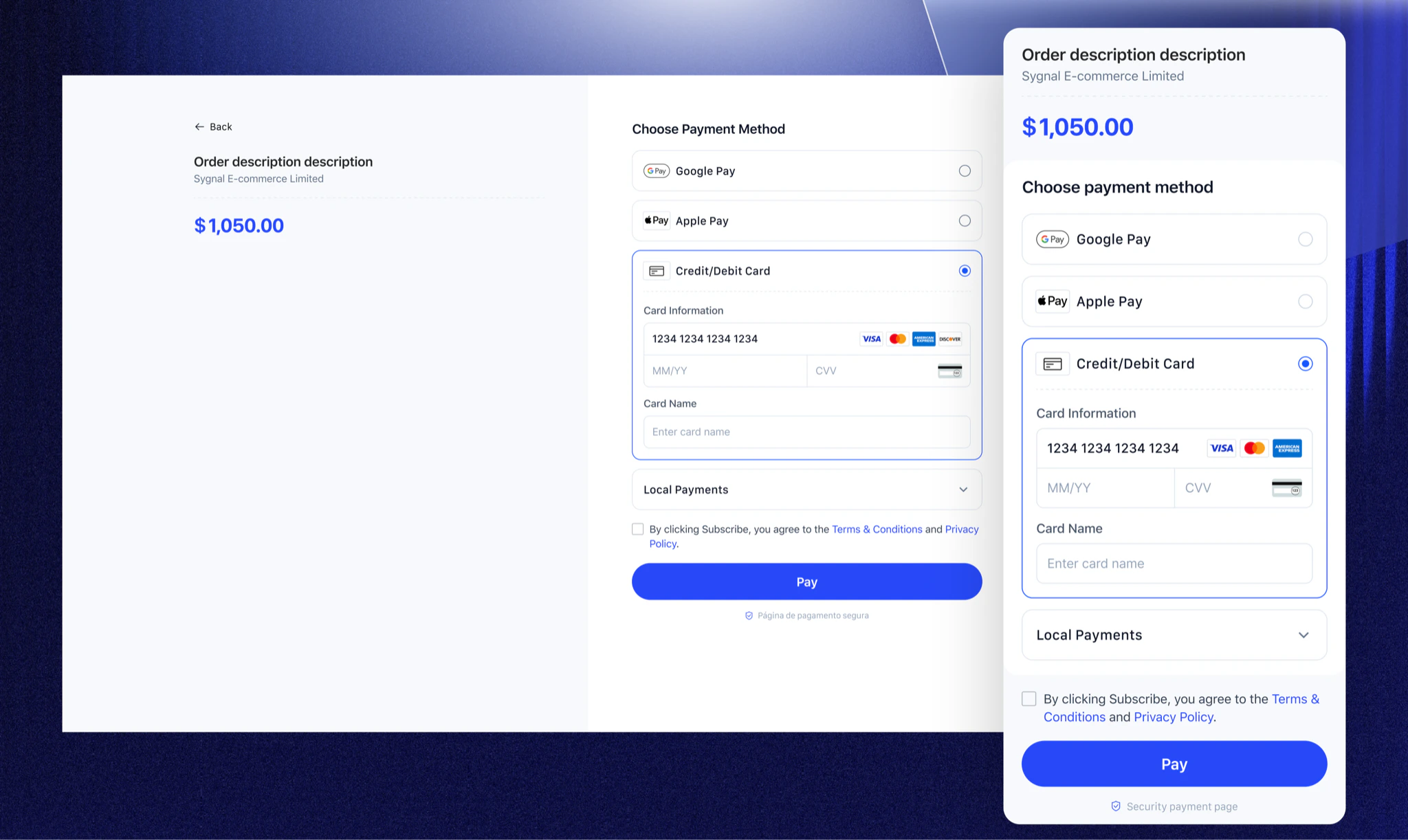
    Waffo hosts and renders the entire checkout page. Your backend creates a payment session and redirects the user to the Waffo-hosted URL.

    <CheckoutIntegrationModeCards
      items={[
    {
      title: "Zero Frontend Development",
      description:
        "No need to handle frontend payment logic; Waffo manages page rendering and security.",
    },
    {
      title: "Automatic Optimization",
      description:
        "Automatically applies Waffo's latest conversion rate optimization strategies.",
    },
  ]}
    />

    <div style={{ marginTop: "16px" }}>
      <Frame>
        <img src="https://mintcdn.com/waffo-docs/Pi4mlrktV3FjQDJZ/images/essentials/checkout/hosted-checkout.png?fit=max&auto=format&n=Pi4mlrktV3FjQDJZ&q=85&s=f2cc4736a482929f190a45ba0f2249e8" alt="Waffo Hosted Checkout preview showing the payment page on multiple devices" width="2048" height="1222" data-path="images/essentials/checkout/hosted-checkout.png" />
      </Frame>
    </div>
  </Tab>

  <Tab title="Embedded Checkout">
    Embed the Waffo Checkout directly into your page using the client SDK or pre-built components, giving you full control over layout and user experience.

    <CheckoutIntegrationModeCards
      items={[
    {
      title: "Seamless Brand Experience",
      description:
        "The checkout renders inside your page without redirects, maintaining your brand context throughout the payment flow.",
    },
    {
      title: "Fine-grained Customization",
      description:
        "Define specific CSS properties like fonts, spacing, and border radius via JavaScript objects.",
    },
  ]}
    />

    <div style={{ marginTop: "16px" }}>
      <Frame>
        <img src="https://mintcdn.com/waffo-docs/Pi4mlrktV3FjQDJZ/images/essentials/checkout/embedded-checkout.png?fit=max&auto=format&n=Pi4mlrktV3FjQDJZ&q=85&s=bdf2a8c5e15535308f95a896d10970b8" alt="Waffo Embedded Checkout preview showing the checkout embedded inside the merchant's page" width="2048" height="1222" data-path="images/essentials/checkout/embedded-checkout.png" />
      </Frame>
    </div>
  </Tab>
</Tabs>

## Payment methods showcase

Waffo Checkout dynamically displays available payment methods based on payment mode, region, currency, or business rules. Whether it is a one-time payment or a subscription, the Checkout seamlessly synergizes with the corresponding payment capabilities.

<PaymentMethodsShowcase prefix="Supported " highlight="430+" suffix=" mainstream methods" />

[View Supported Payment Methods →](/en/essentials/payment-methods)

## Payment flow experience

From order creation to payment completion, Waffo provides a clear, smooth, and standardized interaction flow.

<Steps>
  <Step title="Confirm Order">
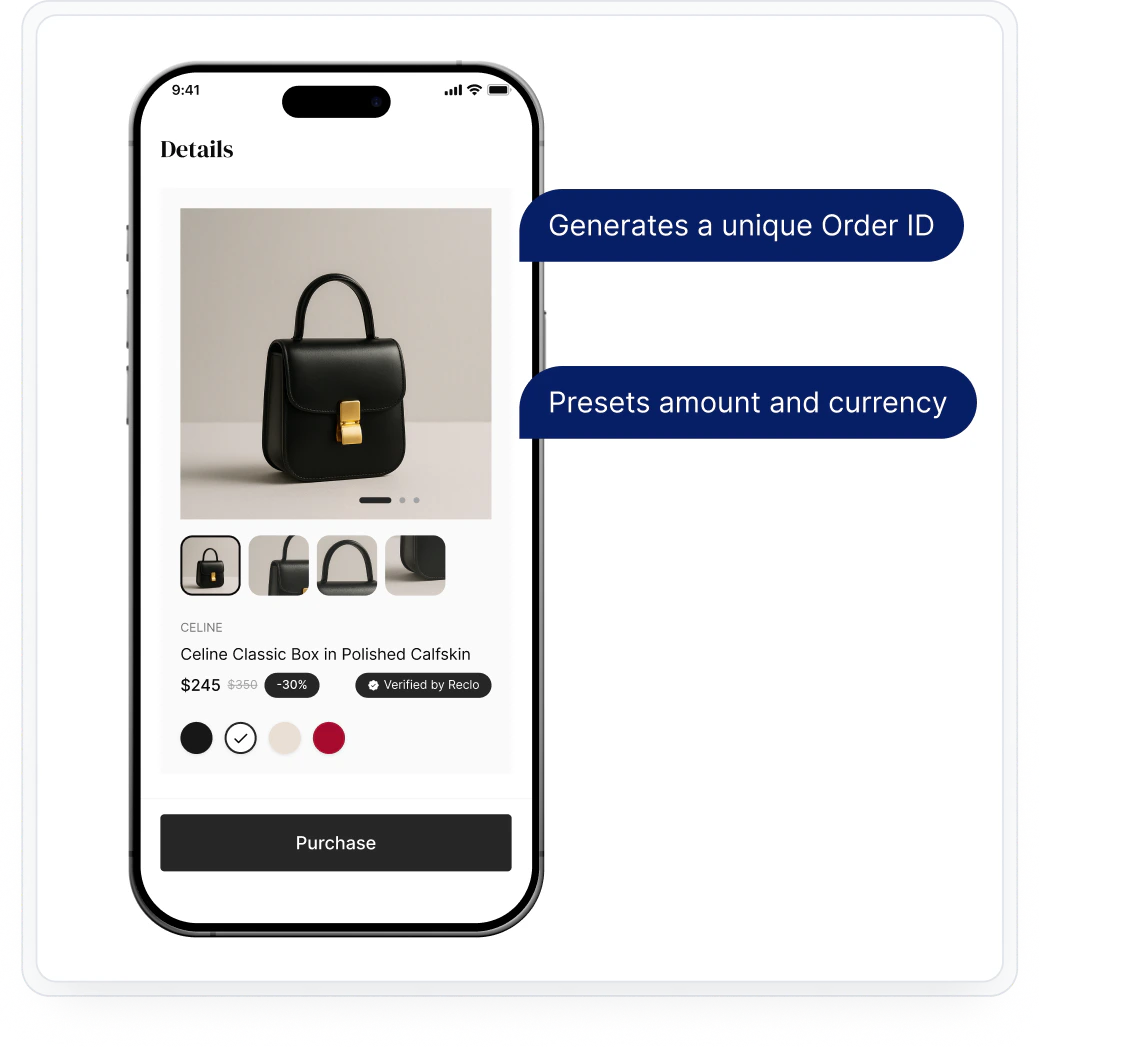
    The user browses goods or services on the merchant's site and clicks the "Checkout" button. The merchant backend calls the Waffo API to create a Payment Session or Subscription.

    * Generates a unique Order ID
    * Presets amount and currency

    <Frame>
      <img src="https://mintcdn.com/waffo-docs/Pi4mlrktV3FjQDJZ/images/essentials/checkout/step1.png?fit=max&auto=format&n=Pi4mlrktV3FjQDJZ&q=85&s=4fd2d1b8b9b9e7ddd3cc2cc643c568b0" alt="Payment flow step 1: confirm order" width="1133" height="1047" data-path="images/essentials/checkout/step1.png" />
    </Frame>
  </Step>

  <Step title="Invoke Checkout">
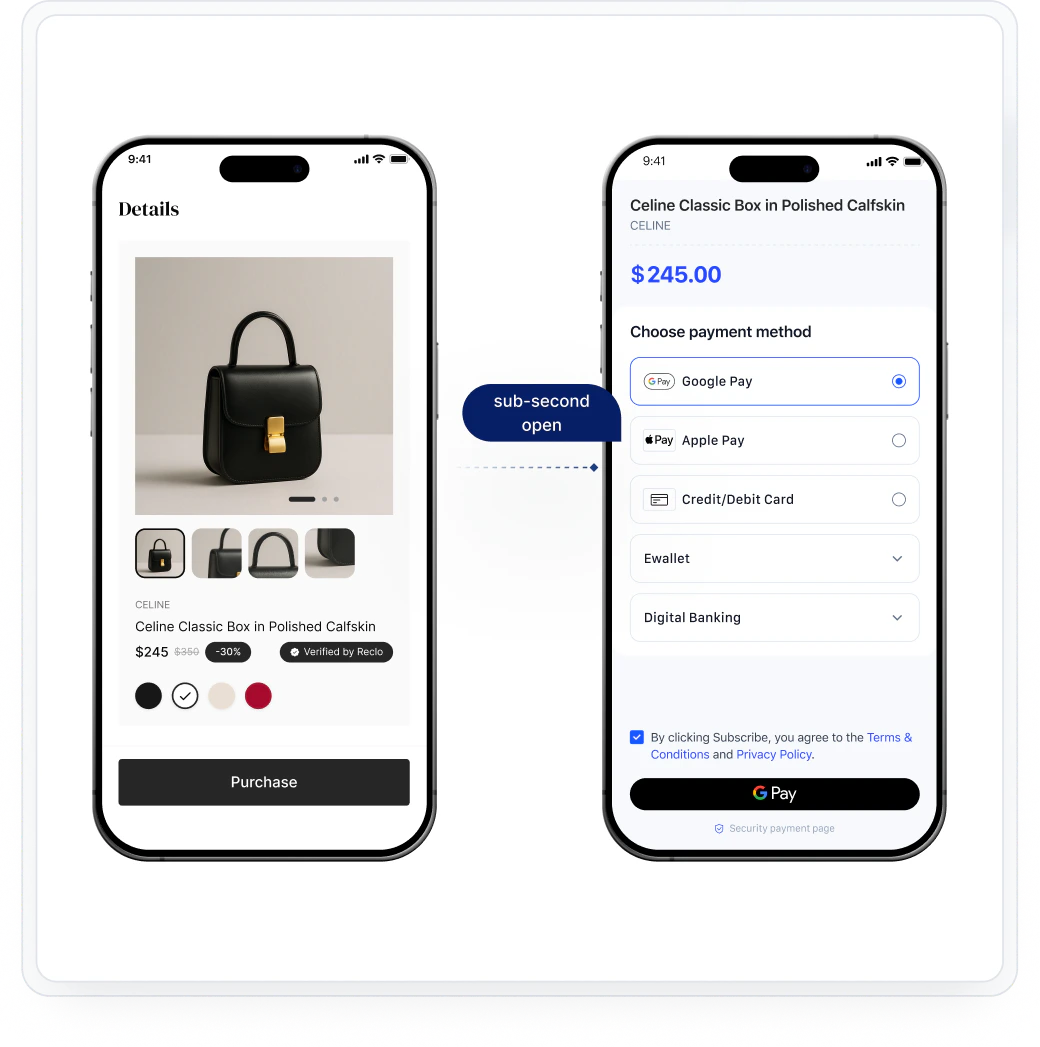
    The merchant frontend invokes the Waffo Checkout via redirect (Hosted) or SDK initialization (Embedded).

    <Frame>
      <img src="https://mintcdn.com/waffo-docs/Pi4mlrktV3FjQDJZ/images/essentials/checkout/step2.png?fit=max&auto=format&n=Pi4mlrktV3FjQDJZ&q=85&s=5491c48ab541e7de95951cfa50655cb4" alt="Payment flow step 2: invoke checkout" width="1040" height="1047" data-path="images/essentials/checkout/step2.png" />
    </Frame>
  </Step>

  <Step title="Select Payment Method">
    The user selects their preferred payment method from the dynamically displayed options. Available methods are filtered by region, currency, and merchant configuration.

    <Frame>
      <img src="https://mintcdn.com/waffo-docs/Pi4mlrktV3FjQDJZ/images/essentials/checkout/step3.png?fit=max&auto=format&n=Pi4mlrktV3FjQDJZ&q=85&s=f2f902166cd525b7c47b3d60c3a09e7d" alt="Payment flow step 3: select payment method" width="1040" height="1047" data-path="images/essentials/checkout/step3.png" />
    </Frame>
  </Step>

  <Step title="Authorize and complete payment">
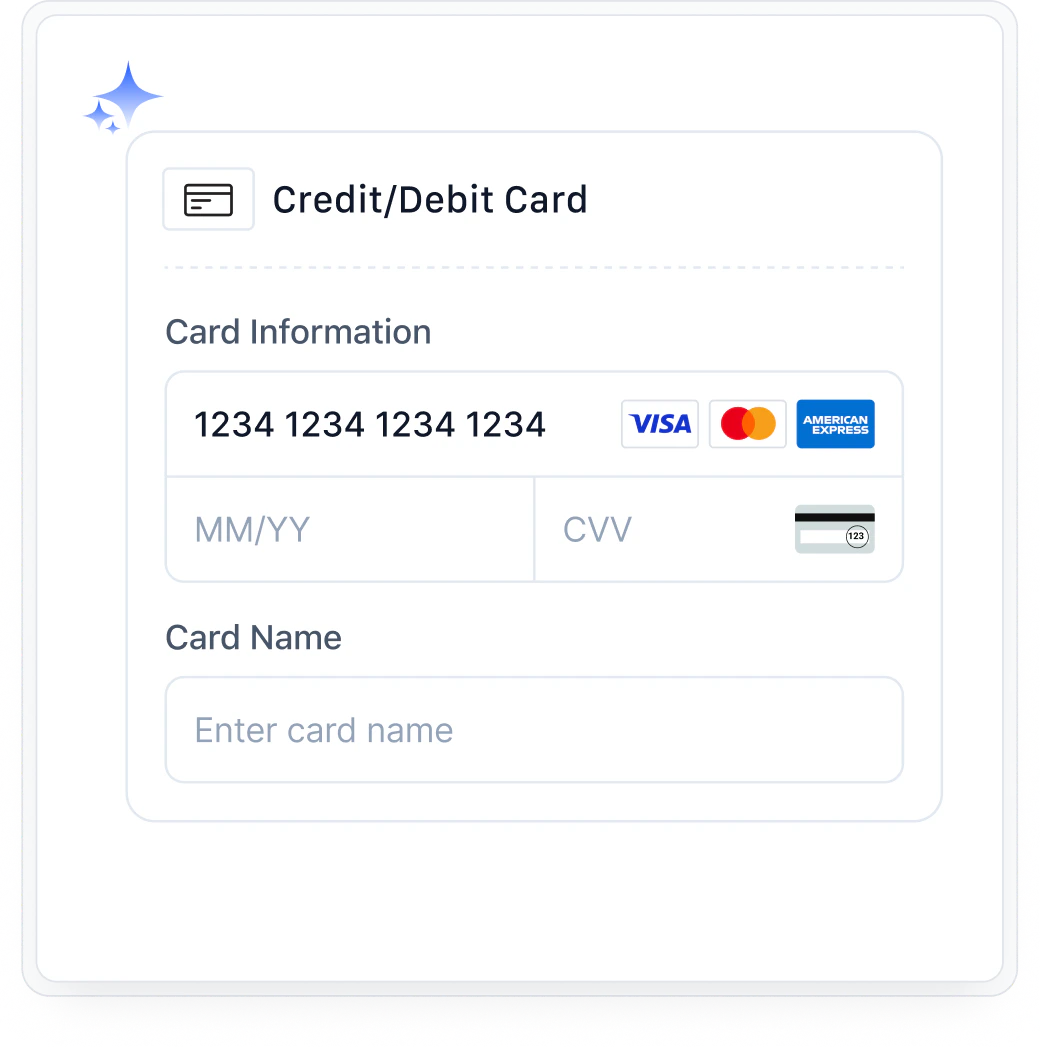
    The user completes authentication and authorization through the selected payment method's native flow (card input, wallet redirect, biometric, etc.).

    <Frame>
      <img src="https://mintcdn.com/waffo-docs/Pi4mlrktV3FjQDJZ/images/essentials/checkout/step4.png?fit=max&auto=format&n=Pi4mlrktV3FjQDJZ&q=85&s=c984eb0264839ab1f53ba228ee84d04f" alt="Payment flow step 4: authorize and complete payment" width="1040" height="1047" data-path="images/essentials/checkout/step4.png" />
    </Frame>
  </Step>

  <Step title="Result & Notification">
    Waffo returns the payment result to the user's browser and sends a webhook notification to the merchant's backend. The merchant updates order status accordingly.

    <Frame>
      <img src="https://mintcdn.com/waffo-docs/Pi4mlrktV3FjQDJZ/images/essentials/checkout/step5.png?fit=max&auto=format&n=Pi4mlrktV3FjQDJZ&q=85&s=7f109986ed43922e5c8e6c19133e022f" alt="Payment flow step 5: result and notification" width="1040" height="1047" data-path="images/essentials/checkout/step5.png" />
    </Frame>
  </Step>
</Steps>

## UI customization options

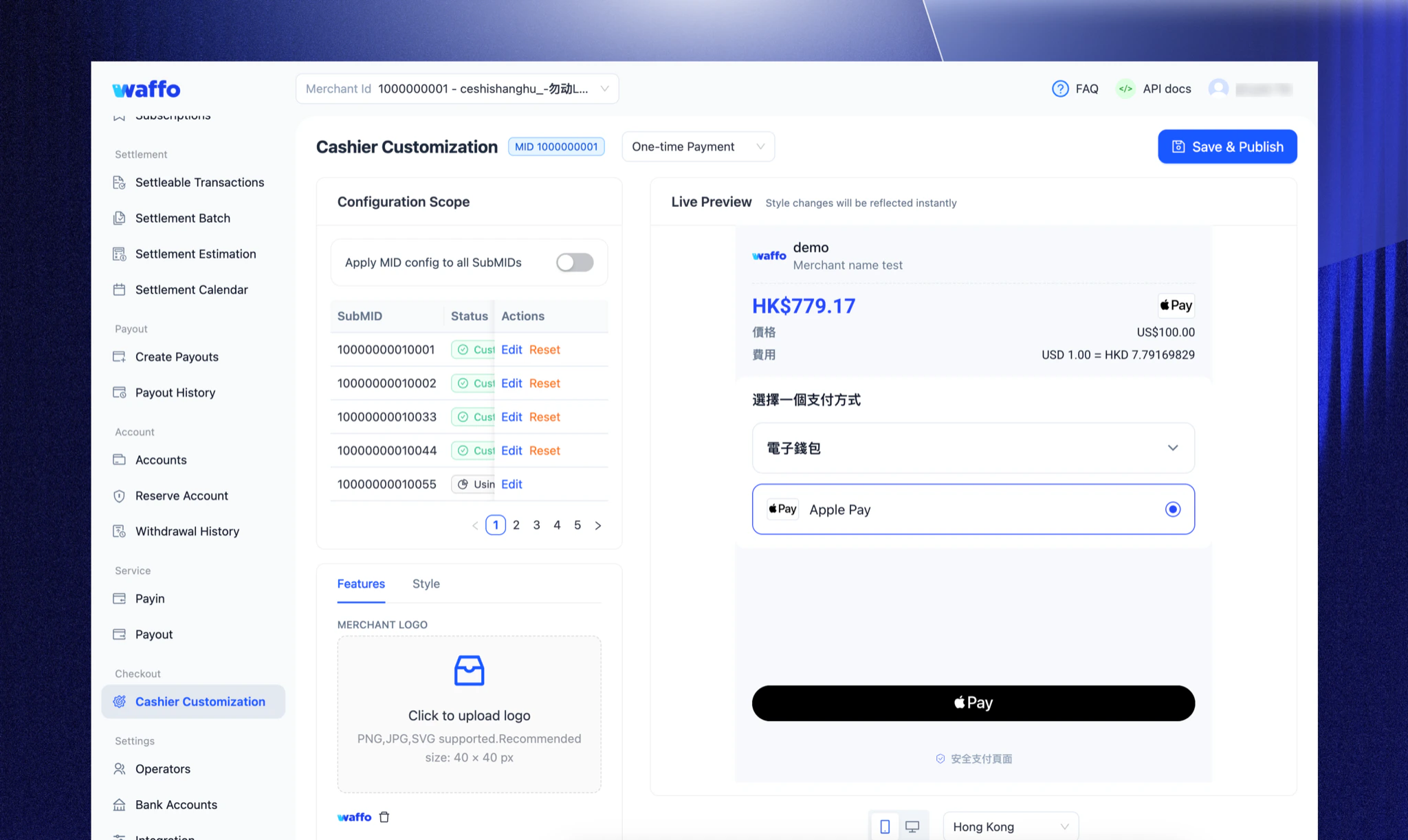
To ensure the checkout blends seamlessly with your brand, Waffo offers granular customization options. You can control the look and feel via three methods:

* **Merchant Portal:** Visual Configuration, No Code Required. Upload logo, configure brand colors and interface styling, customize payment method order—all with real-time preview in the merchant dashboard.
* **API Parameters:** Server-side dynamic control. Pass configuration parameters when creating a Session to display different interfaces for different user groups (e.g., VIPs).
* **Client SDK:** Frontend fine-grained control. (Embedded only). Define specific CSS properties like fonts, spacing, and border radius via JavaScript objects.

<Frame>
  <img src="https://mintcdn.com/waffo-docs/Pi4mlrktV3FjQDJZ/images/essentials/checkout/ui-customization.png?fit=max&auto=format&n=Pi4mlrktV3FjQDJZ&q=85&s=b504f404bf8f5b63b3a3d75c694a0dbe" alt="Waffo Merchant Portal showing the Cashier Customization screen with live preview of the checkout interface" width="2048" height="1222" data-path="images/essentials/checkout/ui-customization.png" />
</Frame>

## Multi-language support

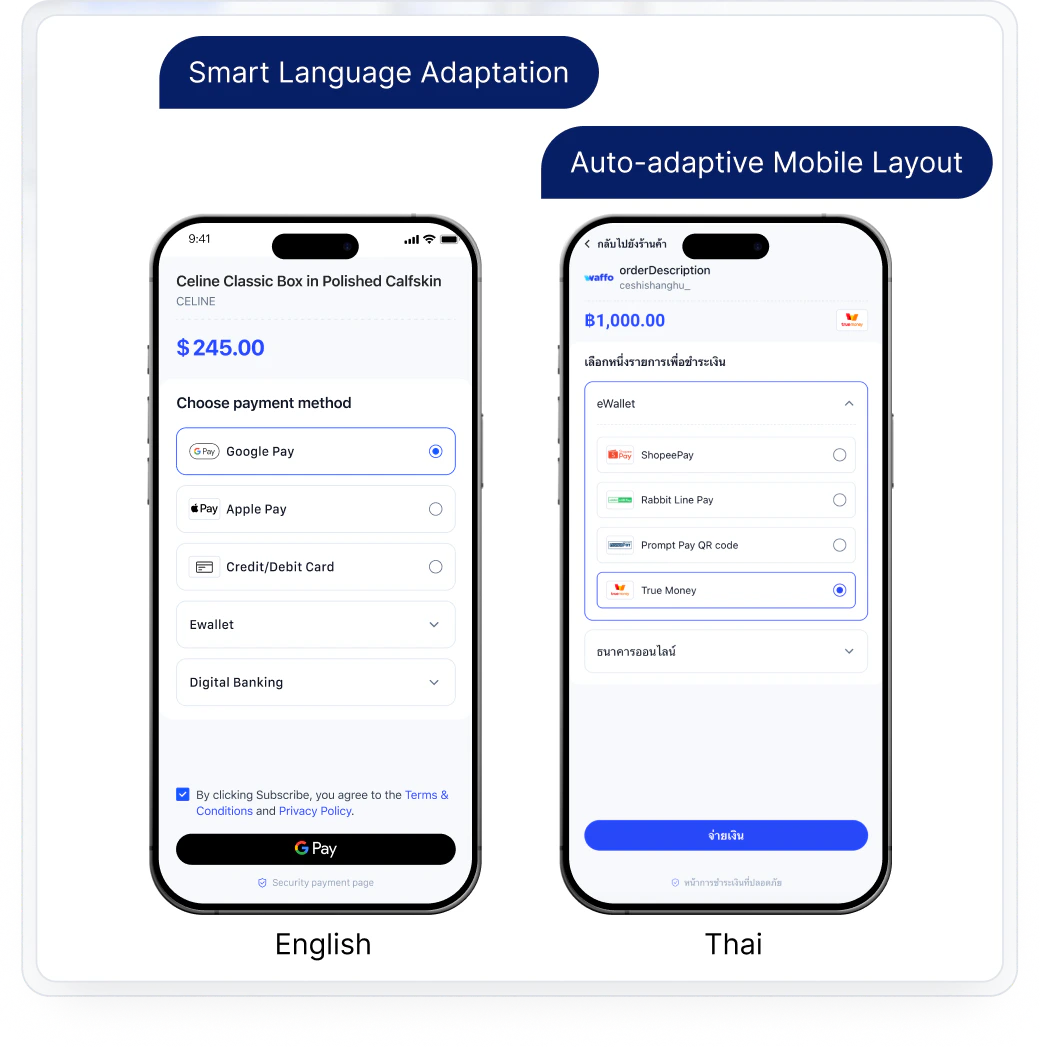
Waffo Checkout aims to provide a payment experience that feels like a native local application for global users. To deliver the most precise localization, Waffo Checkout intelligently presets and presents the most suitable interface language based on the region of the selected payment method.

<Note>
  **Example:** When a user selects **Alipay**, the system automatically adapts to a **Simplified Chinese** interface; when selecting **TrueMoney**, it adapts to **Thai**, ensuring users complete payments in their most familiar language environment.
</Note>

Example languages supported (non-exhaustive): English, Thai, Japanese, Simplified Chinese, Traditional Chinese, Spanish, Bahasa Indonesia, and more.

<Frame>
  <img src="https://mintcdn.com/waffo-docs/Pi4mlrktV3FjQDJZ/images/essentials/checkout/multi-language-support.png?fit=max&auto=format&n=Pi4mlrktV3FjQDJZ&q=85&s=e5a22e8081335c2cb0d5b9a2a45c5653" alt="Waffo Checkout multi-language support preview" width="4272" height="2550" data-path="images/essentials/checkout/multi-language-support.png" />
</Frame>

## Integration

Waffo Checkout can be combined with different payment capabilities to form a complete solution:

* **Using Hosted Checkout:** Support one-time or subscription payments with minimal code.
* **Using Embedded Checkout:** Embed the checkout via SDK or components for higher freedom of experience and customization.
* **With Server API:** Used to create payments or subscriptions, query status, receive notifications, and dynamically control checkout behavior.

[View Development Documentation](/api-reference/introduction) to learn how to integrate Checkout with different payment modes.

## Frequently asked questions

<AccordionGroup>
  <Accordion title="Which payment methods does the Checkout support?">
    Currently, the Checkout supports 430+ global payment methods. The specific methods available may vary based on region and merchant configuration.

    See the full list on the [Payment Methods](/en/essentials/payment-methods) page.
  </Accordion>

  <Accordion title="Does the Checkout meet payment security and compliance requirements?">
    Yes, the Checkout complies with relevant payment security and compliance standards (such as PCI DSS) and processes sensitive payment information via secure channels.
  </Accordion>

  <Accordion title="How does the Checkout handle payment failures?">
    If a payment fails, the Checkout page displays the reason for the failure. Users can retry the payment or switch to a different credit card. Common failure reasons include insufficient funds, incorrect card information, or transaction decline by the issuing bank.
  </Accordion>
</AccordionGroup>

***

Need help? [Contact support](mailto:support@waffo.com)