> ## Documentation Index
> Fetch the complete documentation index at: https://waffo.com/docs/llms.txt
> Use this file to discover all available pages before exploring further.

# Data Intelligence

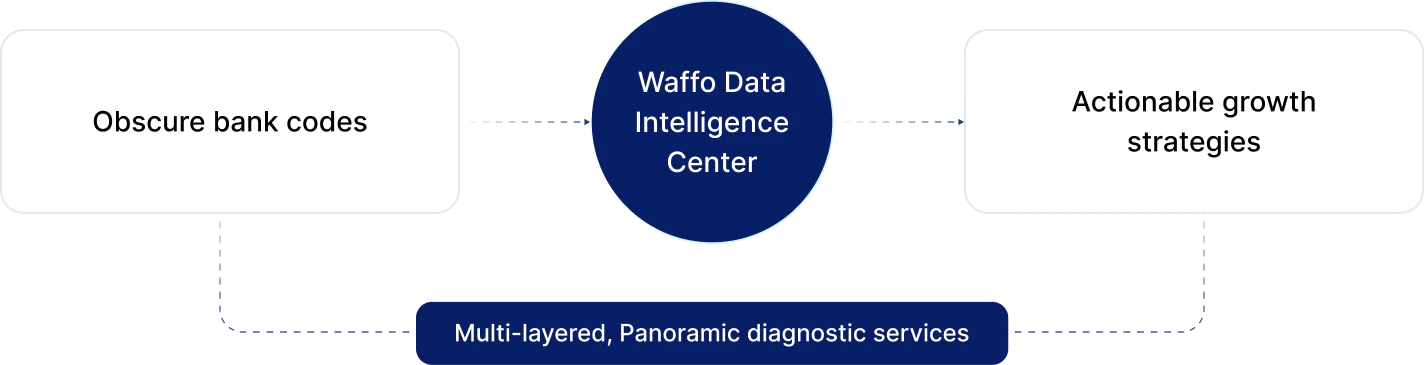
> End-to-end data intelligence that translates obscure bank codes into actionable growth strategies.

export const SmartCodeMappingCards = ({cards = []}) => {
  const [isDark, setIsDark] = useState(false);
  useEffect(() => {
    const check = () => setIsDark(document.documentElement.classList.contains("dark"));
    check();
    const observer = new MutationObserver(check);
    observer.observe(document.documentElement, {
      attributes: true,
      attributeFilter: ["class"]
    });
    return () => observer.disconnect();
  }, []);
  const t = {
    cardBorder: isDark ? "#3f3f46" : "#e2e8f0",
    cardBg: isDark ? "#18181b" : "#ffffff",
    headerBg: isDark ? "#27272a" : "#f8fafc",
    headerBorder: isDark ? "#3f3f46" : "#e2e8f0",
    title: isDark ? "#f4f4f5" : "#0f172a",
    examples: isDark ? "#71717a" : "#94a3b8",
    sectionLabel: isDark ? "#a1a1aa" : "#475569",
    sectionText: isDark ? "#d4d4d8" : "#334155",
    attrIconBg: isDark ? "#1c1c1c" : "#f1f5f9",
    attrIconColor: isDark ? "#a1a1aa" : "#64748b",
    recIconBg: isDark ? "#1e3a5f" : "#eff6ff",
    recIconColor: isDark ? "#4D7CFF" : "#2563eb",
    divider: isDark ? "#27272a" : "#f1f5f9"
  };
  const AttrIcon = () => <svg width="16" height="16" viewBox="0 0 16 16" fill="none" xmlns="http://www.w3.org/2000/svg">
      <circle cx="8" cy="8" r="7" stroke={t.attrIconColor} strokeWidth="1.3" />
      <path d="M8 4.5V8.5L10.5 10" stroke={t.attrIconColor} strokeWidth="1.3" strokeLinecap="round" strokeLinejoin="round" />
    </svg>;
  const RecIcon = () => <svg width="16" height="16" viewBox="0 0 16 16" fill="none" xmlns="http://www.w3.org/2000/svg">
      <path d="M8 2L9.5 6H14L10.5 8.5L11.5 13L8 10.5L4.5 13L5.5 8.5L2 6H6.5L8 2Z" stroke={t.recIconColor} strokeWidth="1.2" strokeLinejoin="round" fill={t.recIconBg} />
    </svg>;
  return <div style={{
    display: "grid",
    gridTemplateColumns: "repeat(2, 1fr)",
    gap: "16px",
    margin: "24px 0"
  }}>
      {cards.map((card, i) => <div key={i} className="waffo-hover-card" style={{
    border: `1px solid ${t.cardBorder}`,
    borderRadius: "12px",
    overflow: "hidden",
    background: t.cardBg
  }}>
          {}
          <div style={{
    background: t.headerBg,
    borderBottom: `1px solid ${t.headerBorder}`,
    padding: "14px 18px"
  }}>
            <div style={{
    fontSize: "14px",
    fontWeight: 600,
    color: t.title,
    margin: 0,
    lineHeight: 1.4
  }}>
              {card.title}
            </div>
            <div style={{
    fontSize: "12px",
    color: t.examples,
    marginTop: "4px"
  }}>
              {card.examples}
            </div>
          </div>

          {}
          <div style={{
    padding: "16px 18px",
    display: "flex",
    flexDirection: "column",
    gap: "14px"
  }}>
            {}
            <div style={{
    display: "flex",
    gap: "10px"
  }}>
              <div style={{
    width: "28px",
    height: "28px",
    borderRadius: "6px",
    background: t.attrIconBg,
    display: "flex",
    alignItems: "center",
    justifyContent: "center",
    flexShrink: 0,
    marginTop: "1px"
  }}>
                <AttrIcon />
              </div>
              <div>
                <div style={{
    fontSize: "12px",
    fontWeight: 600,
    color: t.sectionLabel,
    textTransform: "uppercase",
    letterSpacing: "0.04em",
    marginBottom: "3px"
  }}>
                  Attribution
                </div>
                <div style={{
    fontSize: "13px",
    color: t.sectionText,
    lineHeight: 1.5
  }}>
                  {card.attributionText}
                </div>
              </div>
            </div>

            {}
            <div style={{
    height: "1px",
    background: t.divider
  }} />

            {}
            <div style={{
    display: "flex",
    gap: "10px"
  }}>
              <div style={{
    width: "28px",
    height: "28px",
    borderRadius: "6px",
    background: t.recIconBg,
    display: "flex",
    alignItems: "center",
    justifyContent: "center",
    flexShrink: 0,
    marginTop: "1px"
  }}>
                <RecIcon />
              </div>
              <div>
                <div style={{
    fontSize: "12px",
    fontWeight: 600,
    color: t.sectionLabel,
    textTransform: "uppercase",
    letterSpacing: "0.04em",
    marginBottom: "3px"
  }}>
                  Recommendation
                </div>
                <div style={{
    fontSize: "13px",
    color: t.sectionText,
    lineHeight: 1.5
  }}>
                  {card.recommendationText}
                </div>
              </div>
            </div>
          </div>
        </div>)}
    </div>;
};

export const RealtimeHealthDashboardCards = ({secondLevelTitle = "Second-Level Response", secondLevelDesc, smartAlertsTitle = "Smart Alerts", smartAlertsDesc, issueAttributionTitle = "Issue Attribution", issueAttributionDesc}) => {
  const [isDark, setIsDark] = useState(false);
  useEffect(() => {
    const check = () => setIsDark(document.documentElement.classList.contains("dark"));
    check();
    const observer = new MutationObserver(check);
    observer.observe(document.documentElement, {
      attributes: true,
      attributeFilter: ["class"]
    });
    return () => observer.disconnect();
  }, []);
  const t = {
    cardBorder: isDark ? "#3f3f46" : "#e2e8f0",
    cardBg: isDark ? "#15151a" : "#ffffff",
    illustrationBg: isDark ? "radial-gradient(circle at 50% 45%, rgba(37, 99, 235, 0.14), rgba(15, 23, 42, 0) 58%), #111318" : "#ffffff",
    title: isDark ? "#f4f4f5" : "#0f172a",
    desc: isDark ? "#cbd5e1" : "#475569"
  };
  return <div style={{
    display: "flex",
    flexDirection: "column",
    gap: "12px",
    margin: "24px 0"
  }} className="not-prose">
      {}
      <div className="waffo-hover-card" style={{
    border: `1px solid ${t.cardBorder}`,
    borderRadius: "12px",
    background: t.cardBg,
    overflow: "hidden",
    display: "flex",
    flexDirection: "row",
    minHeight: "200px"
  }}>
        <div style={{
    flex: 1,
    padding: "28px 32px",
    display: "flex",
    flexDirection: "column",
    justifyContent: "center"
  }}>
          <div style={{
    fontSize: "16px",
    fontWeight: 600,
    color: t.title,
    marginBottom: "10px",
    lineHeight: 1.4
  }}>
            {secondLevelTitle}
          </div>
          <div style={{
    fontSize: "14px",
    color: t.desc,
    lineHeight: 1.65
  }}>
            {secondLevelDesc}
          </div>
        </div>
        <div style={{
    flex: 1,
    background: t.illustrationBg,
    display: "flex",
    alignItems: "center",
    justifyContent: "center",
    padding: "16px 24px"
  }}>
          <img src="/images/essentials/data-intelligence/second-level-response-chart.png?v=20260429-1752" alt="Second-Level Response monitoring chart" style={{
    width: "100%",
    height: "auto",
    objectFit: "contain",
    display: "block",
    margin: 0
  }} />
        </div>
      </div>

      {}
      <div style={{
    display: "grid",
    gridTemplateColumns: "1fr 1fr",
    gap: "12px"
  }}>
        {[{
    title: smartAlertsTitle,
    desc: smartAlertsDesc,
    img: "/images/essentials/data-intelligence/smart-alerts-illustration.png?v=20260429-1752",
    alt: "Smart Alerts illustration"
  }, {
    title: issueAttributionTitle,
    desc: issueAttributionDesc,
    img: "/images/essentials/data-intelligence/issue-attribution-illustration.png?v=20260429-1752",
    alt: "Issue Attribution illustration"
  }].map((card, i) => <div key={i} className="waffo-hover-card" style={{
    border: `1px solid ${t.cardBorder}`,
    borderRadius: "12px",
    background: t.cardBg,
    overflow: "hidden"
  }}>
            <div style={{
    background: t.illustrationBg,
    display: "flex",
    alignItems: "center",
    justifyContent: "center",
    padding: "24px",
    minHeight: "148px"
  }}>
              <img src={card.img} alt={card.alt} style={{
    maxWidth: "80%",
    height: "auto",
    objectFit: "contain",
    display: "block",
    margin: 0
  }} />
            </div>
            <div style={{
    padding: "20px 24px"
  }}>
              <div style={{
    fontSize: "15px",
    fontWeight: 600,
    color: t.title,
    marginBottom: "8px",
    lineHeight: 1.4
  }}>
                {card.title}
              </div>
              <div style={{
    fontSize: "13px",
    color: t.desc,
    lineHeight: 1.65
  }}>
                {card.desc}
              </div>
            </div>
          </div>)}
      </div>
    </div>;
};

## Overview

In cross-border payments, data is not just about reporting—it's hidden profit. The global payment landscape is complex and diverse: user habits vary by country, payment methods span cards, local wallets, and BNPL; and bank rules, risk strategies, and network stability differ vastly. Unlike the highly unified domestic payment environment with high success rates, cross-border payments require deep analysis of "Why it failed," not just "Whether it succeeded."

<Frame>
  <div className="h-[220px] flex items-center justify-center rounded-xl">
    <img src="https://mintcdn.com/waffo-docs/Pi4mlrktV3FjQDJZ/images/essentials/data-intelligence/overview-diagram.png?fit=max&auto=format&n=Pi4mlrktV3FjQDJZ&q=85&s=1a89b7c5ce193d553440861dd03d674d" alt="Waffo Data Intelligence Center: translating obscure bank codes into actionable growth strategies via multi-layered panoramic diagnostic services" className="w-full h-auto object-contain m-0" width="1424" height="365" data-path="images/essentials/data-intelligence/overview-diagram.png" />
  </div>
</Frame>

The **Waffo Data Intelligence Center** breaks down data silos between "One-time Payments" and "Subscription Payments," as well as "Bank Cards" and "Local Wallets." We provide merchants with multi-layered, panoramic diagnostic services, translating obscure bank codes into actionable growth strategies. We help merchants answer three core questions: Is my payment health robust? Why are transactions failing? How can I recover lost customers?

***

## Monitoring & Omnichannel Funnel

Waffo monitors not just payment outcomes, but the entire user payment journey, especially for complex hybrid payment scenarios.

### Real-Time Health Dashboard

The Real-Time Health Dashboard provides immediate visibility into your payment performance:

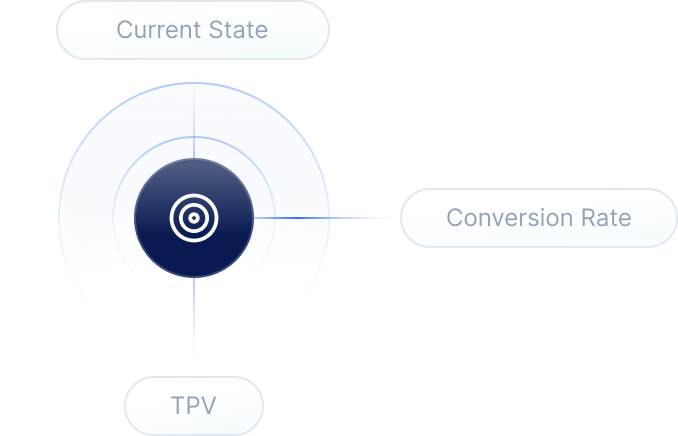
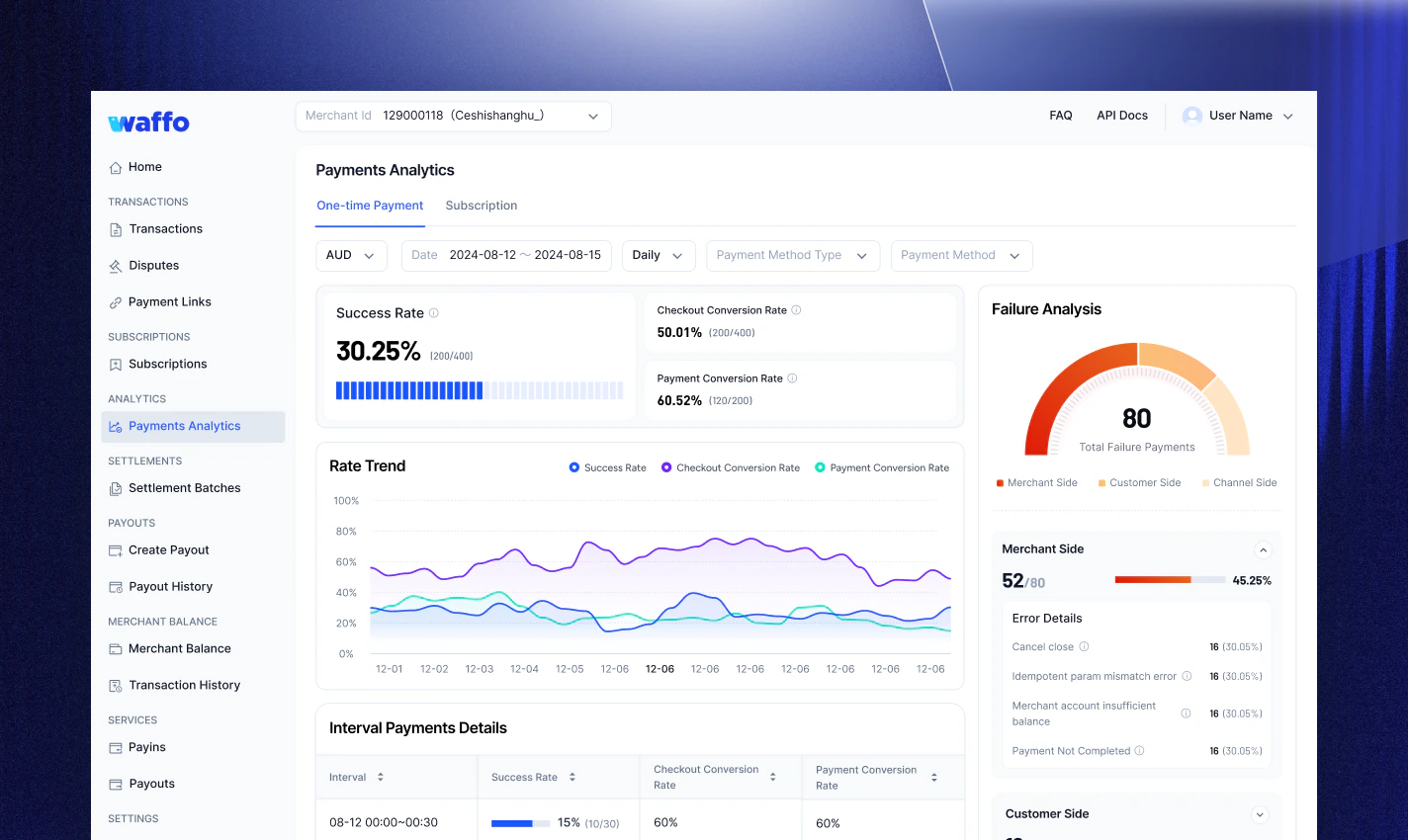
<RealtimeHealthDashboardCards secondLevelTitle="Second-Level Response" secondLevelDesc="Whether it's the Black Friday rush or daily operations, track minute fluctuations in Auth Rate, TPV (Total Payment Volume), and Conversion Rate in real-time." smartAlertsTitle="Smart Alerts" smartAlertsDesc="If the success rate drops abnormally (e.g., a 20% sudden drop in a specific region), the system automatically triggers an alert, helping technical teams quickly investigate whether it's a gateway fault or bank system maintenance." issueAttributionTitle="Issue Attribution" issueAttributionDesc="If the payment success rate suddenly shows an anomaly (e.g., a specific method drops by 20%), the Failure Reason Trend dashboard allows for immediate analysis, precisely attributing the issue to gateway problems or bank maintenance, driving rapid team fixes to minimize business impact." />

<Frame>
  <img src="https://mintcdn.com/waffo-docs/Pi4mlrktV3FjQDJZ/images/essentials/data-intelligence/payments-analytics-dashboard.png?fit=max&auto=format&n=Pi4mlrktV3FjQDJZ&q=85&s=02b9c8e6329ca9185b4d6082f6b486ef" alt="Payments Analytics dashboard showing Auth Rate, TPV, and failure attribution breakdown" style={{width:"100%", height:"auto"}} width="1424" height="850" data-path="images/essentials/data-intelligence/payments-analytics-dashboard.png" />
</Frame>

### Omnichannel Conversion Funnel

Addressing the distinct payment logic between Bank Cards (Direct) and E-Wallets/BNPL (Redirect), we provide a unified funnel view:

* **End-to-End Monitoring:** Tracks the complete journey from "Merchant Invokes Checkout", each step has clear metrics, helping you reconstruct the real user path from entry and selection to operation and completion.

<Frame>
  <img src="https://mintcdn.com/waffo-docs/5FhuvFNh23Cl0uOC/images/essentials/data-intelligence/omnichannel-funnel.png?fit=max&auto=format&n=5FhuvFNh23Cl0uOC&q=85&s=6f0f32dd909f6574ce04be612ada9a23" alt="Omnichannel conversion funnel: 100% Checkout Exposure → 95% Select Payment Method → 92% Info Entry → 90% Click Pay → 80% Success Order" style={{width:"100%", height:"auto"}} width="1429" height="802" data-path="images/essentials/data-intelligence/omnichannel-funnel.png" />
</Frame>

* **Drop-off Diagnosis:** Data clearly tells you whether user churn is due to failure to enter the checkout (technical issue) or abandonment during method selection/info entry (experience or intent issue), guiding targeted optimization of redirect links, payment lists, or interaction flows.

<Frame>
  <img src="https://mintcdn.com/waffo-docs/Pi4mlrktV3FjQDJZ/images/essentials/data-intelligence/failure-analysis-card.png?fit=max&auto=format&n=Pi4mlrktV3FjQDJZ&q=85&s=e4c1eddfcac43b102ad649297ec46828" alt="Failure analysis breakdown: Merchant Side 52/80 (46.25%), Customer Side 16/80 (30.12%), Channel Side 6/80 (25.08%)" style={{width:"100%", height:"auto"}} width="1424" height="850" data-path="images/essentials/data-intelligence/failure-analysis-card.png" />
</Frame>

***

## Drill-down & Smart Attribution

When success rates fall below expectations, Waffo provides powerful analysis tools to locate the "root cause."

### Multi-Dimensional Drill-Down

* **Geo & Issuer:** Precise analysis down to specific Issuing Banks (BIN).

<Note>
  **Scenario:** Overall success rate is normal, but a specific "Brazilian Bank" has a 40% failure rate? This prompts you to optimize routing or installment strategies for that bank.
</Note>

* **Method Comparison:** Horizontal comparison of Credit Card vs. Local Wallet performance. Data might show that pinning "Apple Pay" to the top in specific countries drives higher GMV.

### Smart Code Mapping

Bank returns like **"Do Not Honor"** or **"Error 05"** are no longer black boxes. Waffo intelligently maps thousands of global raw decline codes into binary attribution categories, allowing your team to quickly decide on next steps, reducing ineffective troubleshooting and improving resolution efficiency.

<SmartCodeMappingCards
  cards={[
{
title: "Fund-Related Issues",
examples: "e.g., Insufficient Funds, Limit Exceeded",
attributionText: "Usually attributed to the user side.",
recommendationText: "Guide users to switch payment methods or optimize balance prompts.",
},
{
title: "Technical Issues",
examples: "e.g., System Timeout, Connection Failure",
attributionText: "Mostly caused by channel or technical sides.",
recommendationText: "The system can automatically switch routes and trigger real-time alerts.",
},
{
title: "Risk-Related Declines",
examples: "e.g., Fraud Block, Suspicious Transaction",
attributionText: "Primarily attributed to the bank side or risk strategies.",
recommendationText: "Stop retries to avoid compliance risks and adjust strategies based on risk advice.",
},
{
title: "Account Status Issues",
examples: "e.g., Card Expired, Invalid Number",
attributionText: "Often caused by users not updating info or bank locks.",
recommendationText: "Prompt users to update card info or contact their issuing bank.",
},
]}
/>

***

## Subscription & Retention Health

For SaaS, Membership, and Recurring Billing merchants, we focus on reducing Churn and increasing LTV (Lifetime Value).

### Churn Attribution Analysis

Waffo clearly distinguishes between two distinct types of churn:

<Note>
  **Voluntary Churn:** User manually cancels the subscription. (Requires product experience optimization)
</Note>

<Warning>
  **Involuntary Churn:** User did not cancel, but payment failed due to expired cards or insufficient funds. (Requires payment strategy optimization) This is the key pain point Waffo helps merchants solve.
</Warning>

### Recovery Performance Quantification

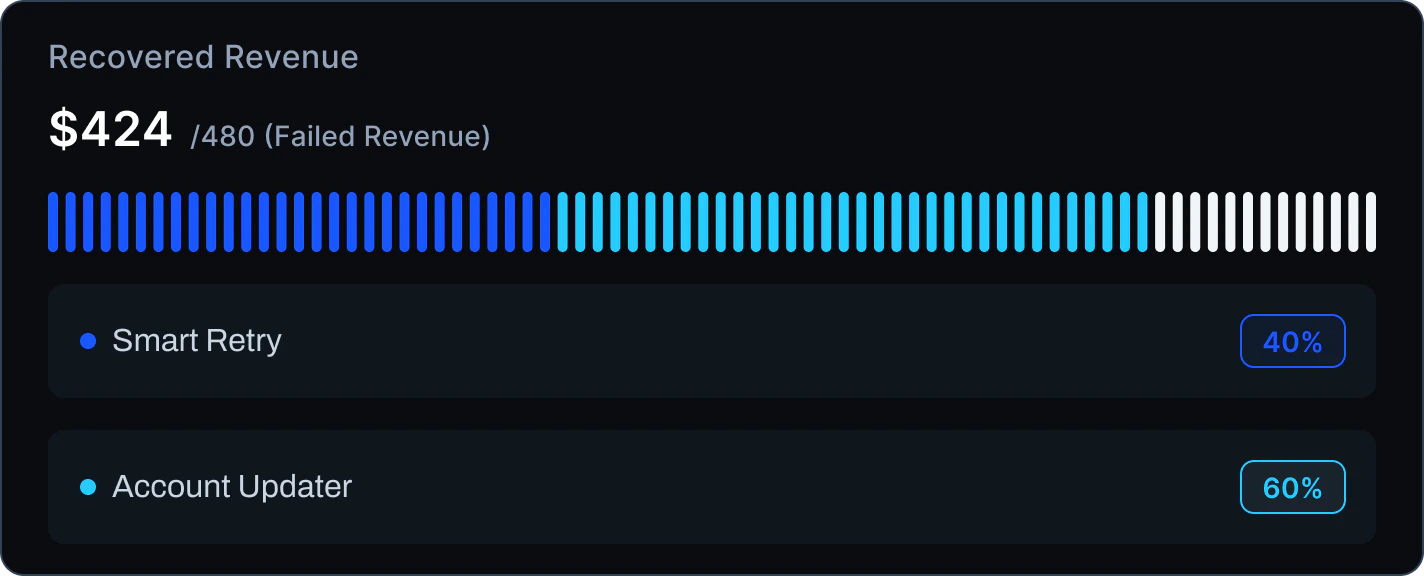
**Recovered Revenue:** Intuitively displays how much revenue—originally destined to fail—was automatically saved this month through Waffo's Smart Retry and Account Updater mechanisms.

<Frame>
  <img src="https://mintcdn.com/waffo-docs/5FhuvFNh23Cl0uOC/images/essentials/data-intelligence/recovered-revenue-card-light.png?fit=max&auto=format&n=5FhuvFNh23Cl0uOC&q=85&s=05df07f6a43232c9394051b5f109d759" alt="Recovered Revenue: $424 out of $480 failed revenue — Smart Retry 40%, Account Updater 60%" className="block dark:hidden w-full h-auto m-0" width="1424" height="576" data-path="images/essentials/data-intelligence/recovered-revenue-card-light.png" />

  <img src="https://mintcdn.com/waffo-docs/5FhuvFNh23Cl0uOC/images/essentials/data-intelligence/recovered-revenue-card-dark.png?fit=max&auto=format&n=5FhuvFNh23Cl0uOC&q=85&s=cd3f5f4f83e22bbdc834de058ce463db" alt="Recovered Revenue: $424 out of $480 failed revenue — Smart Retry 40%, Account Updater 60%" className="hidden dark:block w-full h-auto m-0" width="1424" height="576" data-path="images/essentials/data-intelligence/recovered-revenue-card-dark.png" />
</Frame>

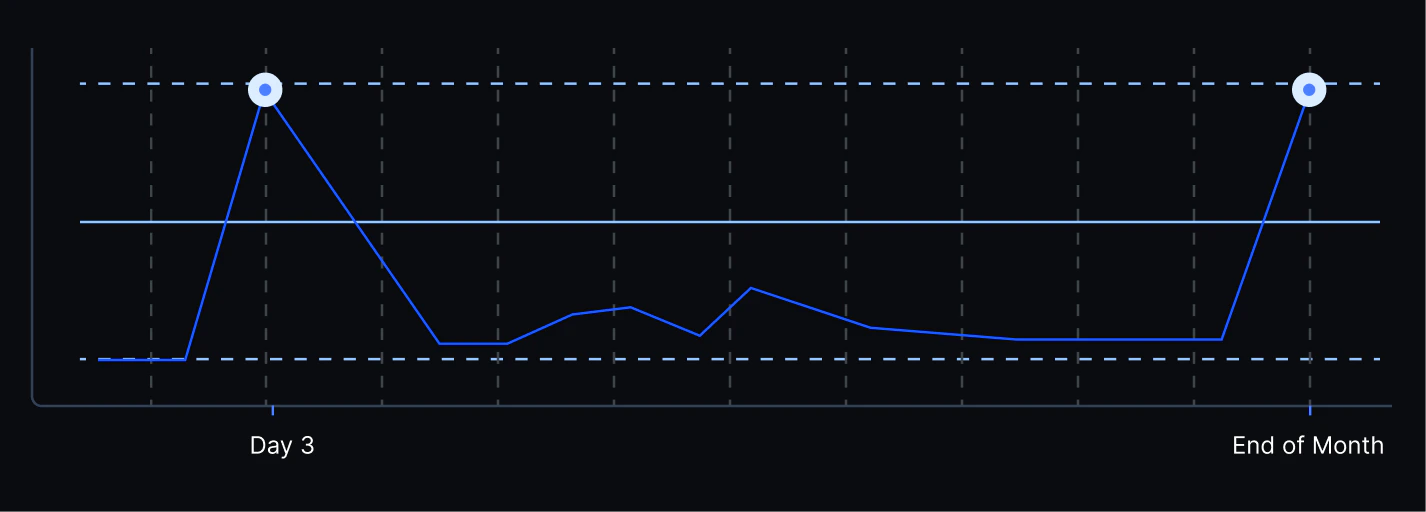
**Best Retry Strategy:** Analysis might show that retrying on "Day 3 after failure" or "End of Month" yields the highest success rate, guiding the system to automatically adjust Dunning logic.

<Frame>
  <img src="https://mintcdn.com/waffo-docs/5FhuvFNh23Cl0uOC/images/essentials/data-intelligence/retry-strategy-chart-light.png?fit=max&auto=format&n=5FhuvFNh23Cl0uOC&q=85&s=76fcc5ffb5c442627db92c78305bf135" alt="Best retry strategy chart showing success rate peaks at Day 3 and End of Month" className="block dark:hidden w-full h-auto m-0" width="1426" height="512" data-path="images/essentials/data-intelligence/retry-strategy-chart-light.png" />

  <img src="https://mintcdn.com/waffo-docs/5FhuvFNh23Cl0uOC/images/essentials/data-intelligence/retry-strategy-chart-dark.png?fit=max&auto=format&n=5FhuvFNh23Cl0uOC&q=85&s=69e3e3e8a6f8f67e6f7c88aa1db05413" alt="Best retry strategy chart showing success rate peaks at Day 3 and End of Month" className="hidden dark:block w-full h-auto m-0" width="1426" height="512" data-path="images/essentials/data-intelligence/retry-strategy-chart-dark.png" />
</Frame>

### Cohort Analysis

Evaluate user lifecycle and channel quality from multiple dimensions:

* **First vs. Renewal Conversion:** Distinguish between new user first-order conversion and existing user renewal conversion to locate bottlenecks at different stages.
* **Retention Heatmap:** Track the 3rd-month and 6th-month retention performance of users acquired in different months via different channels, helping marketing teams evaluate acquisition quality.

***

## Frequently asked questions

<AccordionGroup>
  <Accordion title={`What is "Auth Rate" and how does Waffo calculate it?`} defaultOpen>
    The formula is: Successful Transactions / Total Attempted Transactions. Waffo's advanced analytics supports excluding non-systemic factors like "User Input Errors" or "Voluntary Cancellations" to present a more referenceable Technical Success Rate.
  </Accordion>

  <Accordion title={`How can data help me with "Do Not Honor" declines?`}>
    This is the most common generic decline. Waffo data often reveals that enabling 3DS Authentication in specific high-risk scenarios can significantly reduce this error rate. Our system will suggest dynamic adjustments to risk strategies based on this, converting declines into successes.
  </Accordion>

  <Accordion title={`Why is "Involuntary Churn" analysis important?`}>
    Industry data shows that 20%-40% of subscription churn stems from payment failures rather than user intent. Solving this is the fastest, lowest-cost way to increase LTV.
  </Accordion>

  <Accordion title="Is your data real-time?">
    The Real-Time Health Dashboard provides second-level updates, ideal for monitoring during big sales events. Deep Attribution and Cohort Analysis are typically updated on a T+1 basis to ensure data cleaning and reconciliation accuracy.
  </Accordion>
</AccordionGroup>

***

Need help? [Contact support](mailto:support@waffo.com)