> ## Documentation Index
> Fetch the complete documentation index at: https://waffo.com/docs/llms.txt
> Use this file to discover all available pages before exploring further.
# Mode B:点卡获取 API
> 用户支付完成后,Waffo Point Topup 调用供应商的点卡获取 API 实时取码。含请求响应字段、幂等要求与示例。
Mode B 面向已有点卡库存系统、且具备 API 能力的供应商。用户支付完成后,Waffo Point Topup 调用你的 API 实时获取点卡。
* 点卡实时获取
* 无需人工管理库存
* 库存自动同步
* 具备数字点卡生成系统的游戏发行商
* 已有 API 的点卡分销方
## 集成流程
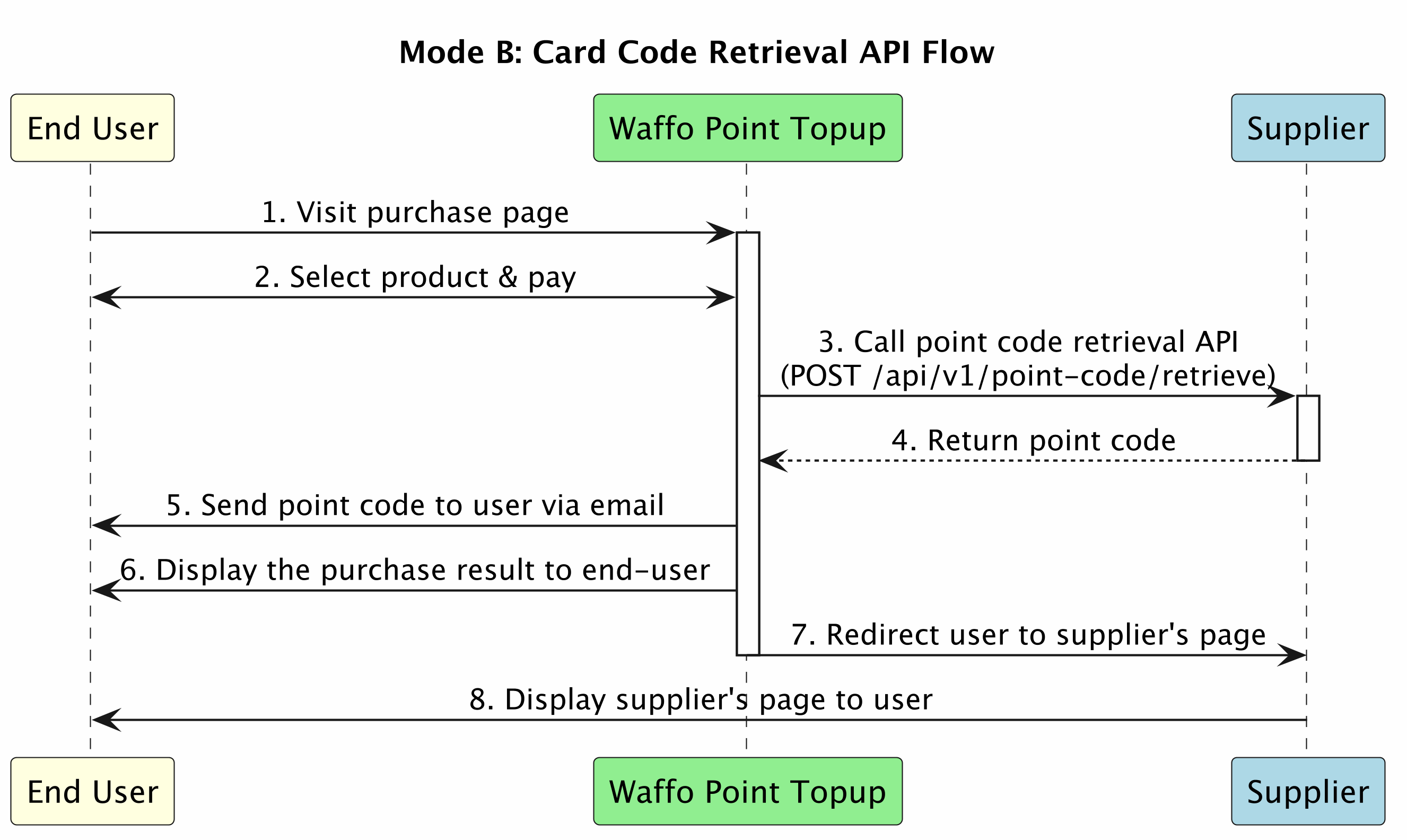 ## 接口清单
| 序号 | 接口名 | 说明 | 提供方 | 集成要求 |
| -- | ---- | ------ | --- | ---------- |
| 1 | 点卡获取 | 实时获取点卡 | 供应商 | 可选集成(示例规范) |
本页给出的接口规范只是**示例**。如果你已有点卡获取接口,直接把自己的接口文档给 Waffo Point Topup,Waffo Point Topup 会适配你的既有接口,不需要你按本页重写一套。
## 用户跳转
如果你想把用户从自己的网站引导到 Waffo Point Topup,可以用 Mode C 的 [URL 签名方式](/docs/zh/developer-docs/point-topup/mode-c-direct-fulfillment#url-签名与跳转),也可以直接给一条不带签名的链接:
```text theme={null}
https://{supplier}.waffoplay.com/{site_code}/
```
## 点卡获取接口
用户支付完成后由 Waffo Point Topup 调用,用于从供应商获取点卡。
| 项 | 值 |
| ------ | --------------------------------------------------------------------------------------- |
| Method | `POST` |
| Path | 由供应商定义 |
| 认证 | 共通 API 签名(SHA256WithRSA),见 [API 共通规范](/docs/zh/developer-docs/point-topup/api-common#api-安全) |
**幂等要求:** 供应商必须以 `distributorOrderId` + `distributorId` 支持幂等。同一请求重复到达时,返回相同的点卡,且不再重复扣减库存。
### 请求参数
| 字段名 | 说明 | 类型 | 必填 |
| -------------------- | ------------------------------------------------ | ----------- | -- |
| `distributorId` | 供应商分配给 Waffo Point Topup 的分销方 ID | String(64) | 必填 |
| `distributorOrderId` | Waffo Point Topup 的订单号。与 `distributorId` 一起作为幂等键 | String(64) | 必填 |
| `skuId` | SKU 标识 | String(128) | 必填 |
| `quantity` | 获取点卡的数量,通常为 1 | Integer | 必填 |
| `faceValue` | 面额,用于动态面额商品 | String(32) | 选填 |
| `requestedAt` | Waffo Point Topup 侧请求时间 | String(32) | 必填 |
### 响应参数
| 字段名 | | 说明 | 类型 | 必填 |
| -------------------- | ------------ | ---------------------------------- | ----------- | -- |
| `distributorOrderId` | | Waffo Point Topup 的订单号 | String(64) | 必填 |
| `status` | | 订单状态:`SUCCESS` 取码成功,`FAILURE` 取码失败 | String(24) | 必填 |
| `pointList` | | 点卡列表,仅当 `status` 为 `SUCCESS` 时返回 | Array | 选填 |
| | `pointCode` | 点卡码 | String(128) | 必填 |
| | `expiryDate` | 有效期 | String(32) | 选填 |
| | `faceValue` | 面额 | String(32) | 选填 |
| `failureCode` | | 失败码,`status` 为 `FAILURE` 时返回 | String(24) | 选填 |
| `failureReason` | | 失败原因 | String(128) | 选填 |
### 示例
```json 请求 theme={null}
{
"distributorId": "WAFFO_POINT_TOPUP_001",
"distributorOrderId": "WP202501050001",
"skuId": "SUPPLIER_POINT_001",
"quantity": 1,
"faceValue": "1000",
"requestedAt": "2025-01-05T10:30:00.000Z"
}
```
```json 响应(成功) theme={null}
{
"code": "0",
"msg": "success",
"data": {
"distributorOrderId": "WP202501050001",
"status": "SUCCESS",
"pointList": [
{
"pointCode": "ABCD-1234-EFGH-5678",
"expiryDate": "2026-12-31",
"faceValue": "1000"
}
]
}
}
```
```json 响应(失败) theme={null}
{
"code": "0",
"msg": "success",
"data": {
"distributorOrderId": "WP202501050001",
"status": "FAILURE",
"failureCode": "INSUFFICIENT_INVENTORY",
"failureReason": "No available points in inventory"
}
}
```
`status` 为 `FAILURE` 属于业务失败,HTTP 状态码与外层 `code` 仍返回成功。系统级错误请按 [错误码](/docs/zh/developer-docs/point-topup/api-common#错误码) 返回。
## 下一步
消息结构、RSA 签名验签、错误码与密钥生成。
不想发点卡码、想直接给用户账户充值,看 Mode C。
## 接口清单
| 序号 | 接口名 | 说明 | 提供方 | 集成要求 |
| -- | ---- | ------ | --- | ---------- |
| 1 | 点卡获取 | 实时获取点卡 | 供应商 | 可选集成(示例规范) |
本页给出的接口规范只是**示例**。如果你已有点卡获取接口,直接把自己的接口文档给 Waffo Point Topup,Waffo Point Topup 会适配你的既有接口,不需要你按本页重写一套。
## 用户跳转
如果你想把用户从自己的网站引导到 Waffo Point Topup,可以用 Mode C 的 [URL 签名方式](/docs/zh/developer-docs/point-topup/mode-c-direct-fulfillment#url-签名与跳转),也可以直接给一条不带签名的链接:
```text theme={null}
https://{supplier}.waffoplay.com/{site_code}/
```
## 点卡获取接口
用户支付完成后由 Waffo Point Topup 调用,用于从供应商获取点卡。
| 项 | 值 |
| ------ | --------------------------------------------------------------------------------------- |
| Method | `POST` |
| Path | 由供应商定义 |
| 认证 | 共通 API 签名(SHA256WithRSA),见 [API 共通规范](/docs/zh/developer-docs/point-topup/api-common#api-安全) |
**幂等要求:** 供应商必须以 `distributorOrderId` + `distributorId` 支持幂等。同一请求重复到达时,返回相同的点卡,且不再重复扣减库存。
### 请求参数
| 字段名 | 说明 | 类型 | 必填 |
| -------------------- | ------------------------------------------------ | ----------- | -- |
| `distributorId` | 供应商分配给 Waffo Point Topup 的分销方 ID | String(64) | 必填 |
| `distributorOrderId` | Waffo Point Topup 的订单号。与 `distributorId` 一起作为幂等键 | String(64) | 必填 |
| `skuId` | SKU 标识 | String(128) | 必填 |
| `quantity` | 获取点卡的数量,通常为 1 | Integer | 必填 |
| `faceValue` | 面额,用于动态面额商品 | String(32) | 选填 |
| `requestedAt` | Waffo Point Topup 侧请求时间 | String(32) | 必填 |
### 响应参数
| 字段名 | | 说明 | 类型 | 必填 |
| -------------------- | ------------ | ---------------------------------- | ----------- | -- |
| `distributorOrderId` | | Waffo Point Topup 的订单号 | String(64) | 必填 |
| `status` | | 订单状态:`SUCCESS` 取码成功,`FAILURE` 取码失败 | String(24) | 必填 |
| `pointList` | | 点卡列表,仅当 `status` 为 `SUCCESS` 时返回 | Array | 选填 |
| | `pointCode` | 点卡码 | String(128) | 必填 |
| | `expiryDate` | 有效期 | String(32) | 选填 |
| | `faceValue` | 面额 | String(32) | 选填 |
| `failureCode` | | 失败码,`status` 为 `FAILURE` 时返回 | String(24) | 选填 |
| `failureReason` | | 失败原因 | String(128) | 选填 |
### 示例
```json 请求 theme={null}
{
"distributorId": "WAFFO_POINT_TOPUP_001",
"distributorOrderId": "WP202501050001",
"skuId": "SUPPLIER_POINT_001",
"quantity": 1,
"faceValue": "1000",
"requestedAt": "2025-01-05T10:30:00.000Z"
}
```
```json 响应(成功) theme={null}
{
"code": "0",
"msg": "success",
"data": {
"distributorOrderId": "WP202501050001",
"status": "SUCCESS",
"pointList": [
{
"pointCode": "ABCD-1234-EFGH-5678",
"expiryDate": "2026-12-31",
"faceValue": "1000"
}
]
}
}
```
```json 响应(失败) theme={null}
{
"code": "0",
"msg": "success",
"data": {
"distributorOrderId": "WP202501050001",
"status": "FAILURE",
"failureCode": "INSUFFICIENT_INVENTORY",
"failureReason": "No available points in inventory"
}
}
```
`status` 为 `FAILURE` 属于业务失败,HTTP 状态码与外层 `code` 仍返回成功。系统级错误请按 [错误码](/docs/zh/developer-docs/point-topup/api-common#错误码) 返回。
## 下一步
消息结构、RSA 签名验签、错误码与密钥生成。
不想发点卡码、想直接给用户账户充值,看 Mode C。