> ## Documentation Index
> Fetch the complete documentation index at: https://waffo.com/docs/llms.txt
> Use this file to discover all available pages before exploring further.

# 收银台

> Waffo 的标准化收银台产品，用于管理覆盖一次性支付与订阅支付模式的全球支付交互流程。

export const CardGroup = ({children, cols = 2}) => {
  const items = Array.isArray(children) ? children.filter(Boolean) : [children];
  const layoutColumns = items.length === 3 ? 3 : cols === 1 ? 1 : 2;
  return <div className="waffo-guide-cards not-prose my-4 grid gap-4" data-columns={layoutColumns}>
      <style>{`
        .waffo-guide-cards {
          grid-template-columns: minmax(0, 1fr) !important;
        }
        .waffo-guide-cards .waffo-clickable-card {
          transition:
            transform 180ms ease,
            border-color 180ms ease,
            box-shadow 180ms ease,
            background 180ms ease !important;
        }
        html:not(.dark) .waffo-guide-cards .waffo-clickable-card:hover {
          border-color: rgba(109, 145, 245, 0.45) !important;
        }
        html.dark .waffo-guide-cards .waffo-clickable-card:hover,
        .dark .waffo-guide-cards .waffo-clickable-card:hover {
          border-color: rgba(109, 145, 245, 0.45) !important;
        }
        @media (min-width: 768px) {
          .waffo-guide-cards[data-columns="2"],
          .waffo-guide-cards[data-columns="3"] {
            grid-template-columns: repeat(2, minmax(0, 1fr)) !important;
          }
          .waffo-guide-cards[data-columns="3"] .waffo-guide-card:nth-of-type(3) {
            grid-column: 1 / -1 !important;
          }
        }
      `}</style>
      {items}
    </div>;
};

export const Card = ({title, icon, href, children}) => {
  const resolvedHref = (() => {
    if (!href || typeof href !== "string") return href;
    if (!href.startsWith("/") || href.startsWith("//")) return href;
    if (typeof window === "undefined") return href;
    const docsPrefixMatch = window.location.pathname.match(/^\/docs(?=\/|$)/);
    const docsPrefix = docsPrefixMatch ? docsPrefixMatch[0] : "";
    if (!docsPrefix) {
      return href.startsWith("/docs/") ? href.slice(5) : href;
    }
    return href.startsWith(`${docsPrefix}/`) ? href : `${docsPrefix}${href}`;
  })();
  const Wrapper = resolvedHref ? "a" : "div";
  const interactiveClass = resolvedHref ? "waffo-clickable-card" : "";
  return <Wrapper href={resolvedHref} className={`waffo-guide-card waffo-hover-card block rounded-xl border border-slate-200 dark:border-neutral-700 bg-gradient-to-b from-slate-50 to-white dark:from-neutral-900 dark:to-neutral-950 p-6 no-underline ${interactiveClass}`}>
      <div className="flex flex-col items-start gap-3">
        <span className="inline-flex h-10 w-10 items-center justify-center rounded-lg border border-slate-200 dark:border-neutral-700 bg-white dark:bg-neutral-900 text-blue-700 dark:text-[#4D7CFF]">
          <svg width="20" height="20" viewBox="0 0 24 24" fill="none" stroke="currentColor" strokeWidth="2" strokeLinecap="round" strokeLinejoin="round" aria-hidden="true">
            {icon === "arrow-right" && <path d="M5 12h14M13 5l7 7-7 7" />}
            {icon === "bell" && <path d="M10 21h4M18 8a6 6 0 0 0-12 0c0 7-3 7-3 9h18c0-2-3-2-3-9" />}
            {icon === "code" && <>
                <path d="m16 18 6-6-6-6" />
                <path d="m8 6-6 6 6 6" />
              </>}
            {icon === "globe" && <>
                <circle cx="12" cy="12" r="10" />
                <path d="M2 12h20" />
                <path d="M12 2a15.3 15.3 0 0 1 0 20" />
                <path d="M12 2a15.3 15.3 0 0 0 0 20" />
              </>}
            {icon === "gear" && <>
                <circle cx="12" cy="12" r="3" />
                <path d="M19.4 15a1.7 1.7 0 0 0 .3 1.9l.1.1a2 2 0 1 1-2.8 2.8l-.1-.1a1.7 1.7 0 0 0-1.9-.3 1.7 1.7 0 0 0-1 1.6V21a2 2 0 1 1-4 0v-.1a1.7 1.7 0 0 0-1-1.6 1.7 1.7 0 0 0-1.9.3l-.1.1a2 2 0 1 1-2.8-2.8l.1-.1a1.7 1.7 0 0 0 .3-1.9 1.7 1.7 0 0 0-1.6-1H3a2 2 0 1 1 0-4h.1a1.7 1.7 0 0 0 1.6-1 1.7 1.7 0 0 0-.3-1.9l-.1-.1a2 2 0 1 1 2.8-2.8l.1.1a1.7 1.7 0 0 0 1.9.3H9a1.7 1.7 0 0 0 1-1.6V3a2 2 0 1 1 4 0v.1a1.7 1.7 0 0 0 1 1.6 1.7 1.7 0 0 0 1.9-.3l.1-.1a2 2 0 1 1 2.8 2.8l-.1.1a1.7 1.7 0 0 0-.3 1.9v.1a1.7 1.7 0 0 0 1.6 1h.1a2 2 0 1 1 0 4H21a1.7 1.7 0 0 0-1.6 1Z" />
              </>}
            {icon === "shield-check" && <>
                <path d="M12 22s8-4 8-10V5l-8-3-8 3v7c0 6 8 10 8 10Z" />
                <path d="m9 12 2 2 4-4" />
              </>}
            {icon === "circle-check" && <>
                <circle cx="12" cy="12" r="10" />
                <path d="m9 12 2 2 4-4" />
              </>}
            {icon === "arrow-trend-up" && <path d="m3 17 6-6 4 4 8-8M14 7h7v7" />}
            {icon === "arrows-rotate" && <>
                <path d="M21 12a9 9 0 0 1-15.5 6.2" />
                <path d="M3 12A9 9 0 0 1 18.5 5.8" />
                <path d="M21 3v6h-6" />
                <path d="M3 21v-6h6" />
              </>}
            {icon === "calendar" && <>
                <rect x="3" y="4" width="18" height="17" rx="2" />
                <path d="M16 2v4M8 2v4M3 10h18" />
              </>}
            {icon === "clock" && <>
                <circle cx="12" cy="12" r="10" />
                <path d="M12 6v6l4 2" />
              </>}
            {icon === "desktop" && <>
                <rect x="3" y="4" width="18" height="12" rx="2" />
                <path d="M8 20h8M12 16v4" />
              </>}
            {icon === "calculator" && <>
                <rect x="5" y="2" width="14" height="20" rx="2" />
                <path d="M8 6h8M8 10h.01M12 10h.01M16 10h.01M8 14h.01M12 14h.01M16 14h.01M8 18h.01M12 18h.01M16 18h.01" />
              </>}
            {icon === "plug" && <>
                <path d="M12 22v-5" />
                <path d="M9 8V2" />
                <path d="M15 8V2" />
                <path d="M18 8v5a6 6 0 0 1-12 0V8Z" />
              </>}
            {icon === "gauge" && <>
                <path d="M12 14l4-4" />
                <path d="M3.3 19a10 10 0 1 1 17.4 0" />
              </>}
            {icon === "layer-group" && <>
                <path d="m12 3 9 5-9 5-9-5 9-5Z" />
                <path d="m3 12 9 5 9-5" />
                <path d="m3 16 9 5 9-5" />
              </>}
            {icon === "laptop-mobile" && <>
                <rect x="3" y="4" width="13" height="10" rx="2" />
                <path d="M2 18h12" />
                <rect x="17" y="8" width="5" height="12" rx="1" />
              </>}
            {icon === "paintbrush" && <>
                <path d="m14 5 5 5" />
                <path d="M4 20c2 0 4-1 4-3 0-1.1-.9-2-2-2-2 0-3 2-3 4 0 .6.4 1 1 1Z" />
                <path d="m6 15 9-9a2.1 2.1 0 0 1 3 3l-9 9" />
              </>}
            {icon === "key" && <>
                <circle cx="7.5" cy="14.5" r="4.5" />
                <path d="m11 11 8-8" />
                <path d="m15 7 2 2" />
              </>}
            {icon === "circle-minus" && <>
                <circle cx="12" cy="12" r="10" />
                <path d="M8 12h8" />
              </>}
            {icon === "wallet" && <>
                <path d="M3 7h15a3 3 0 0 1 3 3v8a3 3 0 0 1-3 3H3Z" />
                <path d="M3 7V5a2 2 0 0 1 2-2h11" />
                <path d="M16 14h.01" />
              </>}
            {icon === "users" && <>
                <path d="M16 21v-2a4 4 0 0 0-4-4H6a4 4 0 0 0-4 4v2" />
                <circle cx="9" cy="7" r="4" />
                <path d="M22 21v-2a4 4 0 0 0-3-3.9" />
                <path d="M16 3.1a4 4 0 0 1 0 7.8" />
              </>}
            {icon === "link" && <>
                <path d="M10 13a5 5 0 0 0 7.1 0l2-2a5 5 0 0 0-7.1-7.1l-1.1 1.1" />
                <path d="M14 11a5 5 0 0 0-7.1 0l-2 2a5 5 0 0 0 7.1 7.1l1.1-1.1" />
              </>}
            {icon === "eye" && <>
                <path d="M2 12s3.5-7 10-7 10 7 10 7-3.5 7-10 7S2 12 2 12Z" />
                <circle cx="12" cy="12" r="3" />
              </>}
            {icon === "file-lines" && <>
                <path d="M14 2H6a2 2 0 0 0-2 2v16a2 2 0 0 0 2 2h12a2 2 0 0 0 2-2V8Z" />
                <path d="M14 2v6h6" />
                <path d="M8 13h8M8 17h6" />
              </>}
            {icon === "sliders" && <>
                <path d="M4 21v-7M4 10V3M12 21v-9M12 8V3M20 21v-5M20 12V3" />
                <path d="M2 14h4M10 8h4M18 16h4" />
              </>}
            {icon === "folder" && <path d="M3 6a2 2 0 0 1 2-2h5l2 2h7a2 2 0 0 1 2 2v10a2 2 0 0 1-2 2H5a2 2 0 0 1-2-2Z" />}
            {icon === "dollar-sign" && <>
                <path d="M12 2v20" />
                <path d="M17 5H9.5a3.5 3.5 0 0 0 0 7H14a3.5 3.5 0 0 1 0 7H6" />
              </>}
            {icon === "toggle-on" && <>
                <rect x="2" y="7" width="20" height="10" rx="5" />
                <circle cx="16" cy="12" r="3" />
              </>}
            {icon === "infinity" && <path d="M18.2 8.2c2.1 0 3.8 1.7 3.8 3.8s-1.7 3.8-3.8 3.8c-4.2 0-8.2-7.6-12.4-7.6C3.7 8.2 2 9.9 2 12s1.7 3.8 3.8 3.8c4.2 0 8.2-7.6 12.4-7.6Z" />}
            {icon === "book-open" && <>
                <path d="M2 4h7a3 3 0 0 1 3 3v14a3 3 0 0 0-3-3H2Z" />
                <path d="M22 4h-7a3 3 0 0 0-3 3v14a3 3 0 0 1 3-3h7Z" />
              </>}
            {icon === "circle-play" && <>
                <circle cx="12" cy="12" r="10" />
                <path d="m10 8 6 4-6 4Z" />
              </>}
            {icon === "gamepad" && <>
                <rect x="3" y="8" width="18" height="10" rx="5" />
                <path d="M8 13h3M9.5 11.5v3M16 13h.01M18 11h.01" />
              </>}
            {icon === "rocket" && <>
                <path d="M4.5 16.5c-1.5 1.3-2 3.5-2 5 1.5 0 3.7-.5 5-2" />
                <path d="M9 15 4 10l6-6c4-4 9-2 10-1 1 1 3 6-1 10l-6 6-5-5Z" />
                <path d="M15 9h.01" />
              </>}
            {(icon === "flask" || icon === "flask-vial") && <>
                <path d="M9 2v6L4 20a2 2 0 0 0 2 2h12a2 2 0 0 0 2-2L15 8V2" />
                <path d="M8 2h8" />
                <path d="M7 16h10" />
              </>}
            {icon === "credit-card" && <>
                <rect x="3" y="5" width="18" height="14" rx="2" />
                <path d="M3 10h18" />
                <path d="M7 15h4" />
              </>}
            {icon === "puzzle-piece" && <path d="M14 7V4a2 2 0 0 0-2-2H8a2 2 0 0 0-2 2v3H3a1 1 0 0 0-1 1v4a2 2 0 0 0 2 2h2v3a2 2 0 0 0 2 2h4a2 2 0 0 0 2-2v-3h3a2 2 0 0 0 2-2V8a1 1 0 0 0-1-1Z" />}
            {(icon === "arrows-spin" || icon === "repeat") && <>
                <path d="M17 2l4 4-4 4" />
                <path d="M3 11V9a4 4 0 0 1 4-4h14" />
                <path d="M7 22l-4-4 4-4" />
                <path d="M21 13v2a4 4 0 0 1-4 4H3" />
              </>}
            {icon === "coins" && <>
                <ellipse cx="8" cy="7" rx="5" ry="3" />
                <path d="M3 7v6c0 1.7 2.2 3 5 3s5-1.3 5-3V7" />
                <path d="M13 10c2.8 0 5 1.3 5 3v4c0 1.7-2.2 3-5 3-1.2 0-2.3-.2-3.1-.7" />
              </>}
            {icon === "triangle-exclamation" && <>
                <path d="m21.7 18-8-14a2 2 0 0 0-3.4 0l-8 14A2 2 0 0 0 4 21h16a2 2 0 0 0 1.7-3Z" />
                <path d="M12 9v4M12 17h.01" />
              </>}
            {icon === "list" && <>
                <path d="M8 6h13M8 12h13M8 18h13" />
                <path d="M3 6h.01M3 12h.01M3 18h.01" />
              </>}
            {icon === "star" && <path d="m12 2 3.1 6.3 6.9 1-5 4.9 1.2 6.8-6.2-3.3L5.8 21 7 14.2 2 9.3l6.9-1Z" />}
            {(icon === "rotate" || icon === "arrow-rotate-left") && <>
                <path d="M3 12a9 9 0 1 0 3-6.7" />
                <path d="M3 4v6h6" />
              </>}
            {icon === "clock-rotate-left" && <>
                <path d="M3 12a9 9 0 1 0 3-6.7" />
                <path d="M3 4v6h6" />
                <path d="M12 7v5l3 2" />
              </>}
            {icon === "circle-xmark" && <>
                <circle cx="12" cy="12" r="10" />
                <path d="m15 9-6 6M9 9l6 6" />
              </>}
            {icon === "paper-plane" && <path d="m22 2-7 20-4-9-9-4Z" />}
            {icon === "signal" && <>
                <path d="M2 20h.01M7 20v-4M12 20v-8M17 20V8M22 20V4" />
              </>}
            {icon === "circle-question" && <>
                <circle cx="12" cy="12" r="10" />
                <path d="M9.1 9a3 3 0 1 1 5.8 1c0 2-3 2-3 4" />
                <path d="M12 17h.01" />
              </>}
            {icon === "palette" && <>
                <path d="M12 22a10 10 0 1 1 7.5-3.4c-.9 1-2.4.4-2.4-.9 0-1.1-.9-2-2-2h-1.4c-1.2 0-2.2 1-2.2 2.2 0 1.1.9 2.1 2.1 2.1" />
                <circle cx="7.5" cy="10.5" r=".8" />
                <circle cx="12" cy="7.5" r=".8" />
                <circle cx="16.5" cy="10.5" r=".8" />
              </>}
            {(!icon || !["arrow-right", "bell", "code", "globe", "gear", "shield-check", "circle-check", "arrow-trend-up", "arrows-rotate", "calendar", "clock", "desktop", "calculator", "plug", "gauge", "layer-group", "laptop-mobile", "paintbrush", "key", "circle-minus", "wallet", "users", "link", "eye", "file-lines", "sliders", "folder", "dollar-sign", "toggle-on", "infinity", "book-open", "circle-play", "gamepad", "rocket", "flask", "flask-vial", "credit-card", "puzzle-piece", "arrows-spin", "repeat", "coins", "triangle-exclamation", "list", "star", "rotate", "arrow-rotate-left", "clock-rotate-left", "circle-xmark", "paper-plane", "signal", "circle-question", "palette"].includes(icon)) && <path d="M13 2 4 14h7l-1 8 9-12h-7l1-8Z" />}
          </svg>
        </span>
        <div className="flex flex-col gap-2">
          <h4 className="m-0 text-base font-semibold text-slate-900 dark:text-slate-100">
            {title}
          </h4>
          <div className="m-0 text-sm leading-6 text-slate-600 dark:text-slate-300">
            {children}
          </div>
        </div>
      </div>
    </Wrapper>;
};

export const CheckoutIntegrationModeCards = ({items = []}) => {
  return <div className="checkout-integration-mode-cards not-prose my-4 grid grid-cols-1 gap-4 md:grid-cols-2">
      <style>{`
        .checkout-integration-mode-cards .checkout-integration-card {
          padding: 24px !important;
          box-sizing: border-box;
        }
        .checkout-integration-mode-cards .checkout-integration-check-icon {
          background-color: #071f66;
          -webkit-mask: url("/images/essentials/checkout/check-icon.svg") center / contain no-repeat;
          mask: url("/images/essentials/checkout/check-icon.svg") center / contain no-repeat;
        }
        .dark .checkout-integration-mode-cards .checkout-integration-check-icon {
          background-color: #4D7CFF;
        }
      `}</style>
      {items.map(item => <div key={item.title} className="checkout-integration-card waffo-hover-card rounded-xl border border-slate-200 dark:border-neutral-700 bg-gradient-to-b from-slate-50 to-white dark:from-neutral-900 dark:to-neutral-950">
          <div className="mb-3 inline-flex h-5 w-5">
            <span className="checkout-integration-check-icon inline-flex h-5 w-5" aria-hidden="true" />
          </div>
          <h3 className="m-0 text-base font-semibold text-slate-900 dark:text-slate-100">
            {item.title}
          </h3>
          <p className="mt-2 mb-0 text-sm leading-6 text-slate-600 dark:text-slate-300">
            {item.description}
          </p>
        </div>)}
    </div>;
};

export const PaymentMethodsShowcase = ({prefix = "Supported ", highlight = "430+", suffix = " mainstream methods"}) => {
  const [isDark, setIsDark] = useState(false);
  useEffect(() => {
    const check = () => setIsDark(document.documentElement.classList.contains("dark"));
    check();
    const observer = new MutationObserver(check);
    observer.observe(document.documentElement, {
      attributes: true,
      attributeFilter: ["class"]
    });
    return () => observer.disconnect();
  }, []);
  return <div className="not-prose my-6 flex flex-col items-start gap-4 border-l-4 px-6 py-4" style={{
    borderColor: isDark ? "#3b82f6" : "#94a3b8",
    background: isDark ? "#18181b" : "#f7f9fc"
  }}>
      {}
      <p className="m-0 text-base leading-6" style={{
    color: isDark ? "#cbd5e1" : "#64748b"
  }}>
        {prefix}
        <strong className="font-semibold" style={{
    color: isDark ? "#ffffff" : "#0f172a"
  }}>
          {highlight}
        </strong>
        {suffix}
      </p>
      <div className="rounded-md bg-white px-2 py-1">
        <img src="/docs/images/payment-methods-logos.svg" alt="Visa, Mastercard, Apple Pay, Google Pay, Alipay, WeChat Pay, TrueMoney and more" className="m-0 block h-9 w-auto max-w-full" />
      </div>
    </div>;
};

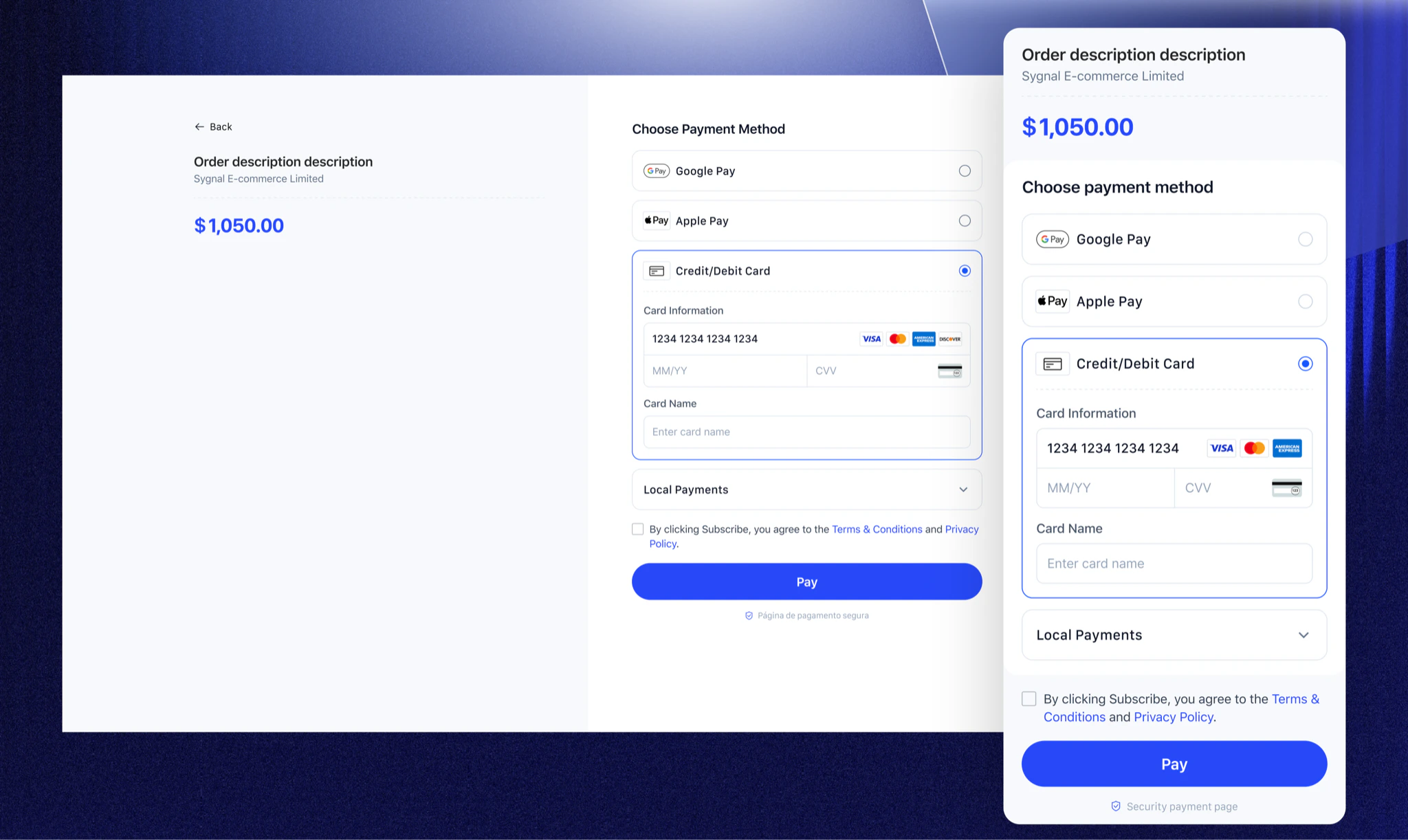
Waffo 收银台是 Waffo 的标准化收银台产品，旨在统一管理全球支付交互流程。它使商户能够在包括 **一次性支付** 与 **订阅支付** 在内的多种模式下，为用户提供安全、顺畅且一致的支付体验。

<div className="flex gap-4 mt-2 mb-2">
  <a href="/docs/docs/zh/developer-docs/getting-started/overview" className="inline-flex items-center gap-2 px-6 py-2 rounded-lg text-white text-base font-medium no-underline bg-primary hover:opacity-90">
    开始集成 →
  </a>

  <a href="mailto:support@waffo.com" className="waffo-secondary-cta inline-flex items-center px-4 py-2 rounded-lg border border-slate-200 bg-white text-slate-600 text-base font-medium no-underline hover:bg-slate-50 dark:border-neutral-700 dark:bg-neutral-800 dark:text-slate-300 dark:hover:bg-neutral-700">
    联系我们
  </a>
</div>

## 核心能力概览

<CardGroup cols={2}>
  <Card title="统一支付模型" icon="layer-group">
    一次集成即可同时支持 **一次性购买** 和 **订阅计费**。
  </Card>

  <Card title="全球化适配" icon="globe">
    智能匹配本地语言和支付方式，消除跨境支付摩擦。
  </Card>

  <Card title="多设备自适应" icon="laptop-mobile">
    覆盖 Web 与移动端平台，UI 全面优化以最大化转化率。
  </Card>

  <Card title="高度可定制" icon="paintbrush">
    支持丰富的收银台定制，包括商户 Logo 上传、可配置的视觉样式（品牌色、字体、圆角半径等），以及灵活的支付方式排序，打造完整品牌化的支付体验。
  </Card>
</CardGroup>

## 集成模式

<Tabs>
  <Tab title="托管结账">
    Waffo 托管并渲染整个结账页面。你的后端创建支付会话并将用户重定向到 Waffo 托管的 URL。

    <CheckoutIntegrationModeCards
      items={[
    {
      title: "零前端开发",
      description: "无需处理前端支付逻辑；Waffo 负责页面渲染与安全防护。",
    },
    {
      title: "自动优化",
      description: "自动应用 Waffo 最新的转化率优化策略。",
    },
  ]}
    />

    <div style={{ marginTop: "16px" }}>
      <Frame>
        <img src="https://mintcdn.com/waffo-docs/Pi4mlrktV3FjQDJZ/images/essentials/checkout/hosted-checkout.png?fit=max&auto=format&n=Pi4mlrktV3FjQDJZ&q=85&s=f2cc4736a482929f190a45ba0f2249e8" alt="Waffo 托管结账在多设备上的支付页面预览" width="2048" height="1222" data-path="images/essentials/checkout/hosted-checkout.png" />
      </Frame>
    </div>
  </Tab>

  <Tab title="嵌入式结账">
    使用客户端 SDK 或预构建组件将 Waffo Checkout 直接嵌入你的页面，让你能够完全掌控布局与用户体验。

    <CheckoutIntegrationModeCards
      items={[
    {
      title: "无缝品牌体验",
      description: "结账在你的页面内渲染，无需重定向，在整个支付流程中保持品牌上下文一致。",
    },
    {
      title: "精细化自定义",
      description: "通过 JavaScript 对象定义字体、间距、圆角半径等特定 CSS 属性。",
    },
  ]}
    />

    <div style={{ marginTop: "16px" }}>
      <Frame>
        <img src="https://mintcdn.com/waffo-docs/Pi4mlrktV3FjQDJZ/images/essentials/checkout/embedded-checkout.png?fit=max&auto=format&n=Pi4mlrktV3FjQDJZ&q=85&s=bdf2a8c5e15535308f95a896d10970b8" alt="Waffo 嵌入式结账嵌入在商户页面内的预览" width="2048" height="1222" data-path="images/essentials/checkout/embedded-checkout.png" />
      </Frame>
    </div>
  </Tab>
</Tabs>

## 支付方式展示

Waffo Checkout 会根据支付模式、地区、币种或业务规则动态展示可用的支付方式。无论是一次性支付还是订阅，Checkout 都能与相应的支付能力无缝协同。

<PaymentMethodsShowcase prefix="支持 " highlight="430+" suffix=" 种主流支付方式" />

[查看支持的支付方式 →](/docs/zh/essentials/payment-methods)

## 支付流程体验

从订单创建到支付完成，Waffo 提供清晰、顺畅且标准化的交互流程。

<Steps>
  <Step title="确认订单">
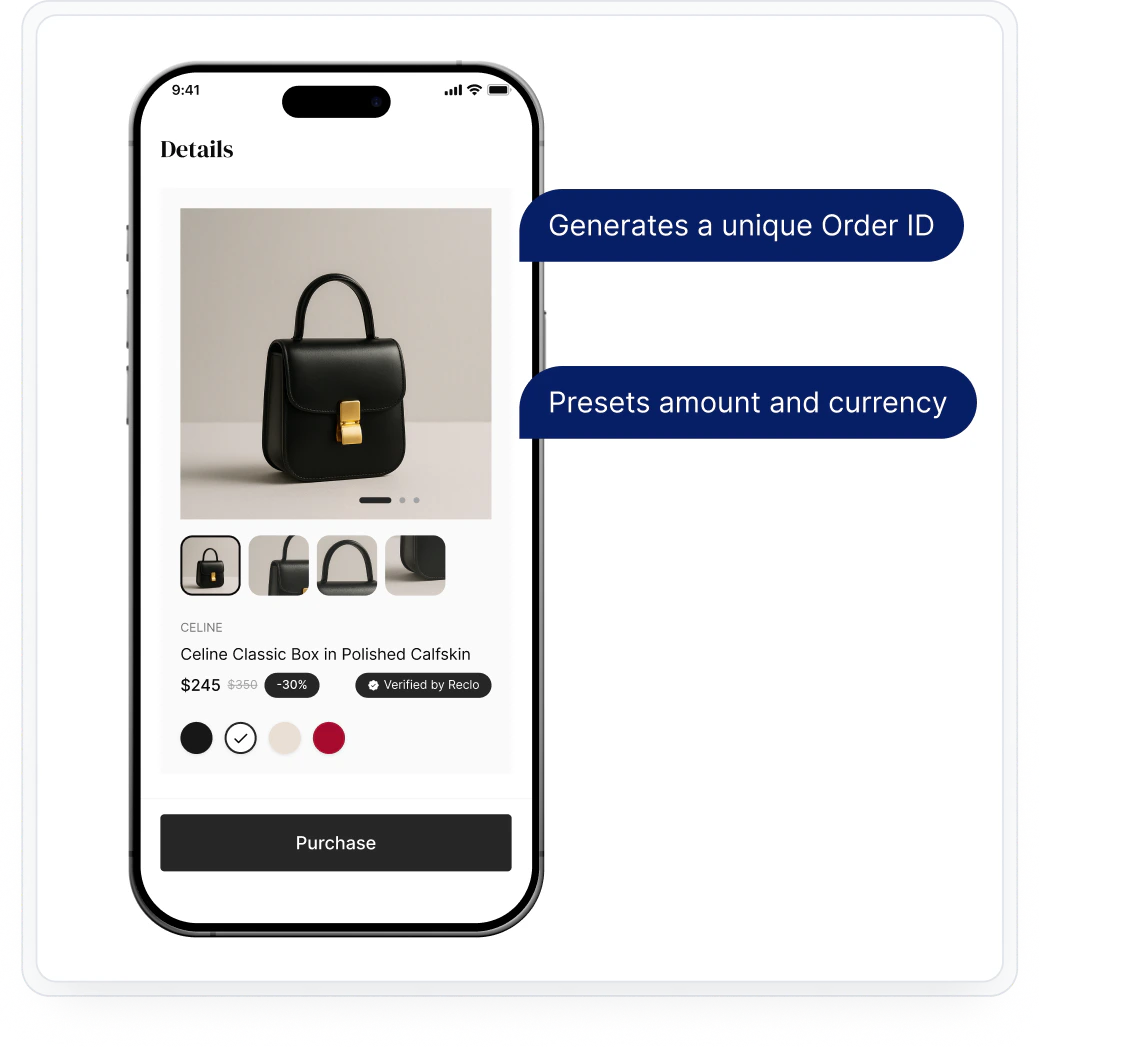
    用户在商户站点浏览商品或服务并点击“结账”按钮。商户后端调用 Waffo API 创建 Payment Session 或 Subscription。

    * 生成唯一的订单 ID
    * 预设金额和币种

    <Frame>
      <img src="https://mintcdn.com/waffo-docs/Pi4mlrktV3FjQDJZ/images/essentials/checkout/step1.png?fit=max&auto=format&n=Pi4mlrktV3FjQDJZ&q=85&s=4fd2d1b8b9b9e7ddd3cc2cc643c568b0" alt="支付流程第 1 步：确认订单" width="1133" height="1047" data-path="images/essentials/checkout/step1.png" />
    </Frame>
  </Step>

  <Step title="唤起 Checkout">
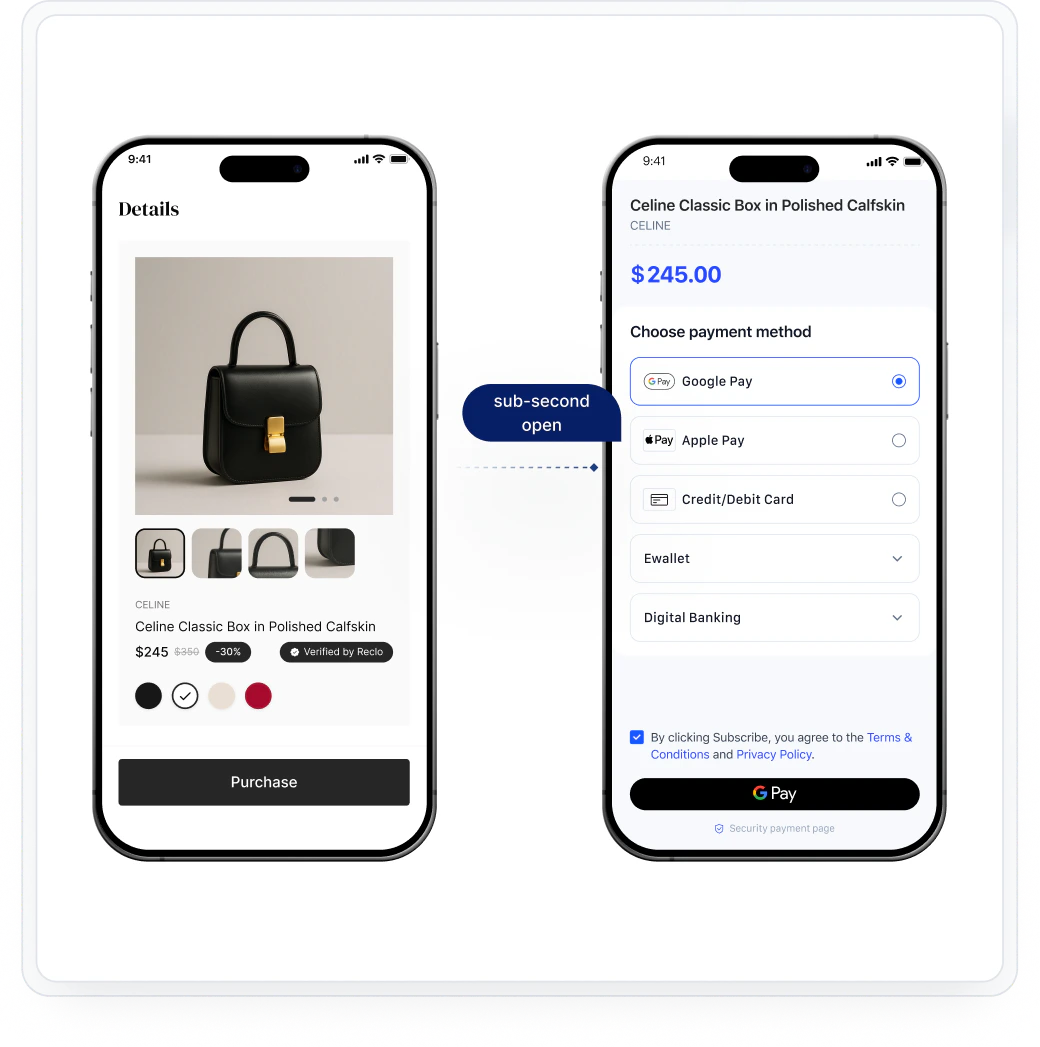
    商户前端通过重定向（Hosted）或 SDK 初始化（Embedded）唤起 Waffo Checkout。

    <Frame>
      <img src="https://mintcdn.com/waffo-docs/Pi4mlrktV3FjQDJZ/images/essentials/checkout/step2.png?fit=max&auto=format&n=Pi4mlrktV3FjQDJZ&q=85&s=5491c48ab541e7de95951cfa50655cb4" alt="支付流程第 2 步：唤起 Checkout" width="1040" height="1047" data-path="images/essentials/checkout/step2.png" />
    </Frame>
  </Step>

  <Step title="选择支付方式">
    用户从动态展示的选项中选择偏好的支付方式。可用方式会根据地区、币种和商户配置进行筛选。

    <Frame>
      <img src="https://mintcdn.com/waffo-docs/Pi4mlrktV3FjQDJZ/images/essentials/checkout/step3.png?fit=max&auto=format&n=Pi4mlrktV3FjQDJZ&q=85&s=f2f902166cd525b7c47b3d60c3a09e7d" alt="支付流程第 3 步：选择支付方式" width="1040" height="1047" data-path="images/essentials/checkout/step3.png" />
    </Frame>
  </Step>

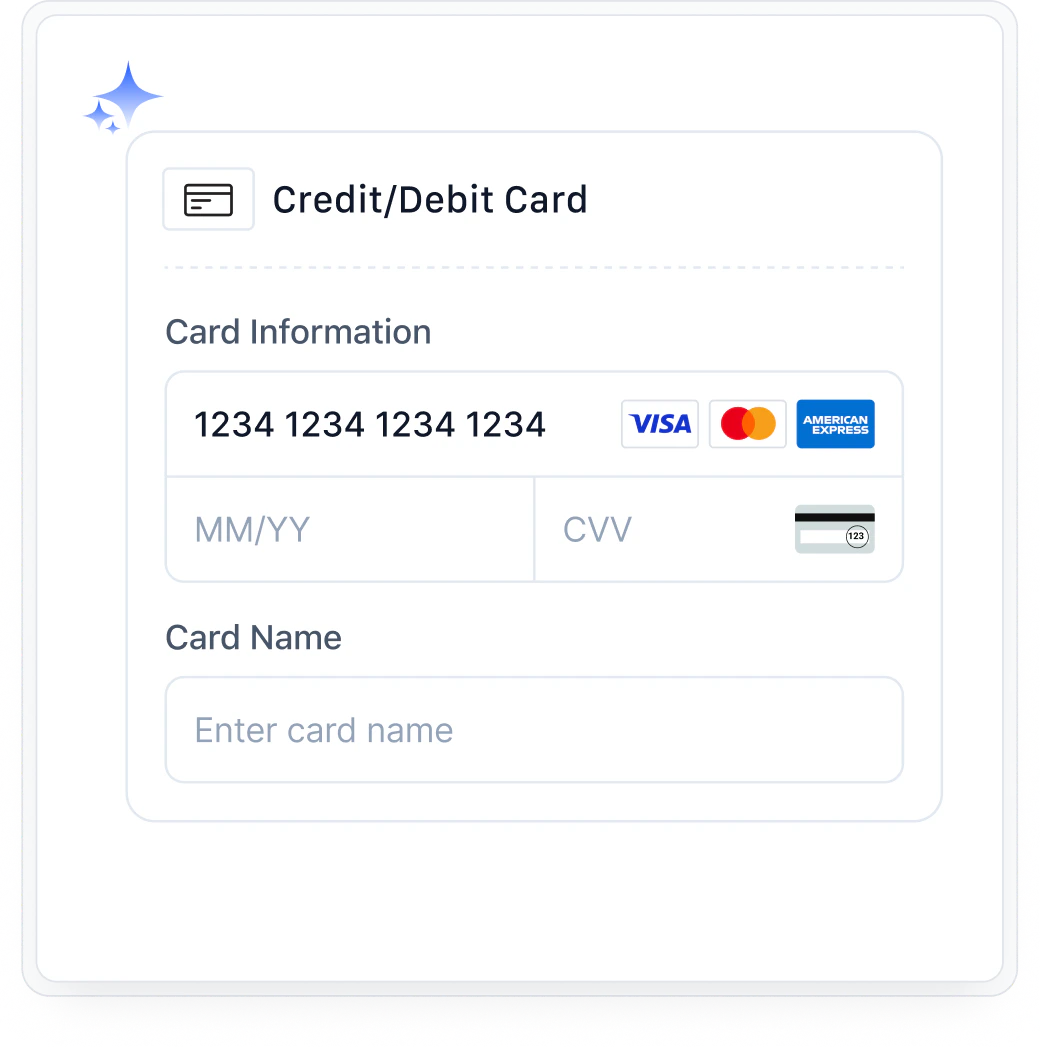
  <Step title="授权并完成支付">
    用户通过所选支付方式的原生流程完成认证与授权（卡信息输入、钱包重定向、生物识别等）。

    <Frame>
      <img src="https://mintcdn.com/waffo-docs/Pi4mlrktV3FjQDJZ/images/essentials/checkout/step4.png?fit=max&auto=format&n=Pi4mlrktV3FjQDJZ&q=85&s=c984eb0264839ab1f53ba228ee84d04f" alt="支付流程第 4 步：授权并完成支付" width="1040" height="1047" data-path="images/essentials/checkout/step4.png" />
    </Frame>
  </Step>

  <Step title="结果与通知">
    Waffo 将支付结果返回至用户浏览器，并向商户后端发送 webhook 通知。商户据此更新订单状态。

    <Frame>
      <img src="https://mintcdn.com/waffo-docs/Pi4mlrktV3FjQDJZ/images/essentials/checkout/step5.png?fit=max&auto=format&n=Pi4mlrktV3FjQDJZ&q=85&s=7f109986ed43922e5c8e6c19133e022f" alt="支付流程第 5 步：结果与通知" width="1040" height="1047" data-path="images/essentials/checkout/step5.png" />
    </Frame>
  </Step>
</Steps>

## UI 自定义选项

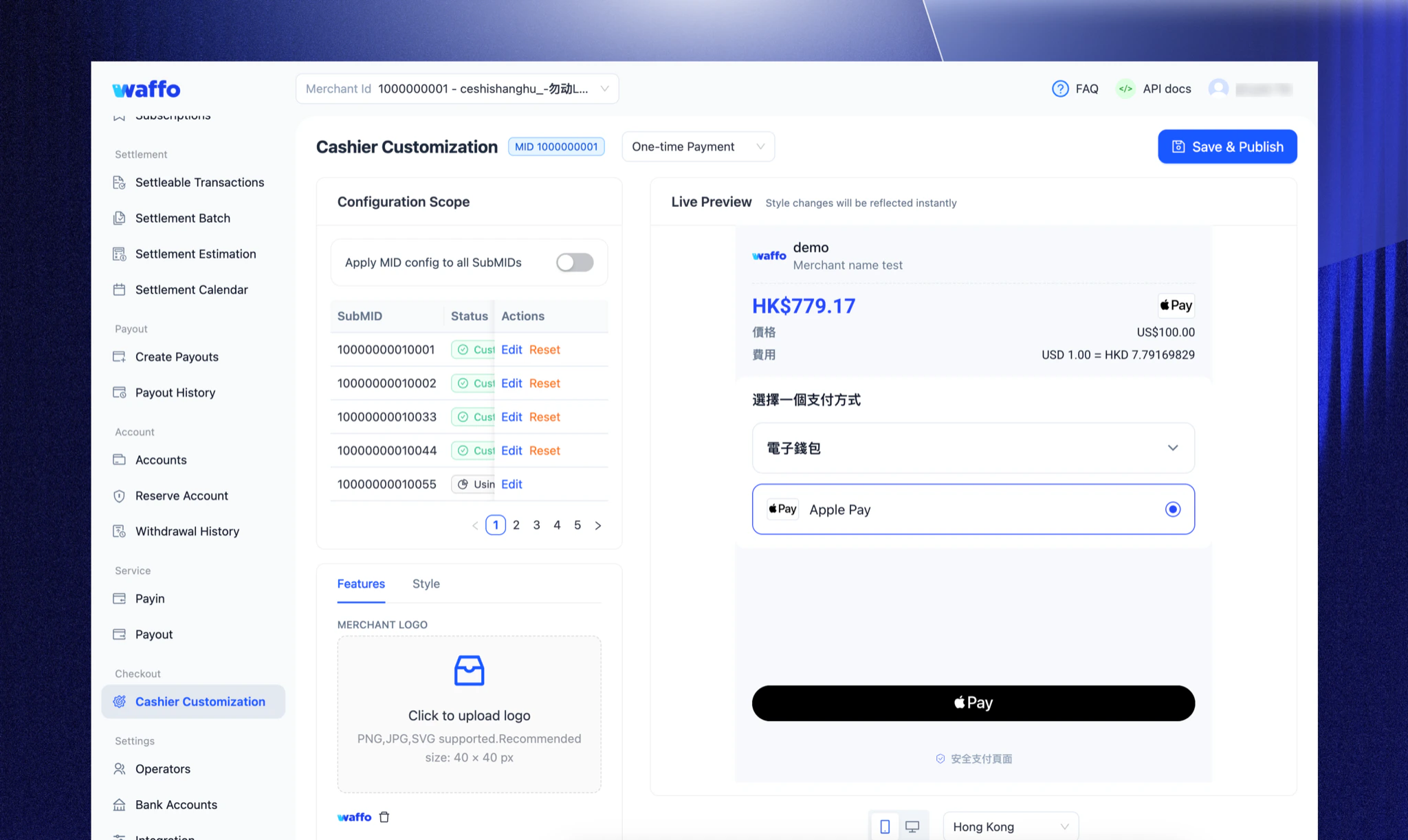
为确保收银台与您的品牌无缝融合，Waffo 提供精细化的自定义选项。您可以通过以下三种方式控制界面外观与体验：

* **商户门户：** 可视化配置，无需代码。上传 Logo，配置品牌颜色与界面样式，自定义支付方式排序——均可在商户后台实时预览。
* **API 参数：** 服务端动态控制。在创建 Session 时传入配置参数，为不同用户群体（例如 VIP）展示不同界面。
* **客户端 SDK：** 前端细粒度控制。（仅限嵌入式）。通过 JavaScript 对象定义字体、间距、圆角半径等具体 CSS 属性。

<Frame>
  <img src="https://mintcdn.com/waffo-docs/Pi4mlrktV3FjQDJZ/images/essentials/checkout/ui-customization.png?fit=max&auto=format&n=Pi4mlrktV3FjQDJZ&q=85&s=b504f404bf8f5b63b3a3d75c694a0dbe" alt="Waffo Merchant Portal showing the Cashier Customization screen with live preview of the checkout interface" width="2048" height="1222" data-path="images/essentials/checkout/ui-customization.png" />
</Frame>

## 多语言支持

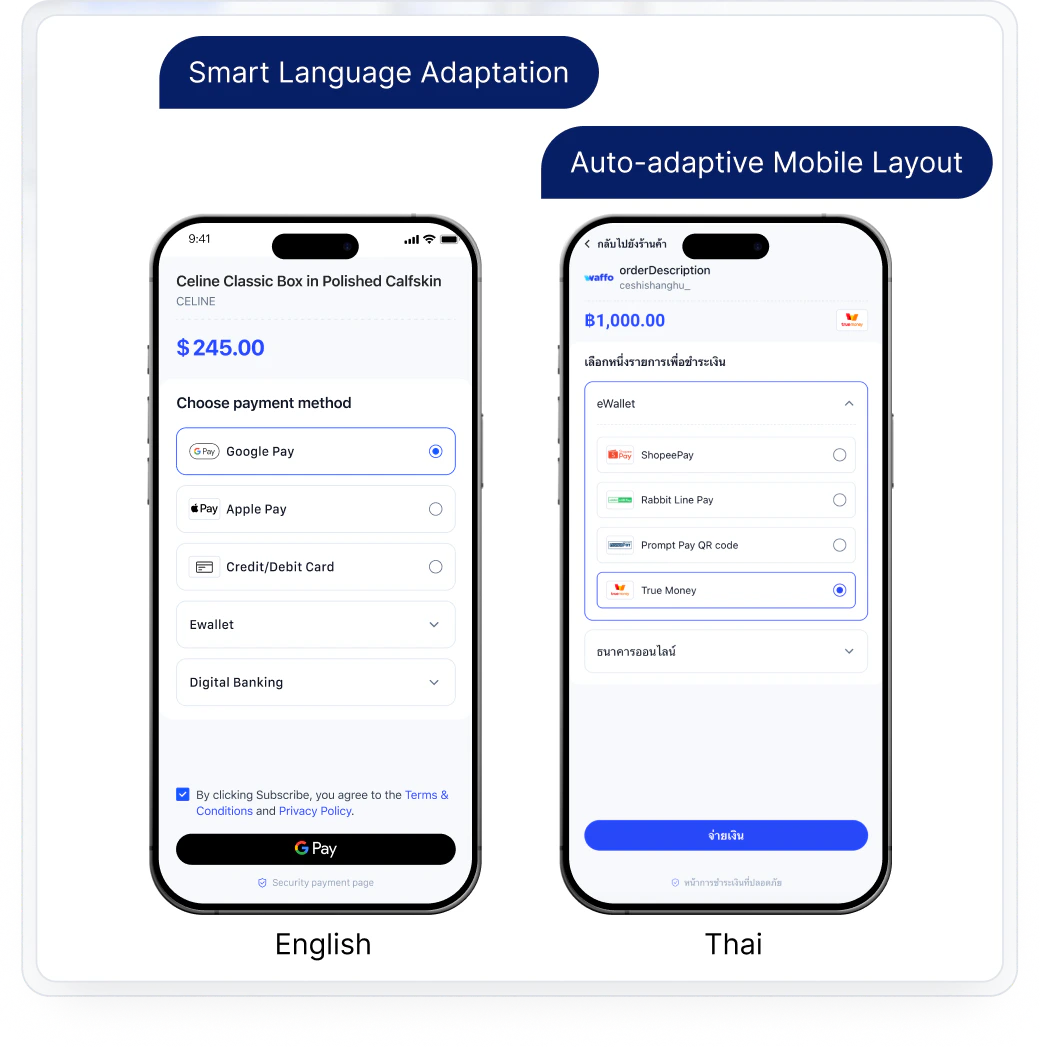
Waffo Checkout 致力于为全球用户提供如同本地原生应用般的支付体验。为实现最精准的本地化，Waffo Checkout 会根据所选支付方式的地区，智能预设并展示最合适的界面语言。

<Note>
  **示例：** 当用户选择 **Alipay** 时，系统会自动切换为 **简体中文** 界面；当选择 **TrueMoney** 时，则切换为 **泰语**，确保用户在最熟悉的语言环境中完成支付。
</Note>

支持的示例语言（非穷举）：英语、泰语、日语、简体中文、繁体中文、西班牙语、印尼语（Bahasa Indonesia）等。

<Frame>
  <img src="https://mintcdn.com/waffo-docs/Pi4mlrktV3FjQDJZ/images/essentials/checkout/multi-language-support.png?fit=max&auto=format&n=Pi4mlrktV3FjQDJZ&q=85&s=e5a22e8081335c2cb0d5b9a2a45c5653" alt="Waffo Checkout 多语言支持预览图" width="4272" height="2550" data-path="images/essentials/checkout/multi-language-support.png" />
</Frame>

## 集成

Waffo Checkout 可以与不同的支付能力组合，形成完整解决方案：

* **使用 Hosted Checkout：** 以最少的代码支持一次性支付或订阅支付。
* **使用 Embedded Checkout：** 通过 SDK 或组件嵌入收银台，以获得更高的体验自由度与可定制性。
* **配合 Server API：** 用于创建支付或订阅、查询状态、接收通知，并动态控制收银台行为。

查看[开发文档](/docs/api-reference/zh/introduction)，了解如何将 Checkout 与不同的支付模式进行集成。

## 常见问题

<AccordionGroup>
  <Accordion title="Checkout 支持哪些支付方式？">
    目前，Checkout 支持 430+ 种全球支付方式。具体可用的方式可能会因地区和商户配置而有所不同。

    请在 [支付方式](/docs/zh/essentials/payment-methods) 页面查看完整列表。
  </Accordion>

  <Accordion title="Checkout 是否满足支付安全与合规要求？">
    是的，Checkout 遵循相关支付安全与合规标准（如 PCI DSS），并通过安全渠道处理敏感支付信息。
  </Accordion>

  <Accordion title="Checkout 如何处理支付失败？">
    如果支付失败，Checkout 页面会显示失败原因。用户可以重试支付或切换至其他银行卡。常见失败原因包括余额不足、卡信息有误或发卡行拒绝交易。
  </Accordion>
</AccordionGroup>

***

需要帮助？[联系支持](mailto:support@waffo.com)