> ## Documentation Index
> Fetch the complete documentation index at: https://waffo.com/docs/llms.txt
> Use this file to discover all available pages before exploring further.

# 全链路数据智能

> 端到端的数据智能，将晦涩的银行代码转化为可执行的增长策略。

export const SmartCodeMappingCards = ({cards = []}) => {
  const [isDark, setIsDark] = useState(false);
  useEffect(() => {
    const check = () => setIsDark(document.documentElement.classList.contains("dark"));
    check();
    const observer = new MutationObserver(check);
    observer.observe(document.documentElement, {
      attributes: true,
      attributeFilter: ["class"]
    });
    return () => observer.disconnect();
  }, []);
  const t = {
    cardBorder: isDark ? "#3f3f46" : "#e2e8f0",
    cardBg: isDark ? "#18181b" : "#ffffff",
    headerBg: isDark ? "#27272a" : "#f8fafc",
    headerBorder: isDark ? "#3f3f46" : "#e2e8f0",
    title: isDark ? "#f4f4f5" : "#0f172a",
    examples: isDark ? "#71717a" : "#94a3b8",
    sectionLabel: isDark ? "#a1a1aa" : "#475569",
    sectionText: isDark ? "#d4d4d8" : "#334155",
    attrIconBg: isDark ? "#1c1c1c" : "#f1f5f9",
    attrIconColor: isDark ? "#a1a1aa" : "#64748b",
    recIconBg: isDark ? "#1e3a5f" : "#eff6ff",
    recIconColor: isDark ? "#4D7CFF" : "#2563eb",
    divider: isDark ? "#27272a" : "#f1f5f9"
  };
  const AttrIcon = () => <svg width="16" height="16" viewBox="0 0 16 16" fill="none" xmlns="http://www.w3.org/2000/svg">
      <circle cx="8" cy="8" r="7" stroke={t.attrIconColor} strokeWidth="1.3" />
      <path d="M8 4.5V8.5L10.5 10" stroke={t.attrIconColor} strokeWidth="1.3" strokeLinecap="round" strokeLinejoin="round" />
    </svg>;
  const RecIcon = () => <svg width="16" height="16" viewBox="0 0 16 16" fill="none" xmlns="http://www.w3.org/2000/svg">
      <path d="M8 2L9.5 6H14L10.5 8.5L11.5 13L8 10.5L4.5 13L5.5 8.5L2 6H6.5L8 2Z" stroke={t.recIconColor} strokeWidth="1.2" strokeLinejoin="round" fill={t.recIconBg} />
    </svg>;
  return <div style={{
    display: "grid",
    gridTemplateColumns: "repeat(2, 1fr)",
    gap: "16px",
    margin: "24px 0"
  }}>
      {cards.map((card, i) => <div key={i} className="waffo-hover-card" style={{
    border: `1px solid ${t.cardBorder}`,
    borderRadius: "12px",
    overflow: "hidden",
    background: t.cardBg
  }}>
          {}
          <div style={{
    background: t.headerBg,
    borderBottom: `1px solid ${t.headerBorder}`,
    padding: "14px 18px"
  }}>
            <div style={{
    fontSize: "14px",
    fontWeight: 600,
    color: t.title,
    margin: 0,
    lineHeight: 1.4
  }}>
              {card.title}
            </div>
            <div style={{
    fontSize: "12px",
    color: t.examples,
    marginTop: "4px"
  }}>
              {card.examples}
            </div>
          </div>

          {}
          <div style={{
    padding: "16px 18px",
    display: "flex",
    flexDirection: "column",
    gap: "14px"
  }}>
            {}
            <div style={{
    display: "flex",
    gap: "10px"
  }}>
              <div style={{
    width: "28px",
    height: "28px",
    borderRadius: "6px",
    background: t.attrIconBg,
    display: "flex",
    alignItems: "center",
    justifyContent: "center",
    flexShrink: 0,
    marginTop: "1px"
  }}>
                <AttrIcon />
              </div>
              <div>
                <div style={{
    fontSize: "12px",
    fontWeight: 600,
    color: t.sectionLabel,
    textTransform: "uppercase",
    letterSpacing: "0.04em",
    marginBottom: "3px"
  }}>
                  Attribution
                </div>
                <div style={{
    fontSize: "13px",
    color: t.sectionText,
    lineHeight: 1.5
  }}>
                  {card.attributionText}
                </div>
              </div>
            </div>

            {}
            <div style={{
    height: "1px",
    background: t.divider
  }} />

            {}
            <div style={{
    display: "flex",
    gap: "10px"
  }}>
              <div style={{
    width: "28px",
    height: "28px",
    borderRadius: "6px",
    background: t.recIconBg,
    display: "flex",
    alignItems: "center",
    justifyContent: "center",
    flexShrink: 0,
    marginTop: "1px"
  }}>
                <RecIcon />
              </div>
              <div>
                <div style={{
    fontSize: "12px",
    fontWeight: 600,
    color: t.sectionLabel,
    textTransform: "uppercase",
    letterSpacing: "0.04em",
    marginBottom: "3px"
  }}>
                  Recommendation
                </div>
                <div style={{
    fontSize: "13px",
    color: t.sectionText,
    lineHeight: 1.5
  }}>
                  {card.recommendationText}
                </div>
              </div>
            </div>
          </div>
        </div>)}
    </div>;
};

export const RealtimeHealthDashboardCards = ({secondLevelTitle = "Second-Level Response", secondLevelDesc, smartAlertsTitle = "Smart Alerts", smartAlertsDesc, issueAttributionTitle = "Issue Attribution", issueAttributionDesc}) => {
  const [isDark, setIsDark] = useState(false);
  useEffect(() => {
    const check = () => setIsDark(document.documentElement.classList.contains("dark"));
    check();
    const observer = new MutationObserver(check);
    observer.observe(document.documentElement, {
      attributes: true,
      attributeFilter: ["class"]
    });
    return () => observer.disconnect();
  }, []);
  const t = {
    cardBorder: isDark ? "#3f3f46" : "#e2e8f0",
    cardBg: isDark ? "#15151a" : "#ffffff",
    illustrationBg: isDark ? "radial-gradient(circle at 50% 45%, rgba(37, 99, 235, 0.14), rgba(15, 23, 42, 0) 58%), #111318" : "#ffffff",
    title: isDark ? "#f4f4f5" : "#0f172a",
    desc: isDark ? "#cbd5e1" : "#475569"
  };
  return <div style={{
    display: "flex",
    flexDirection: "column",
    gap: "12px",
    margin: "24px 0"
  }} className="not-prose">
      {}
      <div className="waffo-hover-card" style={{
    border: `1px solid ${t.cardBorder}`,
    borderRadius: "12px",
    background: t.cardBg,
    overflow: "hidden",
    display: "flex",
    flexDirection: "row",
    minHeight: "200px"
  }}>
        <div style={{
    flex: 1,
    padding: "28px 32px",
    display: "flex",
    flexDirection: "column",
    justifyContent: "center"
  }}>
          <div style={{
    fontSize: "16px",
    fontWeight: 600,
    color: t.title,
    marginBottom: "10px",
    lineHeight: 1.4
  }}>
            {secondLevelTitle}
          </div>
          <div style={{
    fontSize: "14px",
    color: t.desc,
    lineHeight: 1.65
  }}>
            {secondLevelDesc}
          </div>
        </div>
        <div style={{
    flex: 1,
    background: t.illustrationBg,
    display: "flex",
    alignItems: "center",
    justifyContent: "center",
    padding: "16px 24px"
  }}>
          <img src="/docs/images/essentials/data-intelligence/second-level-response-chart.png?v=20260429-1752" alt="Second-Level Response monitoring chart" style={{
    width: "100%",
    height: "auto",
    objectFit: "contain",
    display: "block",
    margin: 0
  }} />
        </div>
      </div>

      {}
      <div style={{
    display: "grid",
    gridTemplateColumns: "1fr 1fr",
    gap: "12px"
  }}>
        {[{
    title: smartAlertsTitle,
    desc: smartAlertsDesc,
    img: "/images/essentials/data-intelligence/smart-alerts-illustration.png?v=20260429-1752",
    alt: "Smart Alerts illustration"
  }, {
    title: issueAttributionTitle,
    desc: issueAttributionDesc,
    img: "/images/essentials/data-intelligence/issue-attribution-illustration.png?v=20260429-1752",
    alt: "Issue Attribution illustration"
  }].map((card, i) => <div key={i} className="waffo-hover-card" style={{
    border: `1px solid ${t.cardBorder}`,
    borderRadius: "12px",
    background: t.cardBg,
    overflow: "hidden"
  }}>
            <div style={{
    background: t.illustrationBg,
    display: "flex",
    alignItems: "center",
    justifyContent: "center",
    padding: "24px",
    minHeight: "148px"
  }}>
              <img src={card.img} alt={card.alt} style={{
    maxWidth: "80%",
    height: "auto",
    objectFit: "contain",
    display: "block",
    margin: 0
  }} />
            </div>
            <div style={{
    padding: "20px 24px"
  }}>
              <div style={{
    fontSize: "15px",
    fontWeight: 600,
    color: t.title,
    marginBottom: "8px",
    lineHeight: 1.4
  }}>
                {card.title}
              </div>
              <div style={{
    fontSize: "13px",
    color: t.desc,
    lineHeight: 1.65
  }}>
                {card.desc}
              </div>
            </div>
          </div>)}
      </div>
    </div>;
};

## 概述

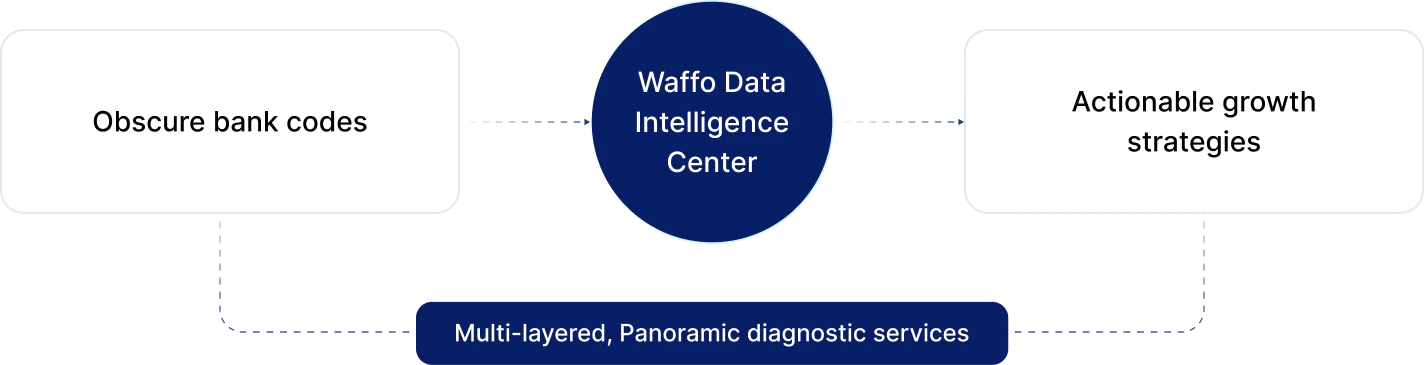
在跨境支付中，数据不仅仅用于报表——更是隐藏的利润。全球支付版图复杂且多元：不同国家的用户习惯各不相同，支付方式涵盖银行卡、本地钱包与 BNPL；同时，各家银行规则、风控策略以及网络稳定性也存在巨大差异。不同于成功率很高、标准高度统一的国内支付环境，跨境支付需要深入分析"为什么失败"，而不仅仅是"是否成功"。

<Frame>
  <div className="h-[220px] flex items-center justify-center rounded-xl">
    <img src="https://mintcdn.com/waffo-docs/Pi4mlrktV3FjQDJZ/images/essentials/data-intelligence/overview-diagram.png?fit=max&auto=format&n=Pi4mlrktV3FjQDJZ&q=85&s=1a89b7c5ce193d553440861dd03d674d" alt="Waffo 数据智能中心：将晦涩的银行代码转化为可落地的增长策略" className="w-full h-auto object-contain m-0" width="1424" height="365" data-path="images/essentials/data-intelligence/overview-diagram.png" />
  </div>
</Frame>

**Waffo 数据智能中心**打通"一次性支付"和"订阅支付"，以及"银行卡"和"本地钱包"之间的数据孤岛。我们为商户提供多层级、全景式诊断服务，将晦涩的银行代码转化为可落地的增长策略。我们帮助商户回答三个核心问题：我的支付健康度是否稳健？交易为什么会失败？如何挽回流失的客户？

***

## 监控与全渠道漏斗

Waffo 不仅监控支付结果，还监控用户的完整支付旅程，尤其适用于复杂的混合支付场景。

### 实时健康度仪表盘

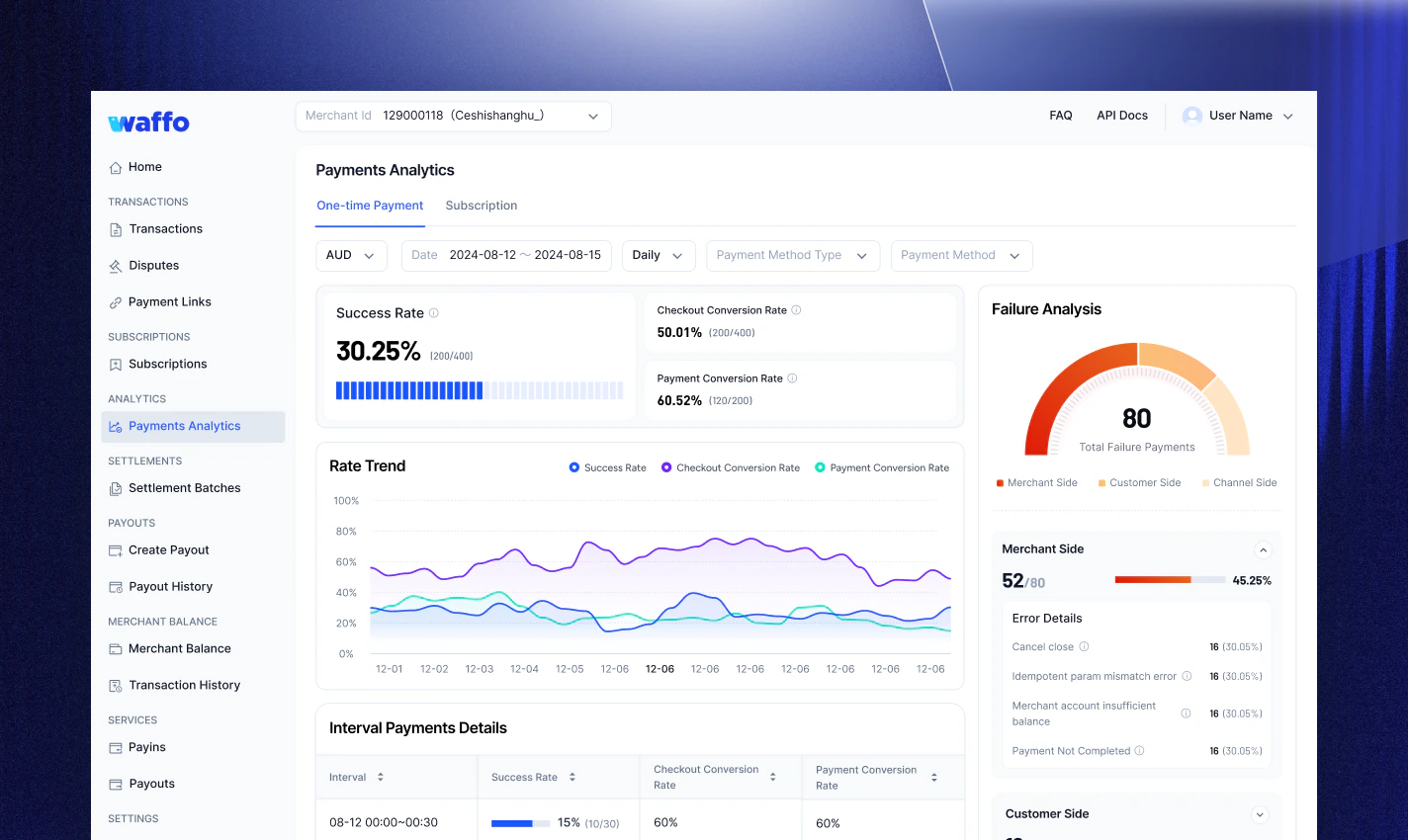
实时健康度仪表盘提供对支付表现的即时可见性：

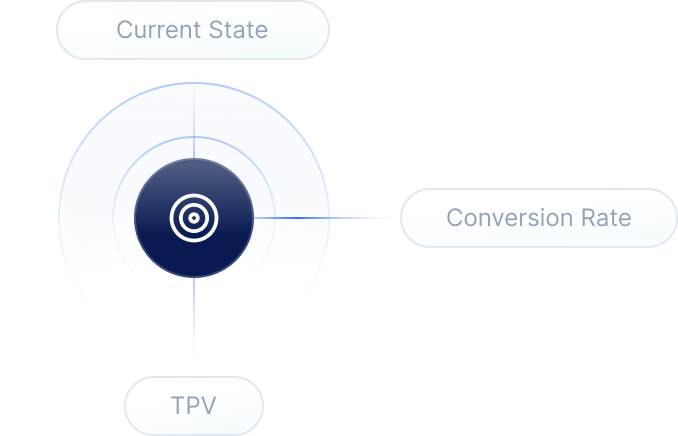
<RealtimeHealthDashboardCards secondLevelTitle="秒级响应" secondLevelDesc="无论是黑色星期五的高峰期还是日常运营，都可实时追踪授权率（Auth Rate）、TPV（Total Payment Volume，总支付交易额）与转化率的分钟级波动。" smartAlertsTitle="智能预警" smartAlertsDesc="当成功率出现异常下滑（例如某个地区突然下降 20%）时，系统会自动触发预警，帮助技术团队快速排查是网关故障还是银行系统维护。" issueAttributionTitle="问题归因" issueAttributionDesc="如果支付成功率突然出现异常（例如某个支付方式下降 20%），失败原因趋势（Failure Reason Trend）仪表盘可立即分析，将问题精确归因到网关问题或银行维护，从而推动团队快速修复，最大限度降低业务影响。" />

<Frame>
  <img src="https://mintcdn.com/waffo-docs/Pi4mlrktV3FjQDJZ/images/essentials/data-intelligence/payments-analytics-dashboard.png?fit=max&auto=format&n=Pi4mlrktV3FjQDJZ&q=85&s=02b9c8e6329ca9185b4d6082f6b486ef" alt="展示授权率、TPV 与失败归因拆分的支付分析仪表盘" style={{width:"100%", height:"auto"}} width="1424" height="850" data-path="images/essentials/data-intelligence/payments-analytics-dashboard.png" />
</Frame>

### 全渠道转化漏斗

针对银行卡（直连）和电子钱包/BNPL（跳转）两种不同的支付逻辑，我们提供统一的漏斗视图：

* **端到端监控：** 追踪从"商户唤起收银台"开始的完整旅程，每一步都有清晰指标，帮助你还原用户从进入到选择、操作到完成的真实路径。

<Frame>
  <img src="https://mintcdn.com/waffo-docs/5FhuvFNh23Cl0uOC/images/essentials/data-intelligence/omnichannel-funnel.png?fit=max&auto=format&n=5FhuvFNh23Cl0uOC&q=85&s=6f0f32dd909f6574ce04be612ada9a23" alt="全渠道转化漏斗：100% 收银台曝光 → 95% 选择支付方式 → 92% 信息录入 → 90% 点击支付 → 80% 成功下单" style={{width:"100%", height:"auto"}} width="1429" height="802" data-path="images/essentials/data-intelligence/omnichannel-funnel.png" />
</Frame>

* **流失诊断：** 数据能清晰告诉你，用户流失是因为进不了收银台（技术问题），还是在选择方式/录入信息阶段放弃（体验或意愿问题），从而针对性地优化跳转链路、支付列表或交互流程。

<Frame>
  <img src="https://mintcdn.com/waffo-docs/Pi4mlrktV3FjQDJZ/images/essentials/data-intelligence/failure-analysis-card.png?fit=max&auto=format&n=Pi4mlrktV3FjQDJZ&q=85&s=e4c1eddfcac43b102ad649297ec46828" alt="失败归因拆分：商户侧 52/80（46.25%）、用户侧 16/80（30.12%）、渠道侧 6/80（25.08%）" style={{width:"100%", height:"auto"}} width="1424" height="850" data-path="images/essentials/data-intelligence/failure-analysis-card.png" />
</Frame>

***

## 下钻与智能归因

当成功率低于预期时，Waffo 提供强大的分析工具，精准定位"根因"。

### 多维下钻

* **地区与发卡行：** 精准分析至具体发卡行（BIN）。

<Note>
  **典型场景：** 整体成功率正常，但某家"巴西银行"的失败率高达 40%？这会提示你针对该行优化路由或分期策略。
</Note>

* **方式对比：** 横向对比银行卡与本地钱包的表现。数据可能显示，在特定国家将"Apple Pay"置顶可带来更高的 GMV。

### 智能代码映射

银行返回的 **"Do Not Honor"** 或 **"Error 05"** 不再是黑盒。Waffo 将数千种全球原始拒绝代码智能映射到二元归因类别，让你的团队快速判断下一步行动，减少无效排查，提升解决效率。

<SmartCodeMappingCards
  cards={[
{
title: "资金类问题",
examples: "例如：余额不足、超过限额",
attributionText: "通常归因于用户侧。",
recommendationText: "引导用户更换支付方式或优化余额提示。",
},
{
title: "技术类问题",
examples: "例如：系统超时、连接失败",
attributionText: "主要由渠道或技术侧引发。",
recommendationText: "系统可自动切换路由并触发实时告警。",
},
{
title: "风控类拒绝",
examples: "例如：欺诈拦截、可疑交易",
attributionText: "主要归因于银行侧或风控策略。",
recommendationText: "停止重试以规避合规风险，并根据风控建议调整策略。",
},
{
title: "账户状态问题",
examples: "例如：卡片过期、卡号无效",
attributionText: "通常是用户未更新信息或银行锁卡。",
recommendationText: "提示用户更新卡信息或联系发卡行。",
},
]}
/>

***

## 订阅与留存健康度

对于 SaaS、会员制以及周期性计费商户，我们重点关注降低流失率（Churn）并提升 LTV（Lifetime Value，用户生命周期价值）。

### 流失归因分析

Waffo 清晰地区分两类不同的流失：

<Note>
  **主动流失（Voluntary Churn）：** 用户手动取消订阅。（需要优化产品体验）
</Note>

<Warning>
  **被动流失（Involuntary Churn）：** 用户未取消，但因卡片过期或余额不足导致支付失败。（需要优化支付策略）这是 Waffo 帮助商户解决的核心痛点。
</Warning>

### 恢复效果量化

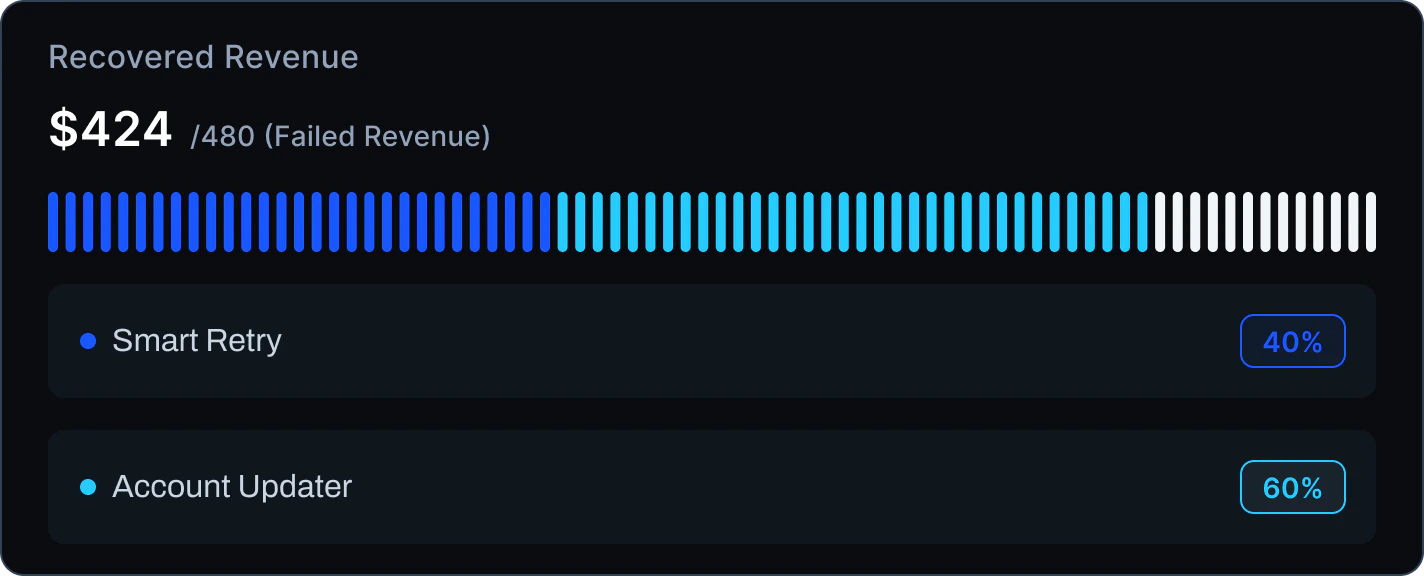
**已恢复收入（Recovered Revenue）：** 直观展示本月通过 Waffo 的 Smart Retry 与 Account Updater 机制，自动挽回了多少原本注定失败的收入。

<Frame>
  <img src="https://mintcdn.com/waffo-docs/5FhuvFNh23Cl0uOC/images/essentials/data-intelligence/recovered-revenue-card-light.png?fit=max&auto=format&n=5FhuvFNh23Cl0uOC&q=85&s=05df07f6a43232c9394051b5f109d759" alt="已恢复收入：从 480 美元失败收入中挽回 424 美元 — 智能重试 40%，账户更新器 60%" className="block dark:hidden w-full h-auto m-0" width="1424" height="576" data-path="images/essentials/data-intelligence/recovered-revenue-card-light.png" />

  <img src="https://mintcdn.com/waffo-docs/5FhuvFNh23Cl0uOC/images/essentials/data-intelligence/recovered-revenue-card-dark.png?fit=max&auto=format&n=5FhuvFNh23Cl0uOC&q=85&s=cd3f5f4f83e22bbdc834de058ce463db" alt="已恢复收入：从 480 美元失败收入中挽回 424 美元 — 智能重试 40%，账户更新器 60%" className="hidden dark:block w-full h-auto m-0" width="1424" height="576" data-path="images/essentials/data-intelligence/recovered-revenue-card-dark.png" />
</Frame>

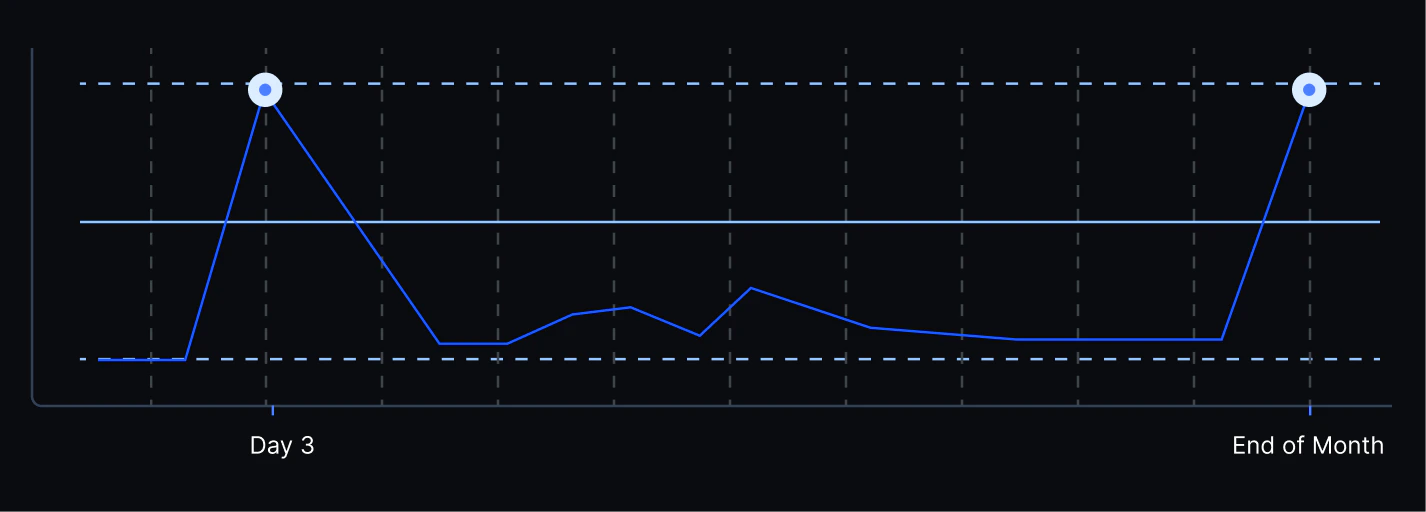
**最佳重试策略（Best Retry Strategy）：** 分析可能显示在"失败后第 3 天"或"月末"重试成功率最高，从而指导系统自动调整催收（Dunning）逻辑。

<Frame>
  <img src="https://mintcdn.com/waffo-docs/5FhuvFNh23Cl0uOC/images/essentials/data-intelligence/retry-strategy-chart-light.png?fit=max&auto=format&n=5FhuvFNh23Cl0uOC&q=85&s=76fcc5ffb5c442627db92c78305bf135" alt="最佳重试策略折线图，显示第 3 天和月末成功率峰值" className="block dark:hidden w-full h-auto m-0" width="1426" height="512" data-path="images/essentials/data-intelligence/retry-strategy-chart-light.png" />

  <img src="https://mintcdn.com/waffo-docs/5FhuvFNh23Cl0uOC/images/essentials/data-intelligence/retry-strategy-chart-dark.png?fit=max&auto=format&n=5FhuvFNh23Cl0uOC&q=85&s=69e3e3e8a6f8f67e6f7c88aa1db05413" alt="最佳重试策略折线图，显示第 3 天和月末成功率峰值" className="hidden dark:block w-full h-auto m-0" width="1426" height="512" data-path="images/essentials/data-intelligence/retry-strategy-chart-dark.png" />
</Frame>

### 分群（Cohort）分析

从多个维度评估用户生命周期与渠道质量：

* **首购 vs. 续费转化：** 区分新用户首单转化与老用户续费转化，定位不同阶段的瓶颈。
* **留存热力图：** 跟踪不同月份、不同渠道获取用户在第 3 个月与第 6 个月的留存表现，帮助市场团队评估获客质量。

***

## 常见问题

<AccordionGroup>
  <Accordion title={`什么是"Auth Rate"，Waffo 如何计算它？`} defaultOpen>
    公式为：成功交易数 / 尝试交易总数。Waffo 的高级分析支持排除"用户输入错误"或"主动取消"等非系统性因素，以呈现更具参考性的技术成功率。
  </Accordion>

  <Accordion title={`数据如何帮助我处理"Do Not Honor"拒绝？`}>
    这是最常见的通用拒绝类型。Waffo 的数据分析通常能发现，在特定高风险场景中启用 3DS 身份验证可显著降低此类错误率。我们的系统会据此建议动态调整风控策略，将拒绝转化为成功。
  </Accordion>

  <Accordion title={`为什么"非自愿流失（Involuntary Churn）"分析很重要？`}>
    行业数据显示，20%-40% 的订阅流失源于支付失败，而非用户主动意愿。解决这一问题是提升 LTV 最快、成本最低的方式。
  </Accordion>

  <Accordion title="你们的数据是实时的吗？">
    实时健康度仪表盘提供秒级更新，非常适合在大促期间进行监控。深度归因分析与分群（Cohort）分析通常以 T+1 的频率更新，以确保数据清洗与对账的准确性。
  </Accordion>
</AccordionGroup>

***

需要帮助？[联系支持](mailto:support@waffo.com)