

Environment information
The SDK switches via
Environment.SANDBOX / Environment.PRODUCTION; there is no need to manually modify the URL.
Test card numbers
Credit Card
CC_VISA
CC_MASTERCARD
CC_JCB
CC_AMEX
Debit Card
DC_VISA
DC_MASTERCARD
DC_JCB
DC_AMEX
General card information
Expiration date: any future date
CVV: any 3 digits (AMEX uses 4 digits)
Sandbox simulator
The sandbox does not connect to real payment channels. Use the simulator to control payment outcomes directly:- One-time payment: After creating an order, open the checkout page. The page provides “Payment Success” and “Payment Failed” buttons — click either to trigger the corresponding result and Webhook.
- Subscription first payment: Same as one-time payment; operate on the checkout page.
- Subscription renewal simulation: Call
POST /api/v1/subscription/manageto get the management page URL → open the management page → the page provides “Simulate Next Payment Success” and “Simulate Next Payment Failed” buttons; each click simulates one renewal cycle.
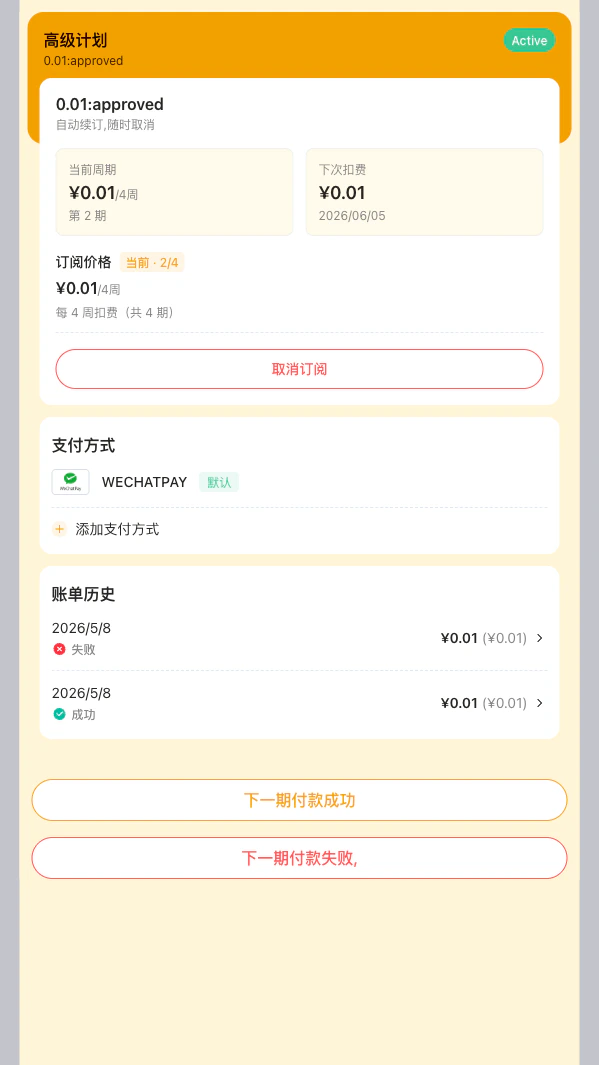
Payment method testing methods
Some payment methods require dedicated checks in addition to regular sandbox payment testing.Octopus testing
If you need to complete QR code payment testing with the Octopus test app, see Octopus sandbox test payment.Google Pay testing
If your integration needs Google Pay on Checkout or your own frontend, complete these checks.- Sign in with a Google Pay test account.
- Add the account to the Google Pay test mode stub data group.
- Confirm that the target country or region is in the Google Pay supported countries list.
- If you load the payment page inside an Android App WebView, apply the Google Pay Android WebView configuration.
- Before production launch, Android Apps must request Google Pay API access through the Google Pay publish guide.
- If production access is not approved, users may see
OR_BIBED_11or a similar error.
Apple Pay testing
If your integration needs Apple Pay on Checkout or your own frontend, complete these checks.- We recommend testing with the merchant’s own Apple Pay account.
- The test account must have a valid Visa, Mastercard, or Amex card.
- UnionPay cards are not supported for Apple Pay testing.
- If you see
Service unavailable, check the device or account region settings. - Web testing may require a global proxy. Mobile payment-link testing can usually work with partial proxy coverage when the Apple Pay sheet is launched from the link.
- Before launch, confirm that the target country or region is in the Apple Pay supported countries list.
Testing Webhooks
The sandbox environment supports Webhook callbacks. Make sure yournotifyUrl is publicly accessible. For local development, it is recommended to use an intranet tunneling tool (such as ngrok or cloudflared).