

Key solutions
Home & Operations
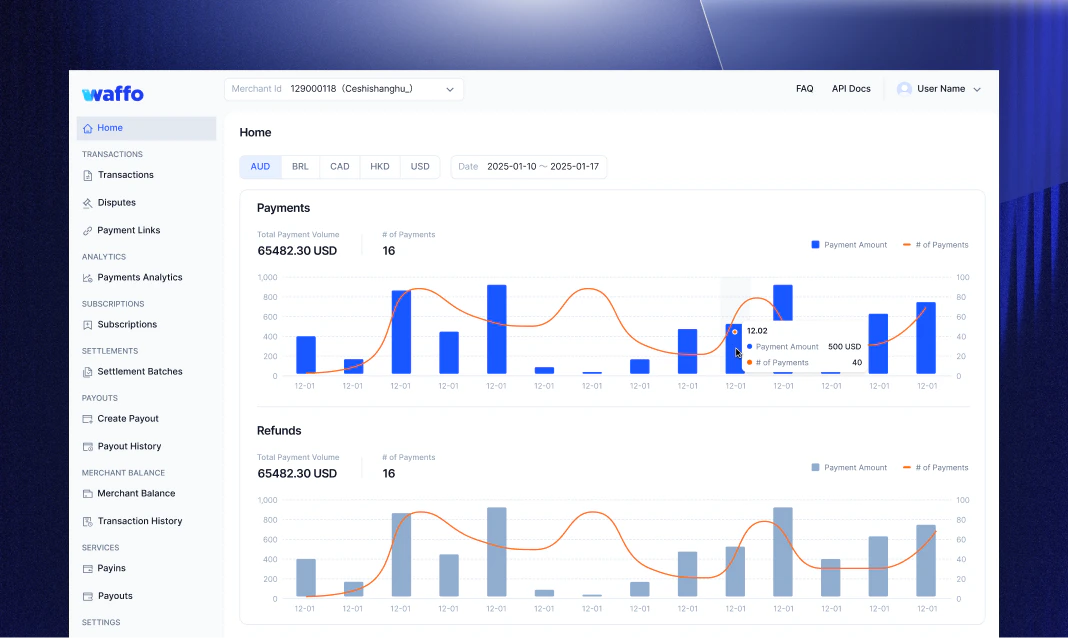
This is your “all-in-one center” for daily work, driving business decisions through data.Home: the “real-time monitor” of business pulse
- Dynamic Dashboard: Displays trends for Payments and Refunds over the last 15 days by default.
- Multi-dimensional View: Supports aggregated views of transaction counts and amounts across different currencies.
- Value: Eliminates information lag for operators, allowing immediate grasp of performance fluctuations and rapid strategy adjustment through refund trend monitoring.
Transaction management: traceability & analytics
- Deep Retrieval & Export: Filter documents by status, time, and payment method across multiple dimensions, with one-click CSV export for offline analysis.
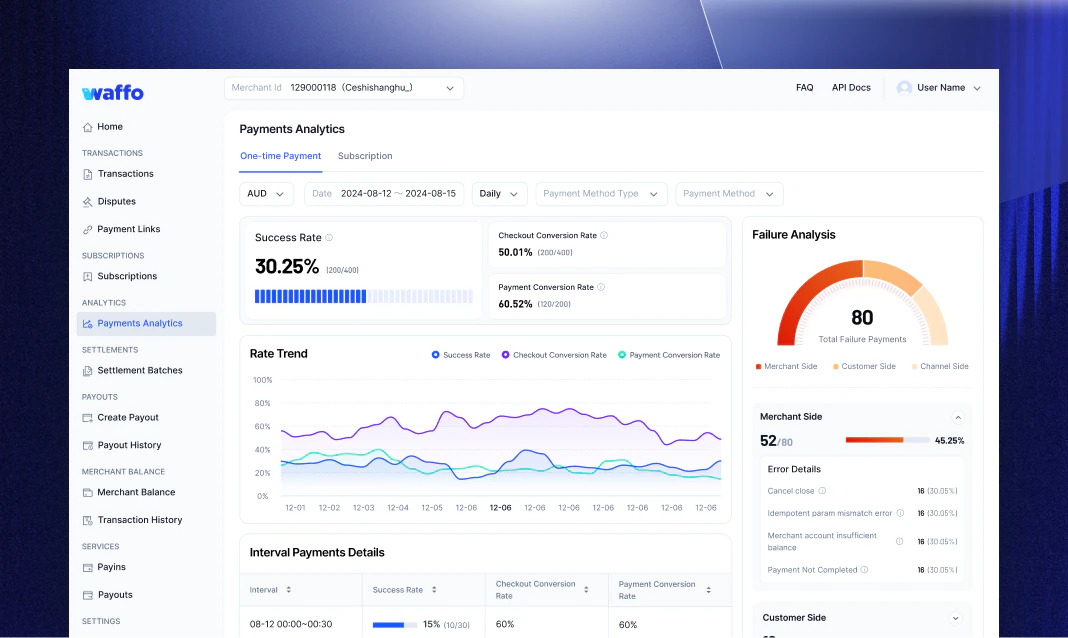
- Payment Analytics: Visualize success rates, checkout conversion rates, and payment conversion rates with trend charts and failure analysis.
- Disputes: Centralized display of credit card chargeback cases. The system provides “to-do” reminders and online evidence submission to help merchants recover funds efficiently.
Subscription: the “automatic deposit” for recurring business
Manage the full lifecycle of recurring billing — from plan creation to renewal tracking.Subscription management
- Subscription Tracking: View active, paused, and cancelled subscriptions with filtering by plan, status, and billing cycle.
- Plan Configuration: Define subscription intervals (daily, weekly, monthly, annual) and pricing tiers for different customer segments.
- Note: Subscription billing is automatically retried on failure. Configure retry logic and dunning settings in the portal.
Settlement & Payout
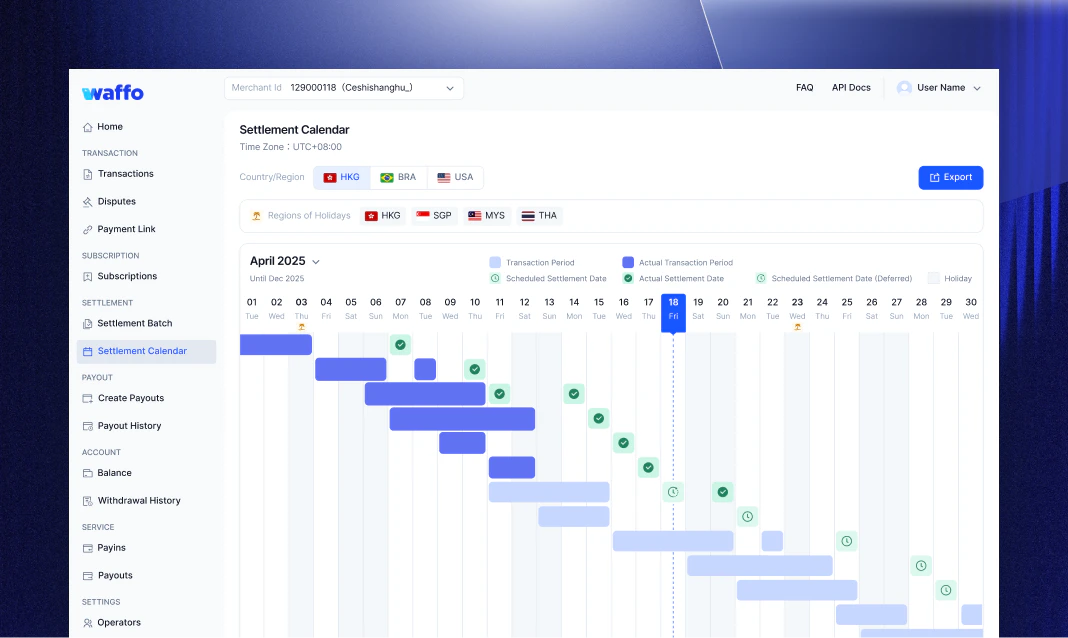
Creating a “Settlement Map” for financial reconciliation and a “Control Tower” for fund flow.Settlement management: removing the “black box”
- Settlement Calendar: Visually maps “which days’ revenue will arrive on which day” and automatically marks the impact of public holidays.
- Settlement Estimation: Scientifically predicts the specific arrival amount of future funds based on current unsettled orders to assist in cash flow planning.
- Batch Reconciliation: Provides daily aggregated entry summaries linked to underlying transaction details, achieving precise matching with bank statements and significantly shortening monthly reconciliation time.
Accounts & payouts: flexible fund flow
- Self-service Withdrawal: Initiate payouts to registered bank accounts on demand, with configurable minimum thresholds and approval workflows.
- Merchant Balance: View real-time balance across currencies and track historical withdrawal transactions.
- Batch Payouts: Upload batch payout files to pay multiple recipients simultaneously. Download templates for IDN and PHL markets directly from the portal.

Settings & Security
A “Toolbox” for technical management to ensure enterprise-level security and compliance.Integration & environments
- Dual-Environment Isolation: Provides Live (Production) and Sandbox environments. Test data and operational data are strictly isolated to protect business security.
- Developer Resources: One-stop access to API Keys (public/private keys) and Webhook configurations to shorten system integration cycles.
Team permissions (RBAC)
- Member Management (Operators): Facilitates the invitation of team members and the assignment of predefined roles.
Value: Ensures that customer service can only view data and cannot move funds, achieving enterprise-level internal control.
Frequently asked questions
How do I start trying the Waffo Portal?
How do I start trying the Waffo Portal?
You can contact a sales consultant for Demo Data to experience a full-function simulation, or register on Waffo.com to immediately open a test account (Sandbox) for quick API integration.
Is "Settlement Estimation" accurate?
Is "Settlement Estimation" accurate?
Yes, it is highly reliable. The system calculates expected arrival dates for unsettled funds in real-time based on your contracted cycle (e.g., T+2, T+7) and global bank holiday data.
What should I do if I encounter a Chargeback?
What should I do if I encounter a Chargeback?
Immediately go to the Transaction > Disputes module. The system will show pending cases and deadlines. Simply upload logistics proof or communication records as prompted, and Waffo will automatically submit the appeal to the card organization.
Need help? Contact support