

Common interface info
The API response indicates whether the request was processed successfully through the HTTP status code:
API message structure
Request and response messages are JSON, UTF-8 encoded, and consist of a header and a body. Distributor (Waffo Point Topup) request to the supplier:X-SIGNATURE is Waffo Point Topup’s signature over the whole body message, made with its own private key.
Supplier response:
X-SIGNATURE is the supplier’s signature over the whole body message, made with its own private key. If the request fails, data is empty.
API security
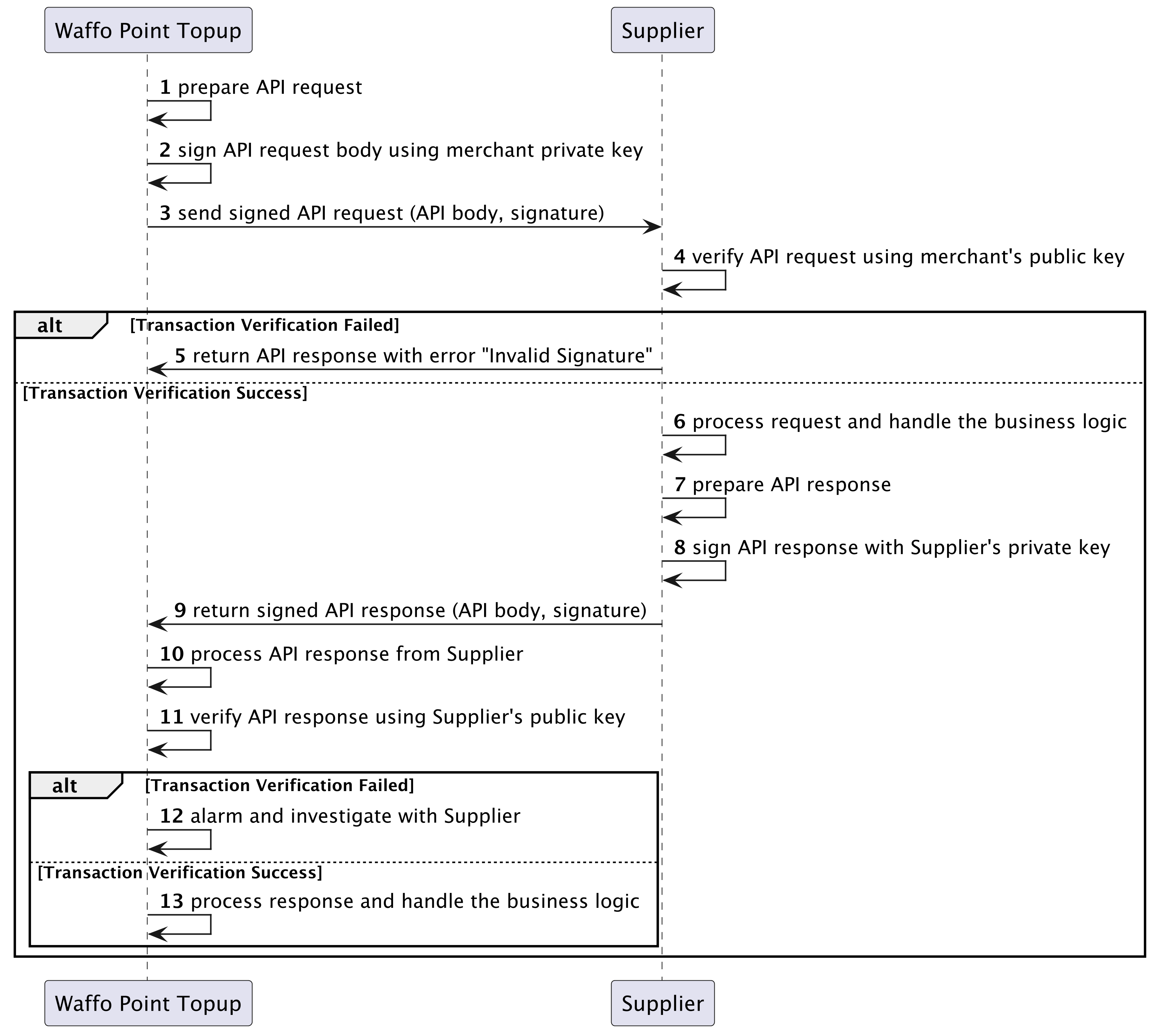
Transaction signing and verification ensure non-repudiation of the messages between Waffo Point Topup and the supplier. The signature algorithm is SHA256WithRSA.1
Supplier onboarding stage
Waffo and the supplier exchange RSA public keys. Each party keeps its own RSA private key and shares only the public key.
2
API request stage
Waffo signs the message with its RSA private key and sends it to the supplier. The supplier verifies it with Waffo’s public key: if verification passes, the supplier processes the request; if it fails, the supplier responds with an
Invalid Signature error.3
API response stage
The supplier signs the response with its RSA private key and returns it to Waffo. Waffo verifies it with the supplier’s public key: if verification passes, Waffo processes the response.If verification fails, Waffo investigates and contacts the supplier, and stops sending new transactions to that supplier until the issue is resolved. The supplier may have already processed the request while Waffo failed to process the response because of the verification failure.
Error codes
Error code prefixes:Generate an RSA key
Use openssl to generate an RSA key pair.1
Install openssl
Download and install openssl from openssl.org/source.
2
Generate the key pair
3
Exchange public keys
Hand
supplier_public_key.pem to Waffo, and obtain Waffo’s public key in return.Next steps
Mode B: point code retrieval API
Request and response fields plus the idempotency requirement for real-time retrieval.
Mode C: direct fulfillment API
Signed URL redirect, direct fulfillment, and fulfillment inquiry.