

Terminology
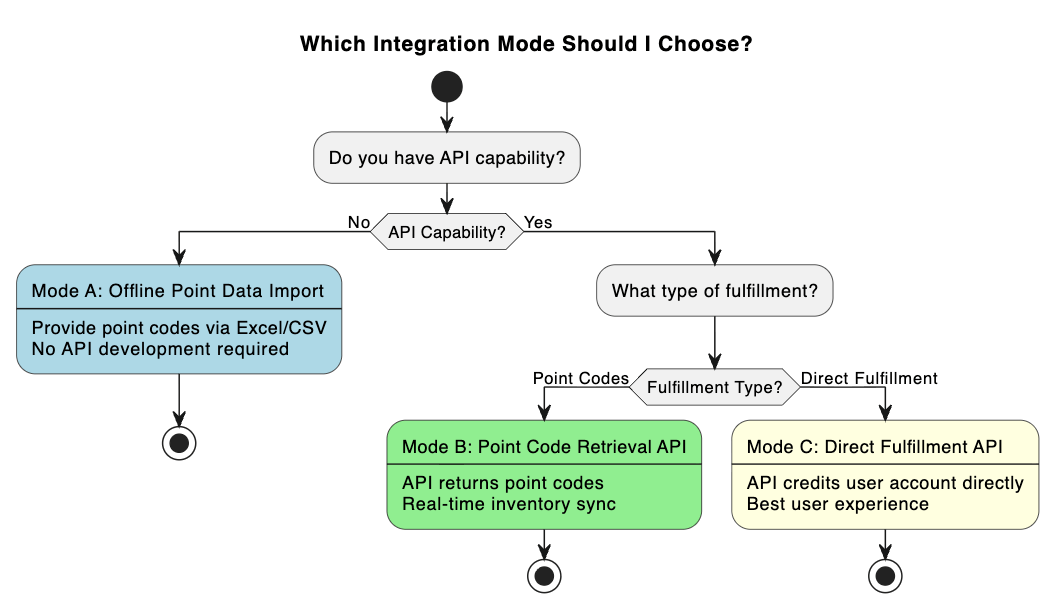
Three integration modes
Online demo site
To see how the three modes work in practice, walk through the end-to-end flows on the demo site.
Mode comparison
Who provides which endpoint
Waffo provides only two endpoints and one webhook. They live in the Point Topup group of the API Reference. Everything on the supplier side is an optional integration: the specifications in this documentation are samples. If you already have equivalent endpoints, hand your own API documentation to Waffo Point Topup and Waffo adapts to your existing interface.The minimal Mode C integration is the
GET /redirect signed redirect plus the fulfillment result webhook, with no fulfillment endpoint of your own. In that case the webhook only reports PAY_SUCCESS and PAYMENT_FAILED, and you run your own delivery process after receiving PAY_SUCCESS.Preparation per mode
Mode A: offline point code import
Mode A: offline point code import
Materials required from the supplier:See Mode A: offline point code import.
Integration steps:
1
Provide point code data
Supplier provides point code data offline as Excel/CSV.
2
Import inventory
Waffo Point Topup imports the point codes into the inventory system.
3
Receive the purchase link
Waffo Point Topup provides the purchase link to the supplier.
4
Embed the link
Supplier embeds the purchase link on its own website.
5
Delivery
After a user purchases, Waffo Point Topup sends the point code to the user’s email.
6
Settlement
Waffo Point Topup provides periodic settlement reports.
Mode B: point code retrieval API
Mode B: point code retrieval API
Materials required from the supplier:See Mode B: point code retrieval API.
Integration steps:
1
Exchange RSA public keys
Supplier and Waffo Point Topup exchange RSA public keys.
2
Provide API materials
Supplier provides the API key and API documentation.
3
Joint testing
Test the point code retrieval API together.
4
Receive the purchase link
Waffo Point Topup provides the purchase link as a static link.
5
Embed the link
Supplier embeds the link on its own website.
6
Go live
Launch in production.
Mode C: direct fulfillment API
Mode C: direct fulfillment API
Materials required from the supplier:See Mode C: direct fulfillment API.
Integration steps:
1
Exchange RSA public keys
Supplier and Waffo Point Topup exchange RSA public keys.
2
Provide keys and materials
Supplier provides
SECRET_KEY, the API key, and API documentation.3
Implement URL signing
Supplier implements the URL signature logic on the backend.
4
Joint testing
Test URL signature verification, the direct fulfillment API, the inquiry API (optional), and the fulfillment event webhook (optional).
5
Embed signed redirect links
Supplier integrates the signed redirect links on its website.
6
Go live
Launch in production.
Next steps
Mode A: offline point code import
Point code CSV format, purchase link embedding, and settlement reports.
Mode B: point code retrieval API
Request and response fields plus the idempotency requirement for real-time retrieval.
Mode C: direct fulfillment API
Signed URL redirect, direct fulfillment, and fulfillment inquiry.
API common specifications
Message structure, RSA signing and verification, error codes, and key generation.