

Advantages
- Seamless user experience, no point code needed
- Instant account credit
- Higher conversion rate
Use cases
- Game publishers with an account top-up system
- Membership and subscription services
Integration flow
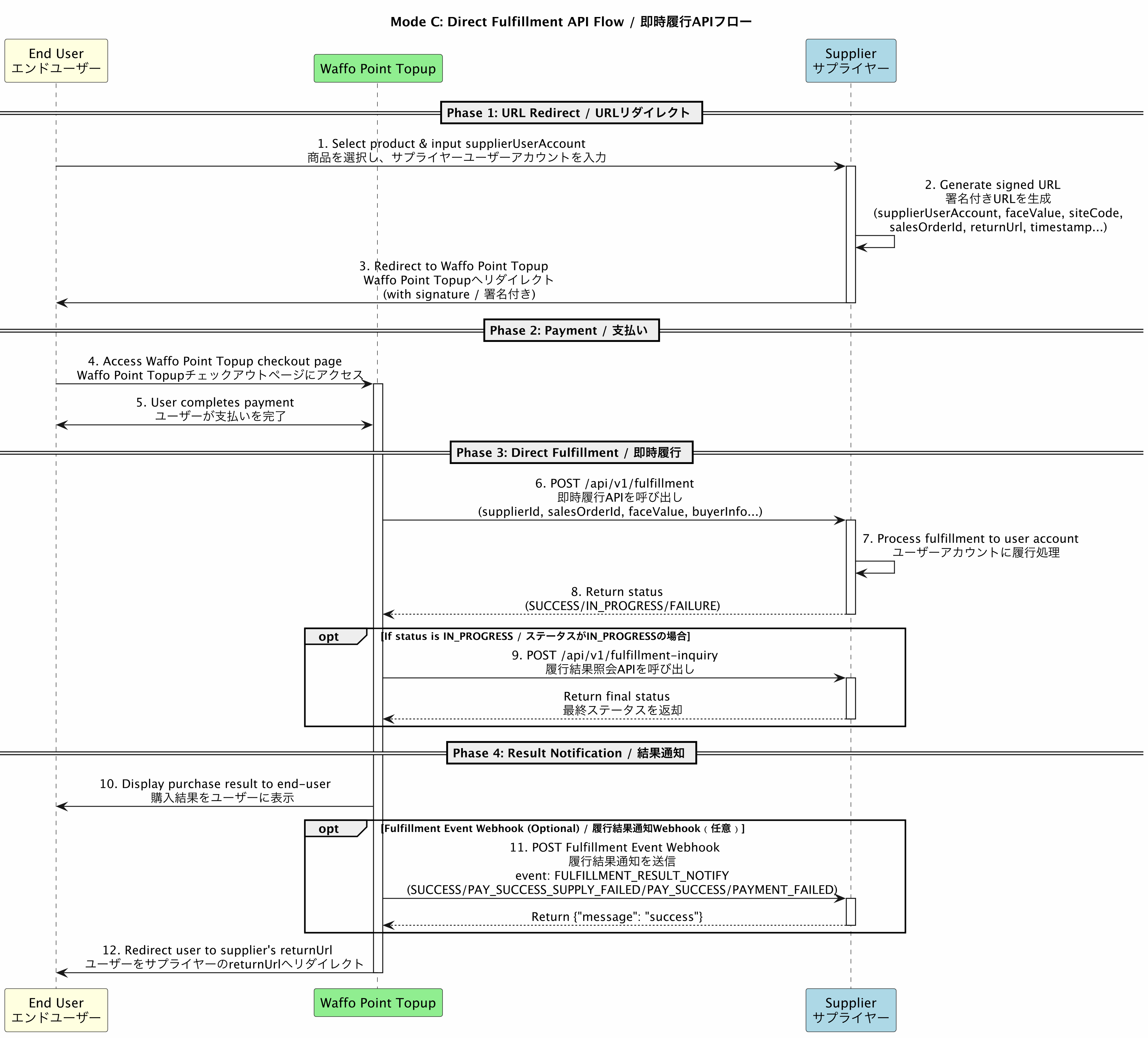
- Simple flow
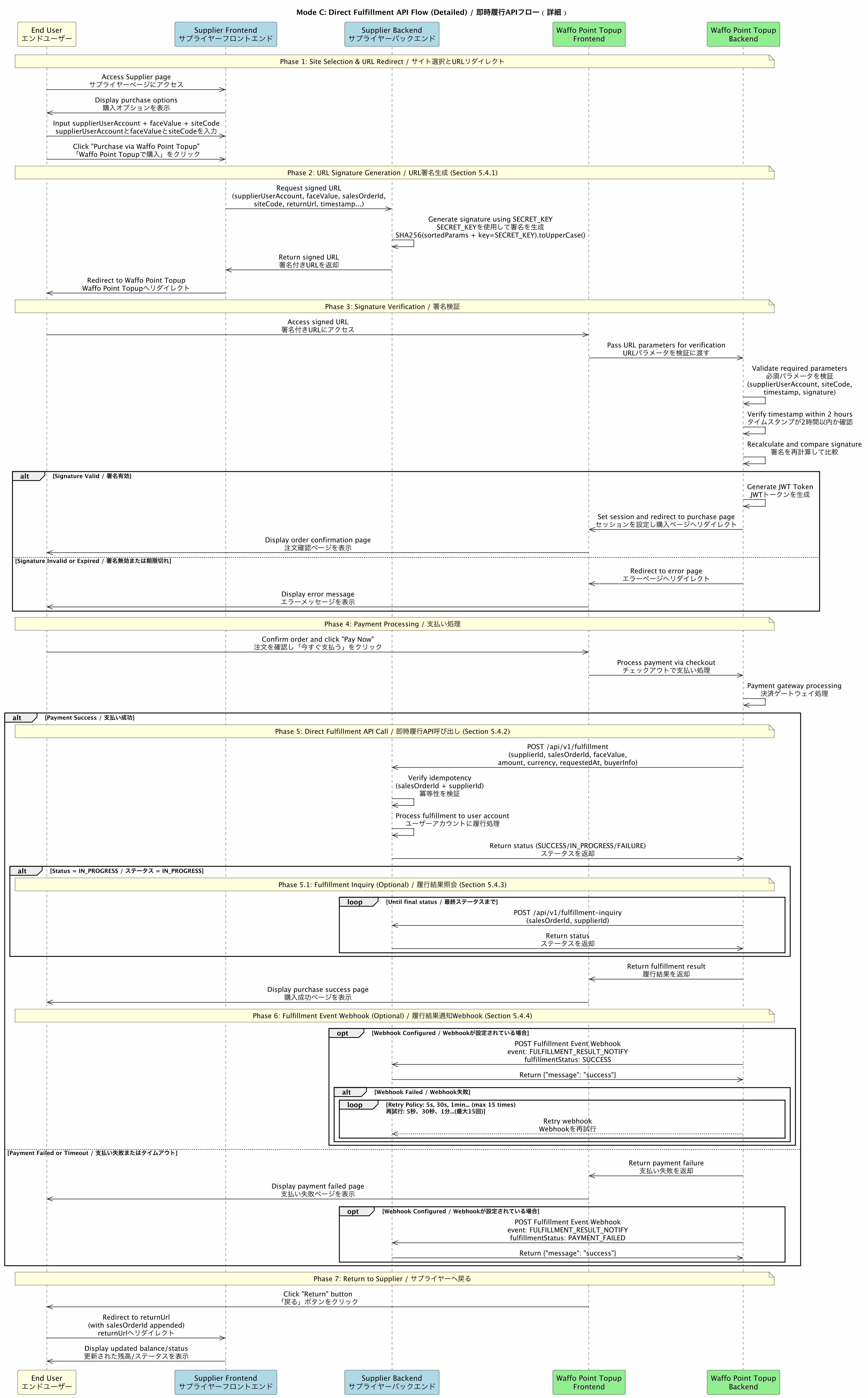
- Detailed flow
API list
The minimal integration needs only items 1 and 4: signed redirect plus the fulfillment result webhook, with no fulfillment endpoint of your own. In that case the webhook only reports
PAY_SUCCESS and PAYMENT_FAILED, and you run your own delivery process after receiving PAY_SUCCESS.URL signature and redirect
Passes user information through signed URL parameters, guaranteeing parameter integrity. This is a Waffo-provided endpoint. The full parameter list with types, requirement flags, and examples is in the API Reference: signed redirect. This section covers how to compute the signature. URL format:{supplier} is the dedicated subdomain Waffo assigns to you during onboarding.
A custom supplier-owned domain can be used instead, as long as you point that domain at the Waffo endpoint. When you do, the base URL in the signing string must be that custom domain — the signature covers the base URL, so a domain mismatch fails verification.
Signature algorithm
1
Drop parameters
Exclude the
signature parameter and drop any parameter whose value is empty or blank.2
Sort
Sort the remaining parameters by key in ASCII ascending order.
3
Build the signing string
Build it as
{baseUrl}?key1=value1&key2=value2&.... The base URL — scheme + host + path, for example https://supplier.waffoplay.com/redirect — must be included.4
Calculate the signature
Compute HMAC-SHA256 over the signing string, using the shared
SECRET_KEY as the HMAC key.5
Convert to uppercase
Hex-encode and convert to uppercase.
Signature example
Given these parameters:
Step 1, sort and concatenate:
Java implementation example
Node.js signing guide (HMAC-SHA256 and RSA-SHA256)
Download
Waffoplay Sign Methods.zip for Node.js implementations of HMAC-SHA256 and RSA-SHA256 signing.Verification flow
When the user accesses the signed URL, the Waffo Point Topup backend:- Receives all URL parameters
- Validates that all required parameters are present:
faceValue,salesOrderId,supplierId,supplierUserAccount,siteCode,timestamp,signature - Verifies that
timestampis within the valid period of 2 hours - Recalculates the signature using the same algorithm
- Compares the calculated signature with the signature in the request
- On success, generates a JWT token and sets it in the user session
- Redirects to the target
siteCodepurchase page
Direct fulfillment
Called by Waffo Point Topup after the user completes payment.Request
In
requestedAt, T separates the date from the time, .000 is milliseconds, and Z denotes UTC. For example 2025-01-05T10:30:00.000Z is 10:30:00 UTC on 5 January 2025.Response
Response example:
Fulfillment inquiry
Called by Waffo Point Topup to query the fulfillment result from the supplier.If your direct fulfillment endpoint is itself idempotent, you do not need this inquiry endpoint — Waffo retries with the same
salesOrderId and you guarantee idempotent handling.Request
Response
Response example:
Fulfillment result webhook
Waffo Point Topup posts the final fulfillment status to the endpoint you pass as thenotifyUrl parameter on the signed redirect, covering payment success with fulfillment failure, payment failure, and unpaid orders that timed out.
The full field list, the complete failureCode table, and request examples are in the API Reference: fulfillment result webhook.
fulfillmentStatus is what drives your integration logic:
If you choose the minimal integration — signed redirect plus this webhook, with no fulfillment endpoint — Waffo only reports
PAY_SUCCESS and PAYMENT_FAILED.Response and retry policy
After receiving the fulfillment callback, if you processed it successfully, respond with HTTP200 OK and include success in the response body. Waffo Point Topup then treats the fulfillment result as successfully notified. Otherwise Waffo Point Topup retries.
Waffo fulfillment inquiry API
Lets the supplier query the fulfillment result of a Mode C order from Waffo Point Topup. This is the pull-based counterpart of the fulfillment result webhook, typically used for reconciliation or as a fallback when a webhook notification was missed. The responsedata structure is identical to the webhook data.
Full parameters, response examples, and a live playground are in the API Reference: fulfillment inquiry.
Lookup keys:
supplierId is required, and at least one of salesOrderId and payOrderId must be provided. If the order does not exist, or does not belong to the calling supplier, an error response is returned per the error codes.
Next steps
API common specifications
Message structure, RSA signing and verification, error codes, and key generation.
Integration overview
Full mode comparison and the preparation checklist.